Top 12 Statistics for Shopify Apps
Last modified: December 23, 2025

Shopify is a fantastic e-commerce platform that has helped numerous people turn their passions or dreams into a reality. However, that doesn’t mean that it’s easy. Shopify is only a basic platform and without some knowledge or help, being successful on the platform can be challenging. That’s why so many brands rely on Shopify Apps for help. In this article, we will look at some of the key statistics for Shopify apps and how they’re helping brands to build better stores.
What Are Shopify Apps?
Shopify apps are pieces of software that can be added to the basic Shopify website to add functions. Some of the common functions that are added to Shopify websites include SEO, email marketing, popup features, and others.
The features and functions that can be added to the website can help to sell more, and improve the loading speed or other features. However, most apps cost a monthly subscription. Though, there are some that charge based on your usage.
What Is the Shopify App Store?
The Shopify apps store is the place where a merchant can browse the catalog of Shopify apps to choose their app. From there, the merchant just needs to click on the installation button on the Shopify app product page and the app is added to your store.
You can then configure the app to your specific needs. Charges for the apps are made via your usual subscription payment with Shopify.
But these two features don’t tell the whole story of Shopify apps and when you do some research, there is a lot of information available that can provide lots of fantastic ways that they can be used.
Let’s look at some of the top statistics for Shopify apps.
1. 87% of Merchants Use the Shopify App Store
Considering that Shopify is only a basic platform, you would think that every single merchant on Shopify would use the Shopify app store. But that isn’t the case. Research has shown that only 87% of merchants use the store. That might seem like a high uptake, but that means more than one in ten stores don’t.
There are a few reasons for this, including the following.
Themes including app features - Numerous themes are available including Shoptimized and Booster where the theme comes with a range of features or access to apps that aren’t available on the app store. Therefore, if a brand has installed one of these themes, then they won’t need to use the app store at all. Some research has shown that 80% of merchants will use third-party apps, with some using both the app store and apps hosted elsewhere.
Cost - Some merchants are trying to create a Shopify website for as little money as possible. Therefore, these merchants will not buy any app subscriptions at all. This isn’t always a great plan, though, some investment in a store can improve the returns of the store significantly. However, some features are there to make using Shopify features easier, so an app isn’t necessary, it is a quality of life improvement.
Not Running a Store - When looking at the statistic, 87% of merchants also include those who’ve created a store but aren’t actively using this. According to Builtwith.com, there are 5,893,344 websites registered with Shopify.com and only 3,846,219 live websites.
That means that just under 35% of websites that are registered on Shopify aren’t live. These websites could be ones that merchants have abandoned or never got going. Or they can be websites that are still under construction.
Whatever the reason why those websites aren’t live, it does explain why some merchants don’t use the Shopify app store, because they don’t want to incur the charges with the apps. However, there are also free apps that can be used.
2. There Are More than 6,000 Apps on the Shopify App Store
When merchants are trying to choose the apps to install on their websites, there are a lot of choices. The number of apps available on the store is disputed at the time of writing. Some research has found that there are more than 8,000 apps on the store, whereas other research has found 6,000 active apps. Whatever the exact number, it does change all the time. Some apps are discontinued and there are new ones added.
This can mean that sometimes you’re left without a functioning Shopify app. When an app is discontinued on the app store, there might be problems with updates. This can cause significant issues. An app that isn’t updated could be open to security gaps that hackers can exploit to gain access to your data. Or you could get corruption, which can cause significant problems for users when on your website and can lose your sales.
Therefore, if an app is discontinued, then it is always best to remove it yourself. It also prevents subscriptions from being paid which are not for the best apps.
Of course, this figure does not include the number of third-party apps that are available for Shopify merchants. These figures can fluctuate wildly as developers startup or wind down operations. There are numerous other online stores where you can buy third-party apps as well as Shopify.
The number of apps installed per month is estimated to be more than 12 million and there are 33,000 apps downloaded every month.
3. The Most Popular App Has More than 379,000 Users
There are lots of considerations about which apps are the most popular and used on Shopify. Some have based the number of the most used on the number of reviews that have been generated by the app. But this isn’t the most accurate way of determining the number. A good app development team can get users to review their app.
Therefore, while Privy is associated with the most users based on their reviews (6,100), this doesn’t mean that they have the most users. Privy is a marketing app, therefore you would expect them to know how to ask for a review. Other apps with lots of reviews include SEO Image Optimizer by Booster Apps, Free Shipping Bar by Hextom, Sales Pop, and Loyalty Reward Points by Sweet Tooth.
However, another tracking website has found that the most downloaded app is Product Reviews, which has more than 379,383 users. The second-highest used app is Klaviyo which is an email marketing and SMS app that has 238,553 users. The Shopify Inbox app is the third most used app with more than 235,000 users.
There are also some other apps to look out for, including Printful: print on demand.
Out of the top 10 apps that are used on Shopify, three are email marketing apps and three are review apps. Only one is for social media and none are for SEO. The most popular SEO apps are Booster SEO and Image Optimizer.
Only one of the apps that are on the top list of installed apps is a premium, paid app. However, that doesn’t mean that the list of apps is completely free. Some of the apps like Klaviyo are free to install, but using the service incurs a charge.
However, when you remove the free apps, the list of the most popular apps does change. The top app is ShipStation followed by apps like Loox, Feed for Google Shopping, and HelpCenter. The cost for these is between $5 and $10 a month. On the list, three apps cost more than the average and these are Shogun, Vitals, and Gorgias.
The apps in the top ten of paid apps have a more varied category distribution. Three are store designers, two are customer management and there are a couple of bundle operations.
4. The Average Cost for a Shopify App Is $19.14
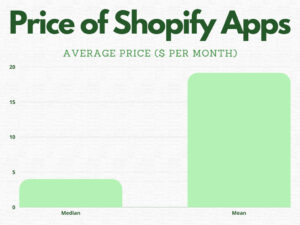
As mentioned before, there is an additional cost for Shopify apps. The average app price is estimated to be $19.14 per app. However, there are a lot of apps that are a lot cheaper than this. The median app price is only $4. There are numerous free apps as well.
That doesn’t mean that owning and producing an app is not worthwhile. Shopify has made more than $100 million from selling apps on the store. The top 25% of app developers on the platform make approximately $167,000 a year from selling apps on the platform.
Numerous apps are made and run by small teams. They also tend to have more than one app.
Most merchants have about six apps on their store, so the average expense for running a Shopify store can be just under $120 a month for the apps. Then there are the costs for the app developer.
During the pandemic, some app developers offered their apps for free to help brands use the platform to make money during challenging periods. Some apps allow you to price match with other apps or software solutions to try to entice you over.
Another option that you often see with apps is a free trial period. The trial period for an app is between three and thirty days.
The most expensive category for apps is the inventory management app category. The average price for an app in this category is over $100 per month. The median price for these apps is $17.98.
The least expensive category is reporting apps, with an average cost of less than $5. This is the same as the median.
5. Installing Ten Apps Can Increase Load Times by 300%
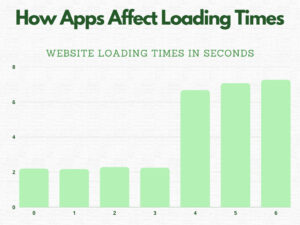
An experiment by speedboostr.com showed how a Shopify website can suddenly see loading times take longer when more apps are installed. Their research showed that the average loading time for the website without any apps was just 2.195 seconds.
By the time they installed six apps, the loading time had increased to 7.257 seconds. This is significantly high.
There are a couple of things to remember when it comes to apps. The first thing is that different apps will affect loading times differently. Six different apps could cause the loading times to increase more or less. It might depend on the complexity of the apps and also how well they are coded.
Some apps require collecting data and coding from other sites, this does tend to slow down a website. Therefore, it doesn’t necessarily mean that the installation of the app is going to increase the loading times.
Another factor to remember is that some apps are there to improve loading times, and these weren’t used in the experiment. Otherwise, there might have been a different response. And in the experiment, one app seemed to have the biggest impact: Email popup, which increased the time it took to load the website by about three seconds.
Another factor is to consider the time it takes to load the Shopify website compared to other websites. Research has shown that the average e-commerce website took 10.3 seconds to load on a desktop and nearly 30 seconds on a mobile device.
These numbers are significant. The average consumer will not wait more than three seconds for a desktop website to load, and expect mobile websites to load almost as quickly. Therefore, having a loading time that is less than that is important. But the good news is that most apps will not impact your website’s speed that much.
The impact that is related to the loading time of your website can also be huge. The average website will lose about 7% of its website’s revenue for every second that is lost in loading. And the bounce rate can also be affected by poor loading times.
It is also important to consider the ranking of your website. Poor loading times on desktop and mobile can seriously affect your website’s ranking on Google. The higher your rank on these platforms, the better the traffic levels on your website.
6. 62% of Third Party Integrations Will Slow Down Your Website
Research by Loox has shown that nearly two-thirds of third-party integrations will slow down your website significantly. It can add on as much as three-quarters of a second for each integration.
Numerous third-party integrations can be added to a store. For instance, there are integrations with platforms like MailChimp, Facebook, Twitter, Instagram, Amazon, Etsy, AliExpress, and other sites.
Even a simple website could have lots of different integrations that can slow down your website.
Another consideration is that many apps keep certain data, media, and other applications that can be included with apps, and this can have a massive impact on the success of your website’s loading time.
So consider carefully how many third-party integrations you want on your website. Do they add value to your brand and the user’s experience?
7. Only About 1-3% of Users Review an App
You can’t always tell whether an app has a huge user rate. Most apps don’t list how many installs they’ve had, and Shopify doesn’t produce good guidance. There are some tracking platforms, but their accuracy on some apps might not be 100% accurate. Therefore, you need to look at reviews.
According to some statistics, between 1-3% of users will leave a review of an app they’ve used on a website. So if an app has just one review, you can expect that the app developer has only managed to sell between 33 and 100 copies of the app.
This doesn’t mean that the app isn’t any good. All new apps have to start somewhere, and some developers never ask for an app. That being said, it can help you to determine how popular an app is that has been on the market for a while.
If you’re an app developer and would like to have more reviews for your website, there are several things that you can do to improve the rate at which people leave reviews. For example, you can add a review button to the dashboard of your website, or you can send a couple of emails. It can sometimes take two or three attempts to get audiences to leave a review, so don’t give up on the first attempt.
8. 1.31% of the Top Performing Shopify Websites Use Shopify Discounts
Above there are the details of the most used apps. However, these are not the most used apps for those who are performing the best on Shopify. Numerous other apps are used on the top 20% of Shopify websites.
For instance, Shopify Discounts is used on 1.31% of the top performing Shopify website. Then, interestingly, 0.9% of Shopify websites use Scandinavian Shipping, and 0.85% use Ships to Japan. Many of the top apps used on the best-performing websites are developed by Shopify. One of the top third-party websites that are on the list is Shogun. This is also on the list of the top 10 paid Shopify apps, mentioned before.
This shows that not all third-party apps will make you a success.
9. The Average Shopify App Developer Earns $93,000 a Year
The average top-performing app earns the developers about $167,000 a year from the Shopify app store. But this isn’t the whole store. As mentioned before, there are lots of third-party apps available on other platforms and even direct from websites.
Research from ZipRecruiter has discovered that the average Shopify developer earns around $93,000 a year. However, the bottom 6% of developers on Shopify will earn only $43,000 and $56,000.
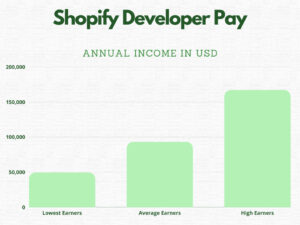
Those in the top 3% of performing developers will earn somewhere between $173,000 and $186,000 per year.
There are numerous different ways that developers can earn money from their apps. The first is by using subscriptions from the app. These are recurring and therefore are a very popular option for revenue generation.
But there are also options. Some use advertisements within the apps to generate revenue. These are ads that are added to different parts of the dashboard for the app.
Other options include sponsorship, and there are also options to collect donations from platforms like Buy Me a Coffee or Patreon. Using these options can be very cost-effective and are also a good way to engage audiences with future projects.
It is also possible for some apps to be translated from a Shopify to WordPress plugin. This can mean that you can improve the potential market size of your audience. And if a client does decide to move from one platform to another, you can still keep them as a client.
The category of apps with the best revenue is often in marketing. They have an average revenue of $19,900 per year. The second-highest earning category is store design, with average revenue of $13,500 per year.
The category with the lowest revenue is reporting apps. These apps generally don’t make any money from their sales.
One site estimates that 0.18% of app developers earn more than $1 million per year.
10. Up to 90 New Apps Are Launched Every Week
The average number of new apps that are appearing every week on the Shopify store is between 40 and 90. The competition for attention when an app is launched is really high. Of the 700 or so apps that have been launched in a given three-month period, the total revenue averages $29,471 with an average of $39.72 per app and a median of $0. That means, more apps aren’t making any money.
So if you’re planning on launching a new store app, then you have to consider that for the first few months you’re unlikely to make any money from the project. Or you need to pay a lot of marketing money to get the results that you would like.
11. The Average Free App Has a Rating of 2.38
There are more than 579,000 reviews of Shopify apps on the store. The average rating for all the apps is 2.96 with a median of 4.2. You would think that free apps would have a better rating than their premium counterparts, but this is not the case.
In reality, having a free app can have problematic reviews. The average for a free app is 2.38 with a median of 2.7. This means that there are lots of negative reviews for the free apps. So while customers are getting extra functions for free, they still expect high performance from the app.
On paid apps, the average app is 3.23 stars. However, the median is 4.5. These results show that paid apps have significantly more high-level reviews than low rankings.
Interestingly, apps that are premium and require monthly subscriptions have more than four times the number of reviews. Research has shown free apps received only 105,000 reviews. Premium apps receive 474,740 reviews. There are only twice as many premium apps as free apps, so the number of paid apps gets twice as many reviews as free apps.
Apps in the merchandising category tend to have the highest average rating, with an average star rating of 3.38. The lowest rated category is reporting, with an average rating of 0. Trust and security also have a low average rating, with an average rating of just 1.1.
12. Most Popular App Categories
App developers do prefer to develop certain types of apps. Before June 2021, the most popular app category was conversion and customer support. However, after June 2021, there were more apps in the sourcing and selling of products as well as the store design categories.
The reason for the difference is that Shopify did change how app categories worked in June 2021. Before this, apps were allowed to be assigned to more than one category. Therefore, some apps were included within two or even three categories that could change how merchants saw some apps.
According to research, 32.4% of apps were assigned to two or more categories and 6.1% of apps were assigned to three categories.
Therefore, 67.6% of apps were assigned to just one category.
-
How do Shopify abandoned cart apps work?
Shopify abandoned cart apps are one of the best apps that you can use on your website. They can help you recover between 20% and 30% of the carts that are abandoned on your website. This can almost double your revenues. They all work in a similar way, by sending a message to your potential customers reminding them about the cart. The message can be sent via SMS, email, or push notification.
-
How to install Shopify apps on your store?
Installing a Shopify app can be easy. Most apps from the Shopify store can be added just by clicking on the button. This will automatically install the app on your store. You then need to enter the store and ensure that the app is active and the settings are done. The app’s subscription is added to your monthly billing.
-
How to uninstall apps on Shopify?
If you’re looking to uninstall an app, the first thing that you need to do is to check that the app’s removal from your website will not cause problems like a conflict or a bad design. Then you need to access your Shopify admin, click on Settings and visit the Apps and Sales channel settings. Then in the row of the app, you’re looking to remove, click on ‘Delete’. Then follow the message to remove.
-
What language are Shopify apps written in?
Shopify offers developers lots of different options for creating apps. There are official libraries for Ruby and Python for building an application. However, there are also other libraries available for apps to be built upon with Node and PHP options for app developers.
-
How do you reduce the impact on loading times when installing new Shopify apps?
Installing too many apps can slow down your website. However, you can reduce the impact by using a good page speed booster or you can install only the apps that you need for your website. Be sure that there is good value with the apps you install and also that other apps you have already can’t do the job instead.
-
How do you add apps on Shopify from other sites?
You can install apps from other sites onto your website by accessing your website and then clicking on the apps section within the Shopify admin. Then you can add an app by following the instructions there. You might want to hire an expert here to ensure that an install works.
-
What Shopify plans get access to apps?
All plans get access to apps on the Shopify app store. However, there are a few apps that are limited on who they work with. For instance, some apps don’t allow for those not on the Shopify Plus stores to use their app.
-
Why are the apps on my Shopify store not working?
If you have an app that is not working on your store, it is likely because your app is not compatible with your website’s theme or another app. If a new app/theme has recently been installed, you can often assume that it is that app/theme that is causing problems.
Conclusion: Top 12 Statistics for Shopify Apps
There are numerous statistics that you should know about Shopify apps. Above are 12+ statistics for you to get more information about them. Do you have any more statistics?