How to Block/Blacklist Customers on Shopify
Last modified: October 6, 2026

Shopify has no native “block customer” button. To blacklist a customer you combine tagging, Shopify’s fraud analysis, and an app like Blockify or Fraud Filter (or Shopify Flow if you’re on Shopify Plus). This guide walks through eight blocking methods, when to use each, and how to make blocks stick when a fraudster comes back with a fresh email.
Why You Might Need to Block a Customer on Shopify
Before jumping into the how-to, it helps to understand what kinds of customers typically get blocked. The most common reasons store owners need to block a customer on Shopify include:
- Chargeback fraud: the customer receives the product, then disputes the charge with their bank to get their money back
- Serial returns and refund abuse: ordering repeatedly with the intent of returning everything
- Stolen credit cards: fraudulent orders placed with compromised payment info
- Harassment or abusive behavior: threatening or abusive messages to your support team
- Resellers violating your terms: bulk-buying products to resell against your store policies
If the situation is borderline, you can force a customer password reset or disable the customer account before going as far as a full block. If any of these sound familiar, here are your options for how to block customers on Shopify.
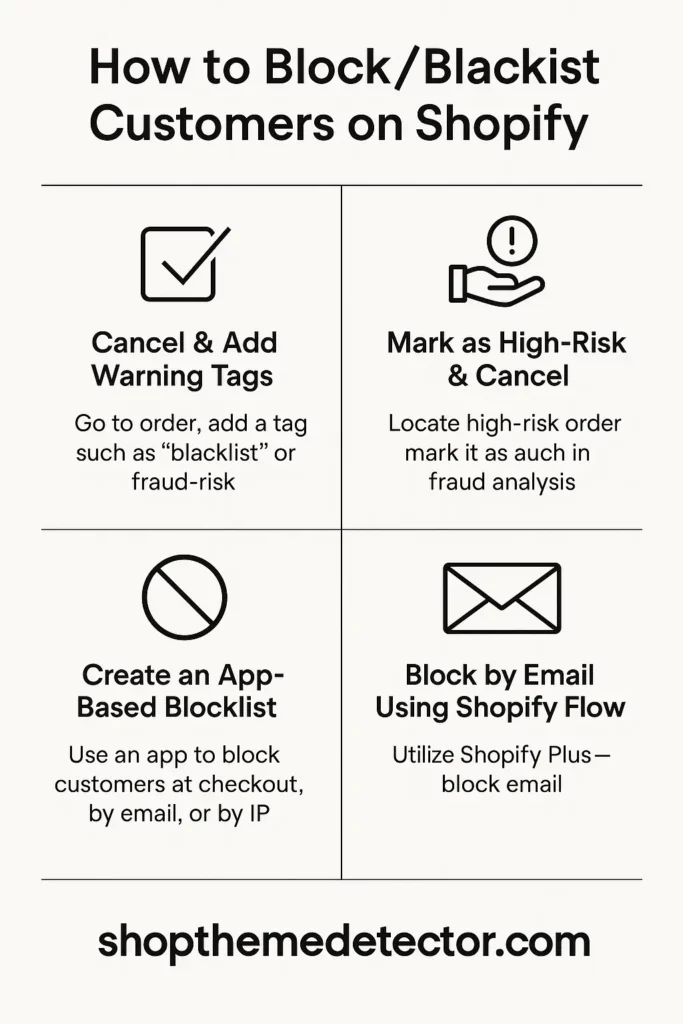
Should You Block, Warn, or Just Cancel? A Quick Decision Guide
Not every problem customer needs a permanent block. Use this rough rule of thumb:
- Cancel the order, no block: single high-risk fraud flag, customer disputes politely, address mismatch with a plausible explanation.
- Tag and warn (soft block): two or more returns in a short window, unverified payment, complaints from your support team. Add a tag, hold next order for manual review.
- Full block: chargeback filed, abusive behavior, confirmed stolen card, or three or more refund cycles in 90 days.
- Country or IP-range block: repeated fraud attempts from the same region or IP block where you don’t have legitimate sales.
Blocking too aggressively hurts revenue. Blocking too late hurts your chargeback ratio. The methods below are listed in roughly increasing order of strictness.
Method 1: Tag, Cancel, and Flag the Customer
This is the simplest way to block a customer on Shopify, and it works on every plan. It won’t stop them from placing a new order, but it makes sure your team catches them before fulfillment.
- Go to Orders in your Shopify admin and click the problem order
- Click the customer’s name to open their profile
- In Customer details, add tags like
blacklist,fraud-risk, orblocked - Add a note explaining the issue (e.g., “chargeback filed on order #1045, IP matches known fraud ring”)
- Go back to the order and cancel it. Select “Refund” or “Do not refund” based on the situation
Next time this customer places an order, the tag shows up immediately. You can train your team to check customer tags before processing any order. This manual method fits stores with low order volume where you review each order individually. For broader segmentation, customer groups let you route flagged buyers into a dedicated segment for monthly review.
Method 2: Use Shopify’s Built-In Fraud Analysis
Every order that comes through your Shopify store gets a fraud analysis score. Shopify checks the billing address, IP location, number of order attempts, and whether the credit card has been flagged before.
To use fraud analysis to block a customer on Shopify:
- Open the order in your Shopify admin
- Scroll to the Fraud analysis section on the right side
- Look for red or yellow indicators. These highlight risk factors like mismatched billing and shipping addresses or multiple failed payment attempts
- If the order is flagged as “High risk,” cancel it immediately and tag the customer
Shopify’s fraud analysis catches a lot of obviously fraudulent orders, but it’s not perfect. It flags risk, it doesn’t block automatically. That means you still need to review flagged orders manually and decide whether to fulfill or cancel.
For stores processing dozens of orders per day, relying on manual fraud review alone isn’t practical. That’s where apps come in.
Method 3: Block Customers with Third-Party Apps
If you want to actually prevent a blacklisted customer from completing checkout, you need a third-party app. See our roundup of the Shopify fraud filter apps roundup for a side-by-side comparison. The three most effective for blocking specifically:
Blockify: Fraud Country Blocker
Based on adoption data from stores in our dataset, Blockify is one of the more widely installed blocking apps on Shopify. See the Blockify install profile for its live install share and the stores using it.
Blockify Usage Statistics
Blockify install share on the Shopify stores in our dataset, refreshed daily.
It lets you:
- Block customers by email address, IP address, or IP range
- Block entire countries or regions from accessing your store
- Auto-redirect blocked visitors to a custom page
- Block known VPN and proxy IP addresses
- Set up bot protection to stop automated fraud attacks
When a blocked customer tries to visit your store, they see a redirect page or access denied message. They can’t add items to cart or reach checkout at all.
Fraud Filter
Fraud Filter (by Shopify) is a free app that lets you create custom rules to auto-cancel or flag orders. You can set rules based on:
- Email address (block specific emails)
- IP address
- Billing or shipping address
- Zip or postal code
When an order matches a rule, Fraud Filter either cancels it automatically or flags it for manual review. This is a solid option if you want to blacklist specific customers by email without paying for a premium app.
Cozy AntiTheft and Cozy Country Redirect
Cozy AntiTheft focuses on content protection (right-click disable, image protection) but also offers IP blocking features. Cozy Country Redirect lets you redirect traffic from specific countries, useful if most of your fraud comes from particular regions.
BM Country Blocker IP Blocker
Based on adoption data from stores in our dataset, BM Country Blocker is one of the few blocking apps that enforces rules in two places at once. The storefront layer stops visitors by country, state, city, IP, VPN, ISP, or referrer, and the order layer rejects submits by email, name, or phone, so a repeat offender who swaps IPs between attempts is still caught at the final step. See the BM Country Blocker install profile for its live install share and the stores using it.
BM Country Blocker Usage Statistics
BM Country Blocker install share on the Shopify stores in our dataset, refreshed daily.
It lets you:
- Block visitors by country, state, city, IP, or IP range
- Block known VPN, proxy, or ISP ranges
- Block by referrer when a specific affiliate or ad source is sending fraud
- Reject orders at submit by email, name, or phone
Pick this one when the fraud pattern is specific and repeatable: a region you don’t ship to, a VPN range abusing coupons, or a phone number that keeps resurfacing on fake accounts. The free pay-as-you-go tier handles very light traffic; the flat plan opens every rule type for stores above that line.
Method 4: Block by Email Address
The most common way to block a customer on Shopify is by their email address. Here’s how to set it up depending on your tools:
- Using Fraud Filter: Create a new rule, select “Email” as the filter, enter the email address, and set the action to “Cancel order”
- Using Blockify: Go to the Blocklist section, add the email address, and choose whether to block checkout or block site access entirely
- Manual approach: Tag the customer as “blocked” and set up a Shopify notification or workflow to alert you when that email places an order
Keep a running spreadsheet or note of blocked emails. Fraudsters often create new accounts, but they frequently reuse the same email, especially for chargeback schemes where they need to receive the order confirmation.
Method 5: Block by IP Address
Blocking by IP is most useful when you’re dealing with a specific bad actor rather than a ring of fraudsters. To block a customer on Shopify by their IP address:
- Find their IP in the Shopify order’s fraud analysis details
- In Blockify, go to the IP Blocklist and add the IP address or IP range
- If you use Cloudflare (custom domain or headless setup), you can also add IP block rules at the CDN level. This stops them before they even reach Shopify
Keep in mind that IP addresses change. If the customer uses a VPN or has a dynamic IP from their internet provider, IP blocking alone won’t stop them. Use it in combination with email blocking for better coverage. For country-level control, Shopify geolocation apps give you more granular routing options than IP blocks alone.
Method 6: Block by Country or Region
If you only ship domestically or to a handful of countries, blocking traffic from everywhere else reduces fraud dramatically. Most Shopify fraud originates from a small number of high-risk regions.
To block customers by country on Shopify:
- Blockify: Add countries to your blocklist. Visitors from those countries get redirected to a “not available in your region” page.
- Shopify Markets: In your Shopify admin, go to Settings, Markets. Remove markets you don’t serve. This won’t block site access but prevents checkout from unsupported countries.
- Geolocation apps: Apps like GeoIP Country Redirect can detect visitor location and redirect or block based on country.
- BM Country Blocker: Blocks by country, state, city, IP, VPN, or ISP, and also rejects orders by email, name, or phone at submit.
This is one of the most effective ways to reduce fraudulent orders if your store only serves specific markets. For a broader look at protecting your store, the Shopify safety and security guide covers payment fraud, account security, and data protection together.
Method 7: Shopify Flow (Shopify Plus Only)
If you’re on Shopify Plus, Shopify Flow is the most powerful way to block a customer on Shopify. Flow lets you build automated workflows with triggers, conditions, and actions, no code required.
Example workflow to auto-block a customer:
- Trigger: Order created
- Condition: Customer email is in your blacklist (stored as a metafield or tag)
- Action: Cancel order, send internal notification, tag customer as “auto-blocked”
You can also build flows that:
- Auto-tag customers after a chargeback
- Cancel orders from customers with more than 3 returns in 90 days
- Flag orders where billing country doesn’t match shipping country
Shopify Flow gives you complete control over blocking logic, but it requires a Shopify Plus subscription.
Method 8: Disable Guest Checkout
One tactic that makes it harder for blocked customers to sneak back in is requiring account creation at checkout. When guest checkout is enabled, anyone can order with any email, making it easy for a blacklisted customer to just use a different address.
To disable guest checkout:
- Go to Settings, Checkout in your Shopify admin
- Under “Customer accounts,” select “Accounts are required”
- Save changes
This creates a barrier. While it won’t stop a determined fraudster (they can create a new account), it adds friction and gives you more data points to track suspicious behavior.
How to Handle Chargebacks from Blocked Customers
If a customer files a chargeback before you block them, here’s what to do:
- Respond to the chargeback immediately through Shopify Payments or your payment gateway. Provide tracking numbers, delivery confirmation, and any communication records.
- Document everything: save screenshots of the order, customer tags, notes, and any emails or messages from the customer.
- Tag the customer with “chargeback” and “blocked” so your team knows not to process future orders.
- Report the email and IP to your fraud app’s blocklist so future attempts are auto-canceled.
Too many chargebacks can put your payment processing at risk. Shopify Payments places stores on “high-risk” status when the chargeback rate crosses roughly 1% of monthly transactions, and Visa typically starts dispute monitoring at 0.9%. That ratio compounds quickly: a store doing 1,000 orders a month only needs about 10 disputes to trip the threshold. Blocking repeat offenders early is the cheapest insurance against losing your payment processor.
Preventing Repeat Offenders
Blocking a customer once doesn’t always solve the problem. Persistent fraudsters create new accounts, use different emails, and switch payment methods. Here’s how to build a stronger defense:
- Layer your blocking methods: combine email blocking, IP blocking, and country restrictions
- Use device fingerprinting: apps like Blockify track device signatures (browser, screen resolution, fonts, canvas hash) that persist even when a customer changes their email or IP. This is the single most effective signal against fraud rings.
- Monitor for patterns: same shipping address with different billing info, same phone number on multiple accounts, or orders placed minutes apart with different emails
- Keep your blocklist updated: review and add new entries weekly based on recent orders flagged by fraud analysis
- Train your team: make sure everyone processing orders knows how to check customer tags and what to do when they spot a flagged account
The goal isn’t to block every suspicious customer perfectly. It’s to create enough friction that fraudsters move on to easier targets. Most will give up after one or two failed attempts if your blocking is consistent.
Legal and GDPR Considerations
Blocking a customer is legal in most jurisdictions, but you should follow a few rules to stay clean:
- You can refuse service for non-protected reasons (fraud, abuse, repeated returns). You cannot refuse based on protected categories like race, religion, gender, or disability.
- GDPR right-to-erasure: if an EU customer asks you to delete their data, you must, but you’re allowed to keep a minimal record (email hash, reason) under “legitimate interest” to enforce the block. Document this in your privacy policy.
- Keep evidence: store the order ID, chargeback notice, or abusive message that justified the block. This protects you if a blocked customer files a complaint or sues.
- Don’t publish blocklists: sharing customer emails or names publicly can expose you to defamation or privacy claims. Keep blocklists internal.
-
Can you block a customer on Shopify based on their order history?
Shopify doesn’t automatically block a customer based on order history. However, you can manually review order patterns - like frequent returns or chargebacks - and then block the customer using tags and a fraud prevention app like Blockify or Fraud Filter. On Shopify Plus, you can use Shopify Flow to auto-cancel orders from customers who exceed a return threshold you set.
-
How do you stop a blocked customer from creating a new Shopify account?
You can’t fully prevent new account creation on Shopify, but you can make it harder. Use an app like Blockify that tracks IP addresses and device fingerprints. Even if the customer uses a new email, the app recognizes the same device or IP and blocks access. Combining IP blocking with email blocking gives you the strongest coverage against repeat offenders.
-
Does Shopify automatically block fraudulent customers?
No. Shopify’s fraud analysis flags risky orders with warning indicators, but it doesn’t auto-block or auto-cancel. You need to review flagged orders yourself and decide whether to cancel. To automate blocking, install a third-party app like Fraud Filter (free) to auto-cancel orders matching specific emails or IPs, or use Shopify Flow on Shopify Plus for custom automation workflows.
-
How do I block a customer on Shopify by their email address?
Install the Fraud Filter app (free from Shopify) and create a rule with “Email” as the filter type. Enter the customer’s email and set the action to “Cancel order.” You can also use Blockify to add emails to a blocklist that prevents them from reaching checkout entirely. For a manual approach, tag the customer as “blocked” in Shopify admin and review incoming orders for that email before fulfilling.
-
What is the best app to block customers on Shopify?
Blockify is the most popular option: it blocks by email, IP, country, and even VPN/proxy addresses. For a free alternative, Shopify’s own Fraud Filter app lets you auto-cancel orders from specific emails or IPs. If you’re on Shopify Plus, Shopify Flow gives you the most control by letting you build custom blocking workflows with triggers and conditions, no code required.
-
Can you legally block a customer on Shopify?
Yes. You can refuse service for non-protected reasons like fraud, chargebacks, abuse, or repeated returns. You cannot block based on protected categories such as race, religion, gender, or disability. If an EU customer asks for data erasure under GDPR, you must comply, but you are allowed to retain a minimal record (such as a hashed email and the reason) under “legitimate interest” to enforce the block. Document this in your privacy policy and keep evidence of why each customer was blocked.
Wrapping Up: How to Block a Customer on Shopify
While Shopify does not have a native “block customer” button, you have several ways to stop problem buyers. Tag and track suspicious accounts, use Shopify’s built-in fraud analysis to catch risky orders early, and install a third-party app like Blockify or Fraud Filter to auto-cancel orders from blacklisted emails or IPs. For stores on Shopify Plus, Shopify Flow gives you the most control with automated workflows. The key is layering these methods so repeat offenders can’t slip through.




