Symmetry Shopify Theme Review 2026
Last modified: October 11, 2026

| # | Image | Name | Price | Reception | Adoption | CWV pass rate |
|---|---|---|---|---|---|---|
| 1 |

|
Symmetry - Beatnik
|
$420 | (391) | 1.4% | 81.1% |
| 2 |
|
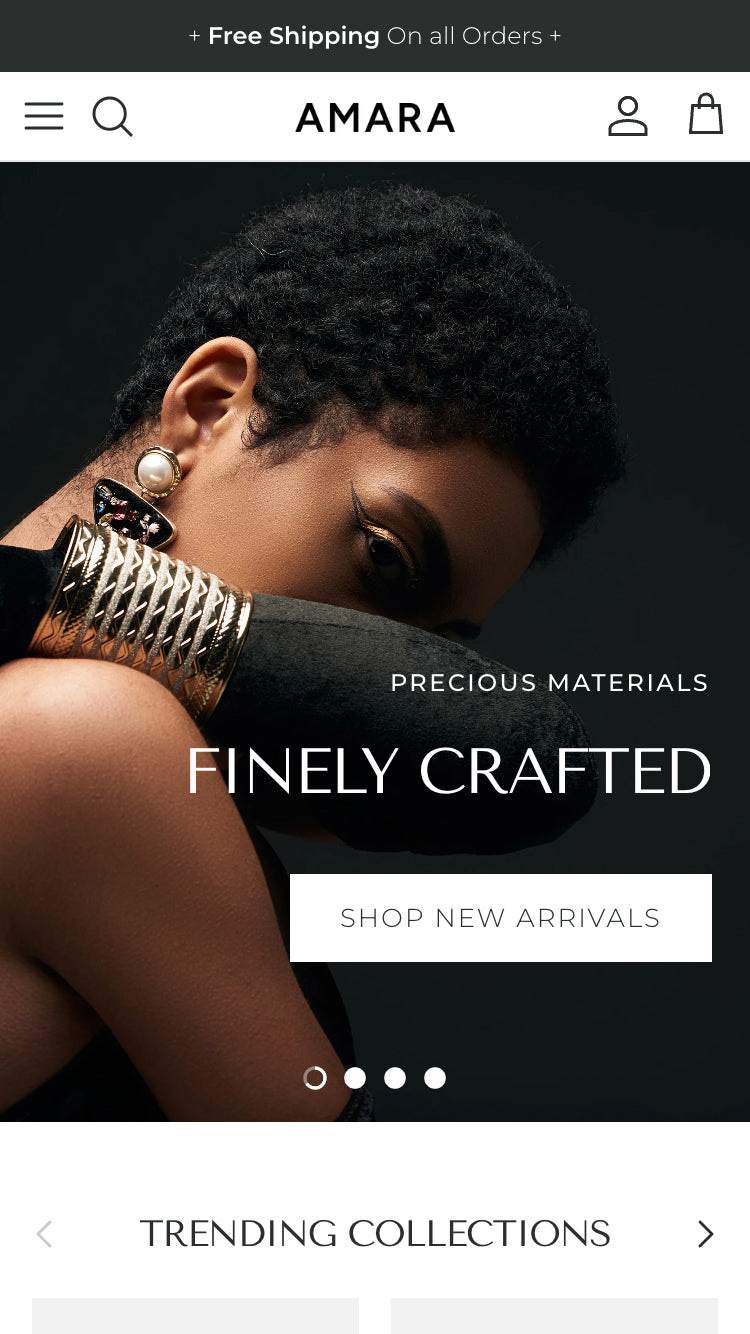
Symmetry - Amara
|
$420 | (391) | 1.4% | 81.1% |
| 3 |

|
Symmetry - Salt Yard
|
$420 | (391) | 1.4% | 81.1% |
| 4 |

|
Symmetry - Duke
|
$420 | (391) | 1.4% | 81.1% |
|
Show More
|
||||||
Symmetry is a premium Shopify theme from Clean Canvas, and it is built around one idea: helping shoppers dig through a big, varied catalog without getting lost. Powerful product filtering and a deep library of drag-and-drop sections are its core, which is why it turns up so often on fashion stores and large mixed catalogs. The verdict upfront: Symmetry is one of the strongest picks on the Theme Store for filter-heavy, high-volume stores, with a high rating and a reputation for responsive support and painless migration. The catch is simply that it is a premium theme whose value shows once you have enough products to filter.
If you run a growing catalog and live or die by how easily people find what they want, Symmetry is worth a serious look. If you sell a single product or a tiny range, you will pay for depth you may not use. The sections below use live detection data to show exactly where Symmetry fits and how its stores actually behave.
What is the Symmetry Shopify theme?
Symmetry is a premium Online Store 2.0 theme published by Clean Canvas, a long-established Shopify theme developer. Where a free theme aims to cover the basics, Symmetry is built for merchants who have outgrown them, with advanced filtering, drag-and-drop sections, and a set of merchandising tools aimed at larger catalogs.
It ships with five presets (Symmetry, Salt Yard, Beatnik, Duke, and Amara), so you get a finished starting point rather than a blank canvas, and it edits through the drag-and-drop customizer with no code. What sets it apart is how much it hands you natively: filtering, swatches, image hotspots, size charts, and marketing tools that many themes leave to apps. Here is where Symmetry sits across our dataset today.
How popular is Symmetry?
Symmetry is a widely used premium theme, well inside the top tier of paid themes we track, though its share of the stores we scan each month has eased back slightly rather than grown. That is common for an established premium theme: it holds a large, loyal base among the catalog-heavy stores it suits, without chasing the mass market that free defaults dominate.
Symmetry has slipped from 1.6% to 1.3% of Shopify stores in our dataset over recent months.
Two things stand out about how Symmetry stores behave, and both fit a big-catalog theme. Its stores run more apps than the dataset average, and still post strong real-world Core Web Vitals across the stores running it. In other words, the depth does not drag the storefront down.
Symmetry design and layout
Symmetry’s look is clean and flexible rather than flashy, and the difference between its five presets is mostly mood. Symmetry and Duke are the sharp, modern options, Salt Yard leans warm and editorial, Beatnik is bolder and more graphic, and Amara is soft and minimal. They all share the same skeleton, so you can start from whichever fits your brand and reshape it from there.
The common thread is a layout that keeps a large catalog navigable. Collection pages put filtering front and center, product grids stay tidy at scale, and the drag-and-drop sections let you rearrange the homepage and landing pages without touching code. It is a theme that gets out of the way of the products, leaning on structure and strong photography rather than built-in drama. For a fashion or lifestyle brand with a deep range, that restraint is usually the right trade.
Symmetry features
The feature set is built around product discovery, and its filtering is the headline. Shoppers can narrow a big range by size, color, price, or custom tags, and swatch options let them switch variants without leaving the grid. Enhanced search and a mega menu round out how people find things, which is exactly what a large catalog needs.
On the product page you get image zoom and hotspots, size charts, and product video, with a slide-out cart and quick buy to shorten checkout. The marketing side is well stocked too, with countdown timers, promo popups, and product badges, plus EU translations and right-to-left support for cross-border stores. A lot of this is native, which is part of Symmetry’s appeal, since it trims the stack of apps you would otherwise bolt on to run a serious catalog.
How fast is the Symmetry theme?
Speed is a fair worry for a feature-rich premium theme, but Symmetry holds up well. On real-world Core Web Vitals it lands ahead of most themes we measure, which is reassuring given how much it packs in. Real-world speed still depends on your images, apps, and catalog size, so treat the field data as a strong baseline rather than a guarantee.
| Theme | CWV pass rate | Few apps | Median LCP |
|---|---|---|---|
| Symmetry | 81.1% | 88.1% | 1.5s |
| Impulse | 78.3% | 85.7% | 1.6s |
| Dawn | 71.1% | 79.5% | 1.6s |
What kinds of stores use Symmetry?
The clearest signal in our data is catalog size. Stores running Symmetry carry far more products than the typical Shopify store we scan, which is exactly the pattern you would expect from a theme built around filtering and collection navigation. Small single-product stores rarely choose it, but big, varied catalogs do.
On the vertical side it skews toward fashion and apparel, with the same reach into lifestyle, home, and accessories that its flexible presets suggest. The throughline is less an industry than a shape of business: a catalog large enough that helping shoppers sort it becomes the main job. If that describes your store, Symmetry is built for you; if it does not, you are paying for depth you will not use.
Which apps do Symmetry stores use?
The apps most often installed on Symmetry stores line up with a marketing-led, catalog-heavy operation, with email, reviews, and merchandising tools leading the list. Symmetry covers a fair amount natively, so the apps tend to add scale rather than fill basic gaps.
| Rank | App | % of stores | Category |
|---|---|---|---|
| 1 | Klaviyo | 53.2% | Email Marketing |
| 2 | Judge.me Product Reviews App | 34.3% | Product reviews |
| 3 | Loox ‑ Product Reviews App | 22.0% | Product reviews |
| 4 | Yotpo | 12.7% | Product reviews |
| 5 | Swym Wishlist | 12.2% | Wishlists |
| 6 | Instafeed ‑ Instagram Feed | 11.8% | Marketing - Other |
| 7 | Recharge | 11.2% | Subscriptions |
| 8 | Triplewhale | 9.2% | Analytics |
| 9 | Trustpilot | 9.1% | Marketing - Other |
| 10 | Gorgias | 8.2% | Support - Other |
How much does Symmetry cost?
Symmetry is a one-time premium purchase from Clean Canvas, priced in the same band as other established premium themes. There is no subscription, so you pay once and own the license for that store. For a store with a large catalog that would otherwise stack up filtering, merchandising, and marketing apps, the native feature set can offset a chunk of that price over time.
What are Symmetry’s strengths and watchouts?
Symmetry’s strength is unusually consistent for a premium theme: a high rating, a reputation for fast and helpful support, and a migration process that reviewers describe as painless. If you are moving from another theme, that lowers the risk of the switch.
The watchout is fit, not quality. Its depth is wasted on a very small store, and its clean design leans on your photography rather than doing the styling for you. Plan your collections and filters before you migrate, because Symmetry is at its best when your catalog is organized to feed its filtering.
Who should use Symmetry?
Symmetry is a strong choice for fashion brands and any store with a large, varied catalog that lives on product discovery. Reach for it if you have enough products that filtering genuinely matters, you want a clean, flexible base you can shape without code, and you value responsive support and a low-drama migration. If you sell a single product or a tight range, a lighter or cheaper theme will serve you better.
Weighing other themes before you commit? Our roundup of Symmetry theme alternatives compares five proven Shopify Theme Store themes on price, speed and real store data.
For the full picture, see the live Symmetry theme statistics for its adoption trend, the store types that choose it, and its speed scores.
Data first, opinion second: we track usage across 3.5+ million Shopify stores daily, and have since 2017. The stats tell us what merchants actually use; our editors rank the final picks by quality, pricing, and fit.
Symmetry - Beatnik
Perfect for brands looking for an eyewear website builder, this version of Symmetry maximizes product display through high-quality images and an elegant, neutral color palette. It offers an intuitive navigation system, allowing users to explore various frame styles, lens options, and collections with ease.
Eyewear is all about precision and aesthetics, and this Symmetry version is tailored to emphasize both. Large, high-resolution product images ensure customers can see the finest details of each frame. The quick view and zoom features allow potential buyers to inspect materials and textures up close, mimicking the in-store shopping experience.
Symmetry Beatnik Highlights
- Minimal yet sophisticated design that showcases eyewear with sharp product imagery.
- Easy filtering options for color, shape, and material to enhance user experience.
- Conversion-focused call-to-action buttons that encourage purchases without distractions.
- Engaging storytelling sections to highlight sustainability, craftsmanship, or technology behind the frames.
Symmetry - Amara
For jewelry and fine accessories, the Amara version of Symmetry leans elegant and editorial. Its demo pairs close-up model shots with a “precious materials, finely crafted” story, so it suits a jewelry, watch, or luxury-accessory brand that sells on materials and craft.
Generous spacing and refined typography keep the focus on small, high-value pieces, while lookbook sections give each collection room to breathe.
Amara highlights
- Elegant, editorial layout built to frame small, high-value pieces
- Close-up imagery that highlights materials and craft
- Refined typography and generous spacing
- Lookbook and story sections for collections and gifting
Symmetry - Salt Yard
For brands looking for a minimalist fashion website builder, the Salt Yard version of Symmetry offers a clean, refined layout that enhances the premium feel of the products. With subtle animations and neutral color schemes, it keeps the spotlight on the garments while delivering a luxurious shopping experience.
Minimalist fashion isn’t about excess, it’s about quality, detail, and simplicity. This version of Symmetry is designed to enhance those elements by keeping distractions to a minimum while emphasizing high-end craftsmanship. For brands that value aesthetic harmony and user engagement, this version of Symmetry is a flawless choice.
Salt Yard highlights
- Elegant typography and muted color palettes for a sophisticated, high-end feel.
- Spacious layouts and immersive product pages that let images shine.
- Wishlist and restock notification features for exclusive and limited-stock items.
- Editorial-style blog integration to enhance brand storytelling and style inspiration.
Symmetry - Duke
For brands needing a streetwear online store builder, this Symmetry version exudes urban energy with bold typography, dynamic visuals, and edgy, high-contrast layouts. Duke is built to engage a younger demographic that values limited drops and exclusive product releases.
Streetwear thrives on exclusivity and hype, and Symmetry’s features cater perfectly to that mentality. With countdown timers, limited-stock banners, and featured influencer content, it encourages quick conversions while maintaining an authentic streetwear aesthetic.
Symmetry - Duke Highlights
- High-impact banner images and bold fonts that resonate with streetwear culture.
- Countdown timers and limited edition sections to drive hype and urgency for product drops.
- Embedded video support to showcase lookbooks, behind-the-scenes, or brand storytelling.
- Custom collection pages designed for apparel, sneakers, and accessories with seamless category navigation.
Related theme reviews
If you are weighing Symmetry against other premium themes, our reviews of Broadcast, Impact, and Prestige cover the closest alternatives. For the full set, see our guide to all Shopify theme reviews.