Xtra Shopify Theme Review: Speed-Tested for 2026
Last modified: September 15, 2026

| # | Image | Name |
|---|---|---|
| 1 |
|
Xtra - Xtra
|
| 2 |
|
Xtra - Seed
|
| 3 |
|
Xtra - Calm
|
| 4 |

|
Xtra - Vault
|
| 5 |
|
Xtra - Rover
|
|
Show More
|
||
The Xtra Shopify theme lands on a lot of premium multipurpose shortlists, and most people reach this review while weighing it against a few other paid themes. Below we break down what it does well, where it falls short, and how it stacks up against Impact and Dawn, backed by live data from the Shopify stores actually running it.
Before the feature tour, here is what our own dataset says about the stores that run Xtra:
- 17% fewer apps than average. Stores running Xtra average 4.9 apps each, 17% fewer than the dataset-wide average of 5.91.
What Is the Xtra Shopify Theme?
Xtra is a premium, multipurpose Shopify theme from the developer Someone You Know, sold on the Shopify Theme Store for a one-time $150. A single license unlocks five presets (Xtra, Seed, Calm, Vault, and Rover), and the theme holds a 98% positive positive rating across 411 Theme Store reviews, which puts it among the better-reviewed paid themes we track.
In our own store data, Xtra runs on the share of Shopify stores shown in the panel above, and those stores carry a leaner app stack and a larger catalog than average. That app-count profile is unusual for a paid theme, and it reflects Xtra building in filtering, upsell, and promotional tools that merchants often pay for through separate apps. The live app-adoption panel further down shows exactly which apps still show up on Xtra stores, and it reads as a reviews-and-retention stack rather than a stack of feature add-ons.
The theme is built for growing, conversion-focused stores that want design flexibility without migrating to a new theme later, since each preset is a different starting look you can preview and switch inside the Shopify theme editor. You will sometimes see it written as “Extra,” but the correct Theme Store name is Xtra. The sections below cover its features, real pricing, measured speed, mobile experience, and how the five presets differ.
Key Features of the Xtra Shopify Theme
The Xtra theme is built on a modular design system. Instead of a fixed page structure, you assemble pages from interchangeable sections that you can add, remove, and rearrange in the Shopify theme editor. The Theme Store listing advertises more than 50 premium features. Here is what stands out:
- Modular section blocks: Every page is assembled from drag-and-drop sections. You can mix product grids, testimonials, image banners, video blocks, and text columns in any order.
- Mega menus: The theme supports multi-column dropdown menus with images, which is especially useful for stores with large catalogs or many product categories.
- Advanced product filtering: Customers can filter products by multiple attributes at once (size, color, price range, availability) without reloading the page.
- Quick view: Shoppers can preview product details, select variants, and add to cart from a pop-up without leaving the collection page.
- Built-in promotional tools: Countdown timers, announcement bars, promotional banners, trust badges, and sale badges are all native to the theme. You don’t need a separate app to run basic promotions.
- Conversion and ordering features: Bulk upsell, cross-sell, recommended products, and quantity pricing on Shopify Plus are built in, so you lean on fewer paid add-ons.
- Color swatches: Product variants display as visual swatches rather than plain dropdown menus, giving customers a better sense of their options.
- Sticky cart and quick add: A persistent cart drawer and quick-add buttons reduce friction between browsing and checkout.
- Large section library: Xtra ships a deep library of pre-designed sections and blocks across all five presets, so you can start from a template instead of a blank canvas.
- Built-in size guide popups: Apparel and footwear stores can attach size charts to specific products without installing a separate app.
Many of these are features that store owners otherwise pay for through third-party apps. Having them built into the theme saves on app subscription costs and avoids the performance hit of loading extra scripts. If you want to understand which features actually matter when picking any premium theme, our guide on the 20 red flags to watch for in Shopify themes walks through the common traps.
Those built-in tools also change what apps stores bother to install. Here are the apps most common on live Xtra stores in our dataset:
| Rank | App | % of stores | Category |
|---|---|---|---|
| 1 | Judge.me Product Reviews App | 36.9% | Product reviews |
| 2 | Klaviyo | 19.7% | Email Marketing |
| 3 | Recharge | 12.6% | Subscriptions |
| 4 | Loox ‑ Product Reviews App | 11.6% | Product reviews |
| 5 | Shopify Inbox | 10.1% | Support - Other |
| 6 | Trustpilot | 9.6% | Marketing - Other |
| 7 | Omnisend Email Marketing & SMS | 6.1% | Email Marketing |
| 8 | Swym Wishlist | 5.6% | Wishlists |
| 9 | Rebuy Personalization Engine | 5.1% | Checkout - Other |
| 10 | PageFly ✦ AI Page Builder | 4.6% | Page builder |
Xtra Theme Pricing and Plans
| Theme | Price |
|---|---|
| Xtra | $150 |
The Xtra Shopify theme costs $150 as a one-time purchase from the Shopify Theme Store. There are no monthly fees, no annual renewals, and no per-preset charges. That single $150 license unlocks all five presets.
Here’s what’s included in the price:
- All five theme presets (Xtra, Seed, Calm, Vault, Rover)
- Free theme updates for the life of the theme
- Support from the theme developer
- Unlimited use on a single Shopify store
- Access to the Xtra documentation portal hosted by the developer
Compared with other premium Shopify themes, which commonly run at premium prices, Xtra sits at the affordable end. Getting five genuinely different starting designs for $150 is strong value, especially for a store that wants options without paying for a redesign later.
If you want to use Xtra on a second store, you’ll need to purchase a separate license. That’s standard for Shopify Theme Store themes.
Xtra Theme Speed and Core Web Vitals
Across 112 real Xtra stores, 26.9% pass Google’s Core Web Vitals (median LCP 1.7s). Filtered to stores running only a few apps, that rises to 23.6%, isolating the theme’s own speed from the apps merchants pile on.
Xtra is built on Shopify OS 2.0, which means it uses Shopify’s section-based architecture throughout the entire theme, not just on the homepage. Every page supports customizable sections, and the theme takes advantage of OS 2.0 features like app blocks and JSON templates.
We measure theme speed from real Shopify stores running Xtra, using Google’s Chrome UX Report field data, not a lab test. Here is the current reading for Xtra:
Xtra’s demo lands on the slower side with a heavy initial load, which is common for feature-dense multipurpose themes that switch on a lot of sections by default. Layout stability is the bright spot: Cumulative Layout Shift stays near zero. The score is driven heavily by how you build the store, so a lean setup performs far better than a maxed-out demo. A few things that help or hurt:
- Lazy loading: Images and videos below the fold don’t load until the visitor scrolls to them, which speeds up initial render and improves Largest Contentful Paint (LCP).
- Reserved space for above-the-fold media: Hero banners and announcement bars include explicit dimensions, which keeps Cumulative Layout Shift (CLS) near zero.
- Optimized image handling: The theme uses Shopify’s built-in image CDN and responsive image sizing, so served images match the device viewport without manual rules.
- Section weight adds up: The more sections, sliders, and embedded videos you enable, the slower the page. Feature density is the main thing to manage.
To keep Largest Contentful Paint under 2.5 seconds, compress hero images below 200KB, turn off presets and sections you are not using, and limit third-party scripts. If your store is already live and loading slowly, see our guide on diagnosing and fixing a slow Shopify theme for step-by-step troubleshooting.
Xtra Theme Mobile Responsiveness
Mobile performance is one of the more practical questions about any Shopify theme, and Xtra handles it well across all five presets. The theme uses a fluid grid system that reflows automatically from desktop to tablet to mobile. Product cards, hero sections, and mega menus all collapse into single-column layouts on smaller screens without manual adjustments.
A few mobile-specific details worth knowing:
- Touch-optimized navigation: The mega menu converts to a hamburger-style drawer on mobile, with expandable subcategories. No horizontal overflow or cut-off text.
- Sticky cart on mobile: The cart drawer and quick-add buttons stay accessible as users scroll, which matters for conversion on product pages.
- Swipe-enabled sliders: Hero banners and product galleries support native swipe gestures. No pinch-to-zoom issues on the default product image viewer.
- Mobile checkout flow: The theme doesn’t modify Shopify’s native checkout (which is Shopify’s responsibility), but the cart and product pages leading to checkout render cleanly on small screens.
- Minimal CLS on mobile: Image placeholders and font loading are handled consistently on mobile, so the page doesn’t jump during load.
The one caveat: the more section-heavy presets pack a lot in, so on very small screens (under 375px wide) a dense homepage can feel crowded. If most of your traffic is mobile, start from one of the lighter presets and add sections sparingly.
Who Should Use the Xtra Theme?
Xtra fits store owners who want flexibility without switching themes later. Because the presets are design starting points rather than industry-locked templates, the clearest way to judge fit is by what your store needs:
- Growing catalogs: The mega menu and advanced filtering handle large product sets and many categories without extra apps.
- Conversion-focused stores: Built-in upsell, cross-sell, countdown timers, and trust badges reduce how many separate apps you have to run.
- Brands that want a distinct look fast: Five presets give you different starting points to preview and pick before you customize.
- Stores selling in bulk: Native bulk upsell and quantity pricing on Shopify Plus cover common wholesale-style ordering needs without a separate app.
- Multi-brand owners: The presets can be paired with separate Shopify stores under one ownership group, keeping branding distinct while running on one familiar theme codebase.
If you’re running a small store with under 20 products and no plans to expand, Xtra might be more theme than you need. Its built-in tools do mean stores tend to lean on fewer add-on apps, as the live numbers above show. But if there’s any chance your product line will grow or your business model will shift, the ability to swap between five presets without migrating to a new theme is a real advantage.
Pros
- Five preset starting designs under one license
- Built-in advanced filtering, mega menu and promotional tools that cut app subscriptions
- Native bulk upsell and quantity pricing on Shopify Plus
- Shopify Theme Store guarantees: OS 2.0, official support, regular updates
- Larger catalog and leaner app-stack profile than the platform average, per our live data
Cons
- Field Core Web Vitals are only middling and do not lift meaningfully on lean-app stores, so speed tuning falls on the build
- Learning curve: five presets and 50+ features are a lot to configure
- Section-heavy demo needs image and section discipline before launch
- Single-store license only
Is the Xtra Shopify Theme Worth It?
For most growing stores, yes. Here’s the honest case for and against the $150 spend:
Worth it if:
- You’re deciding between multiple themes and want one that can adapt as your store evolves
- You’re currently paying for several monthly apps for filtering, mega menu, or promotional apps that Xtra includes natively
- You want Shopify Theme Store support guarantees and regular OS 2.0 updates
- You want a proven, highly rated theme (Xtra’s live rating and review count sit in the panel above)
Not worth it if:
- Your store is pre-revenue or still validating (start with Dawn, upgrade later)
- You need a developer for setup anyway and plan to build a fully custom layout
- You only sell through a single product or simple catalog that Dawn handles fine
- Raw out-of-the-box speed is your top priority (field Core Web Vitals depend on your build, see the speed section above)
The $150 one-time cost typically pays for itself within one to two months if it replaces two or three app subscriptions. For stores that lean on paid apps for filtering, upsell, or promotions, the math usually works out.
Where to Buy the Xtra Shopify Theme
Xtra is sold exclusively through the official Shopify Theme Store. The purchase process is straightforward: log in to your Shopify admin, search for “Xtra,” select the theme, and complete the one-time $150 payment. The theme is automatically added to your store’s theme library.
A few things to know before you buy:
- Preview first: Each of the five presets (Xtra, Seed, Calm, Vault, Rover) has a live preview available on the Theme Store page. Spend time in each before deciding which to install first.
- License is per store: Your purchase covers one Shopify store. If you run multiple stores, each needs its own license.
- Avoid third-party sellers: Any site selling Xtra outside the Shopify Theme Store is distributing an unauthorized copy. These carry security risks, no updates, and no developer support.
- Refund policy: Shopify’s standard theme policy allows refunds within a limited window before you’ve published the theme. Check the current policy in your Shopify admin before purchasing.
How Xtra Compares to Other Premium Multipurpose Themes
Most shoppers comparing Xtra are also looking at Impact, Avone, Kalles, and Wokiee, and Umino. Here’s how Xtra stacks up against each on the dimensions that matter most for premium multipurpose buyers:
- vs Impact: Impact is the closest direct competitor. Both are feature-dense OS 2.0 Theme Store themes with large preset libraries and heavy built-in conversion tools. Where Xtra pulls ahead for value shoppers is price: it lists lower while still bundling advanced filtering, upsell, and quantity pricing. If built-in conversion features at the lowest price matter most, Xtra is the pick. If you want the widest preset library, compare both previews closely.
- vs Avone: Avone offers a large set of homepage demos, but those demos are mostly color and layout variations on the same underlying structure. Xtra’s five presets are broader starting points. Avone fits stores that want to copy a finished demo and ship fast; Xtra fits stores that want to make structural choices later.
- vs Kalles: Kalles is cheaper (often around $89 on ThemeForest) but lives outside the Shopify Theme Store ecosystem, which means slower updates and no OS 2.0 native support on older copies. Xtra’s official Shopify Theme Store listing means faster security updates and guaranteed OS 2.0 compatibility. Choose Kalles if budget is the deciding factor and you have a developer. Choose Xtra if you want the support guarantees.
- vs Wokiee: Wokiee is another ThemeForest theme with a similar price to Kalles. It ships one of the largest demo libraries of any theme on this list but suffers from OS 2.0 lag and a slower update cadence, which shows up on the live Wokiee stats page as a below-average Core Web Vitals pass rate. Xtra trades demo quantity for ecosystem stability.
The pattern is clear: ThemeForest themes (Avone, Kalles, Wokiee) compete on demo count and price; Shopify Theme Store themes (Xtra, Impact) compete on support, updates, and OS 2.0 reliability. For a serious long-term store, the Theme Store route is usually the better trade.
Xtra vs Free Shopify Themes (Dawn and Sense)
Most “Xtra vs free theme” comparisons skip the obvious answer: Xtra costs $150 once, Dawn and Sense are free. The real question is whether that $150 buys you something worth paying for. Here is the side-by-side from our own dataset, with the corrected price:
 Xtra Xtra |  Dawn Dawn | |
|---|---|---|
| Share of stores in our dataset | 0.2% | 15.1% |
| Popularity rank | - | #1 |
| Price | $150 USD | Free |
| Reception | 98% positive (407 reviews) | 36% positive (291 reviews) |
| Developer | Someone You Know | Shopify |
| Avg apps on their stores | 4.9 | 5.6 |
| Apps most used on their stores |
|
|
| Common store types | Subscription, Multichannel & Marketplaces, Wholesale / B2B | Subscription, Multichannel & Marketplaces, Wholesale / B2B |
Where Xtra wins over Dawn or Sense:
- Multi-preset starting points (5 presets: Xtra, Seed, Calm, Vault, Rover) vs Dawn’s single layout. Saves 20 to 40 hours of theme customization for stores that aren’t ready to hire a developer.
- Built-in advanced filtering, mega menu, upsell, and product comparison. These require apps (Searchanise, Boost, Globo) on Dawn, often costing a combined monthly fee.
- Native bulk upsell and quantity pricing on Shopify Plus, where Dawn needs extra setup for the same ordering flows.
Where Dawn or Sense still beats Xtra:
- Lighter, faster base. Dawn is one of the fastest Theme Store themes out of the box, while Xtra’s feature-dense demo measures slower (see the speed section above). For content-light stores, Dawn wins on raw Core Web Vitals.
- No upfront cost. $150 is moot if you fail product-market fit in month one. Validate with Dawn first, upgrade to Xtra when revenue justifies it.
- Officially maintained by Shopify. Dawn gets patches every release of Shopify OS. Third-party themes update on the developer’s schedule.
Rule of thumb: pre-revenue or still validating, start with Dawn. Once app costs and setup time add up, Xtra’s $150 usually pays for itself within a month or two through saved development and app costs.
Limitations to Consider
No theme is perfect, and Xtra has some weak spots worth knowing about before you buy:
- Learning curve: Five presets and more than 50 features mean a lot of options to configure. Setting up the theme takes longer than a simpler one-look theme, especially if you want to customize section layouts.
- Out-of-the-box speed needs tuning: A section-heavy build can load slowly until you compress images and trim the sections you aren’t using. Plan to optimize before launch.
- No built-in blog enhancements: The blog template is basic. If content marketing is central to your strategy, you may want a blog-focused theme or additional customization.
- Single-store license: Each $150 purchase covers one store. Multi-store operators will pay for each license separately.
- Switching presets isn’t instant: While all five presets are included, moving from one to another requires reconfiguring your sections and layout. It’s not a one-click swap, so plan for a few hours of work.
- Theme editor slows down with many sections: Once a page has 20+ active sections, the Shopify theme editor preview takes noticeably longer to refresh after each change. This is mostly an editor experience issue, not a front-end speed issue.
- No native Instagram feed block: Many lifestyle stores want a live Instagram grid. Xtra has none built in, so you’ll need a separate app for this.
None of these are dealbreakers, but they’re worth factoring into your decision, especially the setup and speed tuning if you’re working without a developer.
The Five Xtra Presets
Xtra’s headline feature is its five presets, each a different starting design that shares the same underlying feature set. They are style variations, not industry-locked templates, so any preset can be customized for any kind of store. Preview each one on the Theme Store before you decide, since switching presets later means reconfiguring your sections rather than flipping a switch. Here is how the five compare.
Data first, opinion second: we track usage across 3.5+ million Shopify stores daily, and have since 2017. The stats tell us what merchants actually use; our editors rank the final picks by quality, pricing, and fit.
Xtra - Xtra
Ideal for: Busy, conversion-forward stores
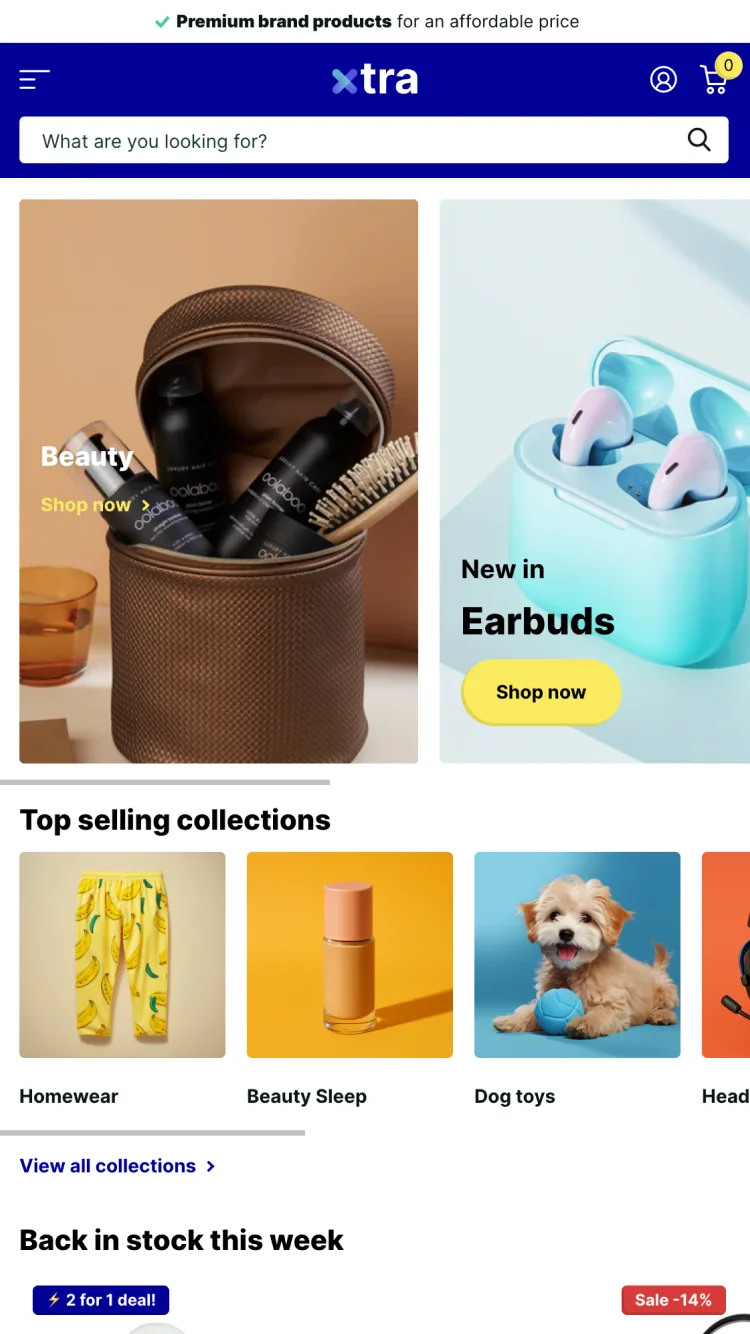
Xtra is the flagship preset and the default starting point. It leads with a bold royal-blue header, a prominent search bar, and stacked promotional banners, so it is the busiest and most conversion-forward of the five layouts. If you are not sure which direction your store will take, this is the preset to install first.
Xtra Highlights
- Deep blue header with an always-visible search bar for large catalogs
- Dual hero banners plus a top-selling collections carousel out of the box
- Sale, back-in-stock, and 2-for-1 badge styles ready to switch on
- The full Xtra toolkit underneath: quick view, mega menu, filtering, and upsells
Xtra - Seed
Ideal for: Clean, natural storefronts
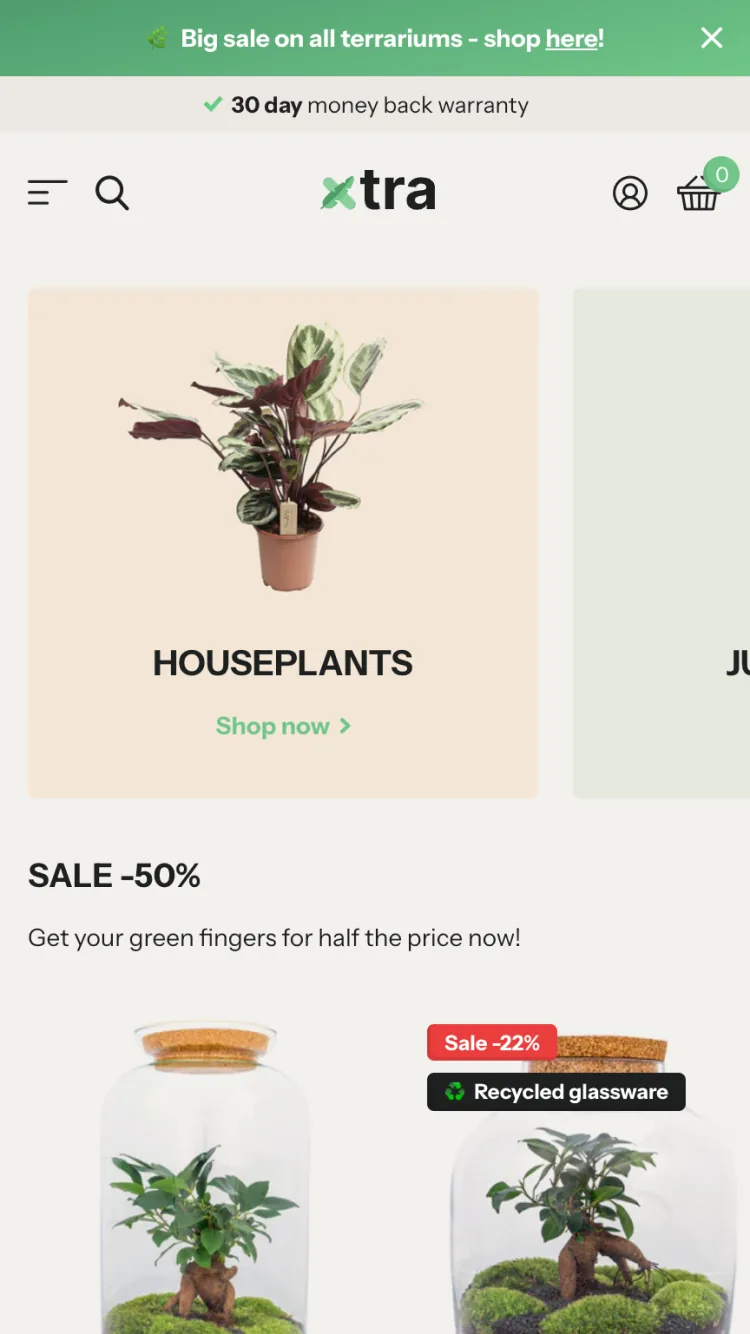
Seed is the lightest, calmest preset. It uses a soft cream and muted green palette with generous whitespace and rounded category tiles, so the design feels understated rather than promo-heavy. It suits store owners who want a clean, natural looking storefront without giving up Xtra’s built-in features.
Seed Highlights
- Soft neutral palette with a single green accent color
- Generous whitespace and rounded category tiles for an airy feel
- Slim announcement bar and minimal header chrome
- The same modular sections and conversion tools as every Xtra preset
Xtra - Calm
Ideal for: Editorial, photo-led brands
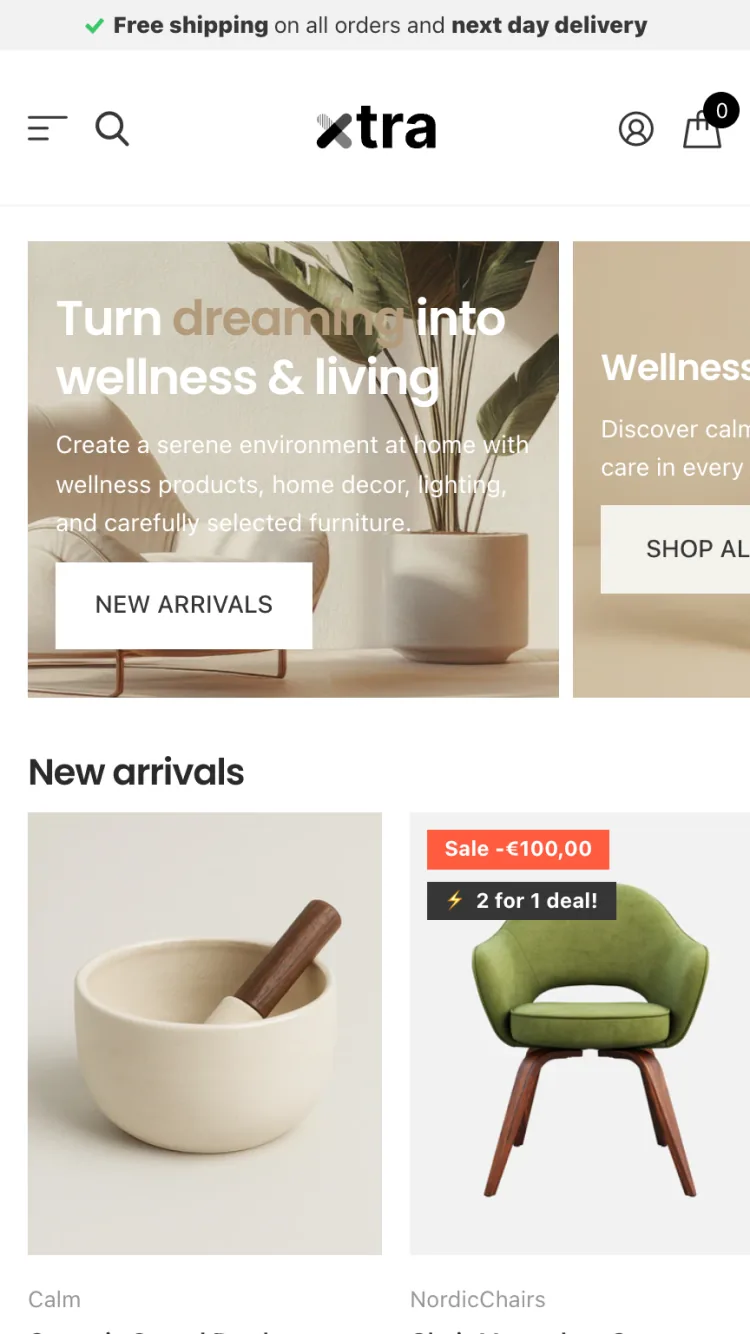
Calm is the warm, editorial preset. It centers on a large lifestyle hero with overlaid text, a warm neutral palette, and a stripped-back black header, giving it a refined, premium feel. Reach for it when you want the design to lead with photography and mood rather than dense product grids.
Calm Highlights
- Warm, beige-led neutral color scheme
- Full-width lifestyle hero with overlaid headline text
- Minimal black header for an understated, premium look
- Sale and deal badges on hand when you want to dial promotion back up
Xtra - Vault
Ideal for: Bold, image-led brands
Vault is the bold, dark preset. A deep navy header with a rotating announcement bar and a full-width search sits above immersive, edge-to-edge hero imagery, giving the store a high-contrast, striking look. It fits brands that want a moody, image-led storefront.
Vault Highlights
- Dark navy header with high contrast against product imagery
- Rotating announcement bar plus a prominent full-width search
- Edge-to-edge hero images for an immersive first impression
- All of Xtra’s built-in filtering, upsell, and promotion features
Xtra - Rover
Ideal for: Type-forward, statement design
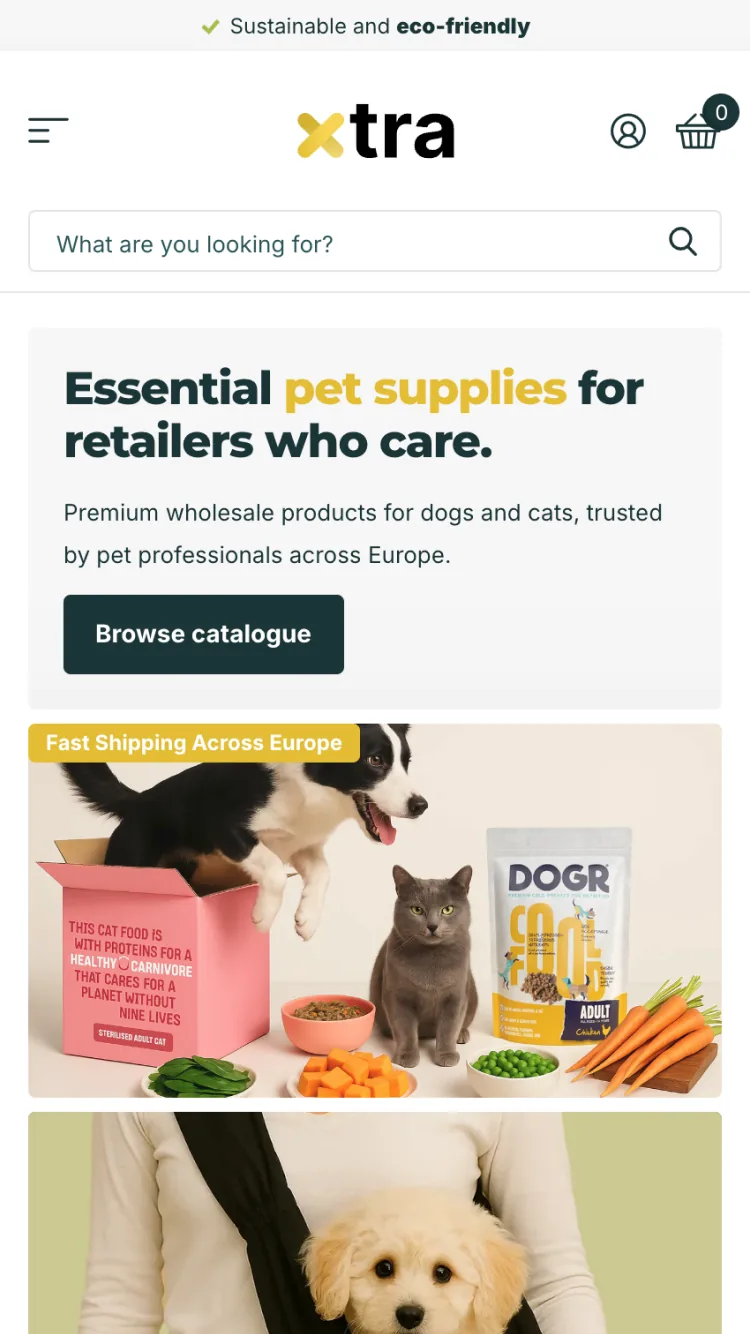
Rover is the typography-forward preset. It pairs a clean white base with a warm gold accent and oversized two-tone headlines, so the layout makes a statement through big type and bold calls to action. Choose it when you want a punchy, modern look built around large statement copy.
Rover Highlights
- Clean white base with a warm gold accent color
- Oversized two-tone headlines and bold, solid CTA buttons
- Large editorial imagery blocks for statement sections
- The shared Xtra feature set: quick view, mega menu, filtering, and upsells
-
How much does the Xtra Shopify theme cost?
The Xtra Shopify theme costs $150 as a one-time purchase on the Shopify Theme Store. That single price includes all five presets: Xtra, Seed, Calm, Vault, and Rover. There are no monthly fees or recurring charges beyond your standard Shopify subscription. Free updates and developer support are included with the purchase.
-
Is the Xtra theme compatible with Shopify OS 2.0?
Yes. The Xtra Shopify theme is fully compatible with Shopify OS 2.0. It uses section-based architecture across all pages (not just the homepage) and supports app blocks, JSON templates, and the full range of OS 2.0 customization features in the Shopify theme editor.
-
What presets does the Xtra Shopify theme include?
The Xtra theme includes five ready-made presets: Xtra, Seed, Calm, Vault, and Rover. Each is a different starting design you can install, preview, and switch between in the Shopify theme editor, so you are not locked into one look. Rather than being tied to a single industry, they are versatile layouts you customize to your store. All five are included in the single $150 purchase, along with the developer’s documentation portal and free updates for the life of the theme.
-
Does the Xtra Shopify theme support wholesale or B2B selling?
Xtra does not ship a separate wholesale preset, but it includes ordering features that help stores selling in bulk, such as bulk upsell and quantity pricing on Shopify Plus. For a full B2B catalog with gated access and customer-specific pricing, pair Xtra with Shopify’s built-in B2B tools. For a standard store that occasionally sells in bulk, Xtra’s native features are often enough on their own.
-
Does the Xtra Shopify theme have a free download?
No. The Xtra Shopify theme is a paid product sold only through the Shopify Theme Store for $150. Any site offering a “free download” of Xtra is distributing a pirated copy, which carries serious risks: no security updates, no developer support, hidden malicious code that can compromise your store and customer data, and a violation of the theme license. The $150 one-time fee is the only legitimate way to buy Xtra.
-
What features does the Xtra Shopify theme include?
Xtra includes modular drag-and-drop sections, mega menus, advanced product filtering, quick view, sticky cart, color swatches, countdown timers, announcement bars, sale badges, trust badges, lazy loading, a large library of pre-built sections, and built-in size guide popups. It also includes bulk upsell and quantity pricing on Shopify Plus. Most of these are features that DTC stores typically pay for as separate apps.
Final Verdict on the Xtra Shopify Theme
The Xtra Shopify theme does something most themes don’t even attempt: it ships five ready-made presets (Xtra, Seed, Calm, Vault, and Rover) under one $150 price tag. That alone makes it worth a close look if you’re unsure which direction your store will grow.
Each preset is a versatile starting design you can preview and switch between, rather than a template locked to one industry. Add in native filtering, mega menus, and conversion tools, and Xtra covers a lot of ground without extra apps.
The main tradeoff is the learning curve. Five presets and more than 50 features mean more options to sort through, and a section-heavy build needs speed tuning before launch. But if you want a theme that can adapt as your business changes, Xtra delivers on that promise better than most alternatives in its price range.
Our verdict
For growing catalog stores that want built-in filtering, mega-menu and promotional tools without stacking apps, Xtra earns its price and its 5-preset flexibility. Field speed is middling, so plan for image and section discipline at build time. Not the pick for a pre-revenue store that still needs to validate on Dawn.
If you liked Xtra, you might also like Testament, Envy, or Yuva Shopify themes. Shoppers focused on checkout performance should also see our roundup of the Shopify themes for conversion, and store owners outgrowing the free Dawn theme can compare with our Dawn Shopify theme alternatives. Or browse our full list of Shopify theme reviews to compare more options.