Studio Shopify Theme Review 2026
Last modified: October 1, 2026

Studio is a free Shopify theme built for artists, photographers, and makers who want their images to carry the storefront. It leans on large visuals, gallery layouts, and collection-first pages instead of dense product grids. Reviews of Studio tend to split into two camps: fans of its clean, image-led look, and critics who find it thin on features next to premium themes. Its Theme Store reception mirrors that split, with fewer than half of its ratings positive. That reception misses the theme’s real strength, which only shows up once you measure the stores actually running it.
Our detection data changes the story. We track Studio across real Shopify storefronts rather than download counts, and the field numbers place it among the faster themes we measure, on stores with light app stacks and mid-size catalogs. The panels below pull from that live data, so the speed, adoption, and app figures update as the stores do. Here is who Studio fits, where it holds up, and where a different free theme serves you better.
What is the Studio Shopify theme?
Studio is one of Shopify’s free, first-party themes, which means Shopify builds and maintains it and you install it at no cost from the Theme Store. It was designed with artists and collections in mind, and the defaults show it: oversized imagery, gallery-style sections, lookbooks, and artist profile blocks. There is a single style, so you shape the look through the theme editor rather than by switching presets. For a creative brand that wants a clean, professional base without paying for a license, it is a sensible starting point.
How popular is the Studio theme?
Studio sits in the mid-40s among the themes we track, a steady share rather than a surging one. You can pull the current figures anytime from our live Studio usage statistics, which the panel here mirrors.
Studio adoption at a glance
Studio usage from our live Shopify store detection dataset.
The install base fits the theme’s intent. These are mostly small, focused creative stores, not multi-category retailers, and the app counts stay low. Its month-to-month share has held flat, which the trend below shows.
Studio has climbed from 0.2% to 0.3% of Shopify stores in our dataset over recent months.
Studio design and layout
The default Studio layout puts imagery first. Product and collection pages give photos room to breathe, and the gallery and lookbook sections are built to frame work rather than cram in merchandising. Color swatches, image zoom, and product videos are included, so a store selling prints or handmade goods can show texture and detail without an app. The trade-off is density. If your catalog is large or you want aggressive upsell blocks on every page, Studio’s calm, spacious defaults will feel restrictive, and you will spend time in the editor tightening them.
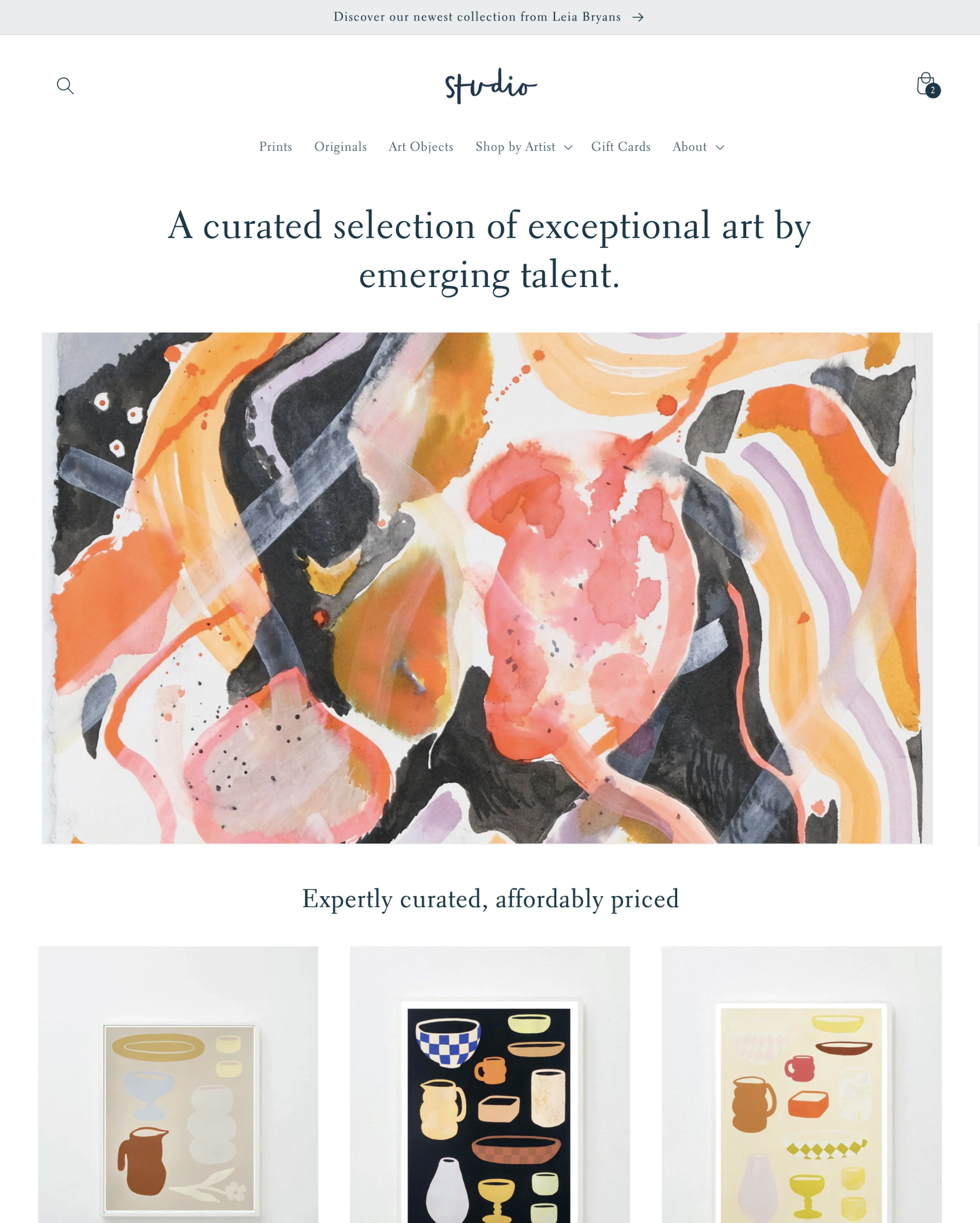
Studio features
Studio ships a focused set of tools rather than a deep one. These are the parts that matter for a visual store.
Image galleries and lookbooks
The gallery and lookbook sections are the reason to pick Studio. They present a body of work, a print series, or a seasonal collection as a set, which flatters creative catalogs where the range is the pitch.
Color swatches, zoom, and product videos
Swatches, image zoom, and product video are built in, so a maker can show glaze, grain, or fabric detail up close without bolting on an app. For products sold on texture and finish, that matters.
Artist profiles and collection pages
Studio includes blocks for artist or maker profiles and treats collections as first-class pages. A single-collection brand or a store built around named creators can tell that story inside the theme.
Search, mega menu, and filtering
Enhanced search, a mega menu, and product filtering with swatch filters are included. They keep a growing catalog browsable, though the filtering is standard rather than the deep faceted search you get from a merchandising-heavy premium theme.
Quick buy, cart notes, and in-store pickup
Quick buy, cart notes, and in-store pickup round out the commerce basics. They cover a small creative store’s needs, but there is no built-in upsell or cross-sell engine, which is why review and marketing apps show up on so many Studio stores.
Which apps Studio stores run
Because Studio ships without heavy built-in merchandising, the apps merchants add tell you what it is missing out of the box. Reviews and email lead the list.
| Rank | App | % of stores | Category |
|---|---|---|---|
| 1 | Judge.me Product Reviews App | 29.3% | Product reviews |
| 2 | Klaviyo | 16.5% | Email Marketing |
| 3 | Loox ‑ Product Reviews App | 8.6% | Product reviews |
| 4 | Shopify Inbox | 8.2% | Support - Other |
| 5 | Recharge | 6.8% | Subscriptions |
| 6 | PageFly ✦ AI Page Builder | 5.1% | Page builder |
| 7 | Instafeed ‑ Instagram Feed | 4.0% | Marketing - Other |
| 8 | Printful: Print on Demand | 4.0% | Print on demand (POD) |
| 9 | Yotpo | 4.0% | Product reviews |
| 10 | Swym Wishlist | 3.7% | Wishlists |
Product review apps top the list, which fits a creative catalog where social proof sells work buyers cannot handle first. Email marketing and subscriptions follow. The stacks stay small, so most Studio merchants add a handful of tools rather than a dozen.
Studio performance and Core Web Vitals
This is where Studio earns its place, and where most reviews get it wrong. The common verdict is that Studio’s performance is average and that you should look elsewhere for speed. Our field data says the opposite.
| Theme | CWV pass rate | Few apps | Median LCP |
|---|---|---|---|
| Studio | 82.5% | 90.1% | 1.3s |
| Impulse | 78.3% | 85.7% | 1.6s |
| Dawn | 71.1% | 79.6% | 1.6s |
Measured across real storefronts in the Chrome UX Report, Studio passes Core Web Vitals on a larger share of its stores than most themes we track, and the median load times sit comfortably under a second and a half. Filter to stores running only a few apps and the pass rate climbs higher, isolating the theme’s own code from the apps merchants pile on. For an image-led free theme, holding that speed is uncommon. The catch: big images are Studio’s whole point, so the moment you upload heavy, uncompressed artwork or stack on apps, you hand that lead back.
Studio Performance and Adoption
How Studio compares across the Shopify themes we track.
Studio pricing
Studio is free. There is no license fee, no upgrade tier, and no trial to expire, because it is one of Shopify’s own themes. Your only real cost is the time to configure it and whatever apps you add to fill feature gaps. For a creative brand watching its budget, that frees money for photography and marketing, which is where an art or print store wins or loses anyway.
Studio pros and cons
Here is the honest balance after weighing the theme against our data and its Theme Store reception.
Pros
- Free and maintained by Shopify, so no license cost and standard update support.
- Among the fastest themes in our real-world field data, not the “average” its reputation suggests.
- Image-first defaults, galleries, and lookbooks suit art, print, and handmade catalogs.
- Swatches, zoom, and product video are built in, cutting app dependencies.
- Stores on it run lean app stacks, which keeps pages quick.
Cons
- Mixed Theme Store reception, with more critical reviews than glowing ones.
- A single style limits fast restyling compared with multi-preset themes.
- Feature set is thinner than premium creative themes, with no built-in upsell engine.
- Spacious defaults fight large or multi-category catalogs.
- Speed depends on you keeping images compressed and the app list short.
Who should use the Studio Shopify theme?
Studio fits a specific store. Choose it if you sell visually, such as art, prints, photography, jewelry, or handmade goods, and you want images to lead. It suits a focused catalog, a single collection or a tight range, where the gallery layout flatters the work. It is a strong pick for a new creative brand that wants to launch fast and cheap and put budget into product shots rather than a theme license. If you are still comparing options for a creative catalog, our roundup of Shopify themes for art stores lines up the closest alternatives. Skip Studio if you run a large, multi-category store, rely on heavy upsell and cross-sell merchandising, or want a deep feature set out of the box.
Studio vs the alternatives
If Studio’s fit feels close but not exact, a few free themes are worth weighing. Sense is Shopify’s free theme aimed at beauty and wellness, with a softer, product-forward layout that suits stores leaning on lifestyle imagery over gallery walls. Dawn, Shopify’s flagship free theme, is the more flexible generalist: heavier, more sections, and easier to bend toward a conventional retail store, though it asks more setup to feel distinctive. Studio wins when the work is the hero and speed matters. Sense and Dawn win when you need more merchandising or a broader catalog. For a newer, block-based pick, our Vessel review covers Shopify’s free Horizon-collection theme, built around product reviews and email.
Conclusion
Studio is a better theme than its Theme Store rating suggests, as long as you use it for what it is built for. It is free, it is fast where it counts, and it makes a creative catalog look intentional. It is not a feature-rich generalist, and it rewards discipline with images and apps. If you sell visually and want a clean, quick base without spending on a license, it earns a place on your shortlist. Compare it against the paid options in our library of Shopify theme reviews before you commit.
-
Who makes the Studio Shopify theme?
Studio is a first-party theme built and maintained by Shopify. It is free to install from the Shopify Theme Store, updated by Shopify rather than a third-party studio, and supported through Shopify’s standard theme channels. It sits alongside other free Shopify themes like Dawn and Sense.
-
Is the Studio Shopify theme free?
Yes. Studio is one of Shopify’s free themes, so there is no license fee and no upgrade tier. You install it at no cost and pay only for any apps you add. Your budget goes to product photography and marketing instead of the theme itself.
-
Is the Studio theme fast?
In our field data, yes. Across real storefronts in the Chrome UX Report, Studio passes Core Web Vitals on more of its stores than most themes we track, with median load times under a second and a half. Speed does depend on you keeping images compressed and your app list short, since large visuals are the theme’s focus.
-
Which stores is the Studio theme designed for?
Studio is built for visual, creative stores: art, photography, prints, jewelry, and handmade goods. Its gallery layouts and lookbook sections flatter a focused catalog where images sell the product. It is a weaker fit for large, multi-category stores or brands that need heavy upsell merchandising out of the box.
-
What apps work well with the Studio theme?
The most common additions on Studio stores are product review apps like Judge.me and Loox, plus email marketing through Klaviyo and subscriptions via Recharge. Reviews matter most for creative catalogs, where buyers rely on social proof for work they cannot handle first. Keep the stack lean, since each app you add chips away at the theme’s speed.
-
Studio vs Sense: which free Shopify theme should you choose?
Choose Studio if your store is image-led and gallery-style, such as art or prints, and you want the fastest clean base. Choose Sense if you sell beauty, wellness, or lifestyle products and prefer a softer, more product-forward layout. Both are free Shopify themes, so you can test each on a copy of your store before deciding.
-
Can the Studio theme handle a large product catalog?
It can, but that is not where Studio is strongest. The theme’s spacious, image-first defaults are tuned for focused collections rather than thousands of products across many categories. A large catalog means more editor work to tighten layouts, and a heavier theme like Dawn may save you time.