Savor Shopify Theme Review 2026
Last modified: October 1, 2026
Savor is a free Shopify theme built for one purpose: making food and drink look good enough to buy on sight. Bright, appetizing product displays and full-width imagery are tuned for the culinary shelf rather than general retail, which is why you find it on specialty food brands, beverage makers, and small-batch producers. The verdict upfront: Savor’s category-specific touches are genuine, with ingredient sections and product recommendations that match how food shoppers actually browse, so it does more than just look nice. The catch is reliability. Its review score is the lowest of any current free theme, and the complaints describe concrete bugs rather than matters of taste, so this is a theme to test hard before you rely on it.
If you sell a tight, photogenic range of food or drink and you want an appetizing storefront without paying for a premium theme, Savor is purpose-built for you. If you need rock-solid reliability out of the box, or you cannot spare time to test and work around rough edges, it is a risky pick. The sections below use live detection data to show exactly where it fits and what to watch for.
What is the Savor Shopify theme?
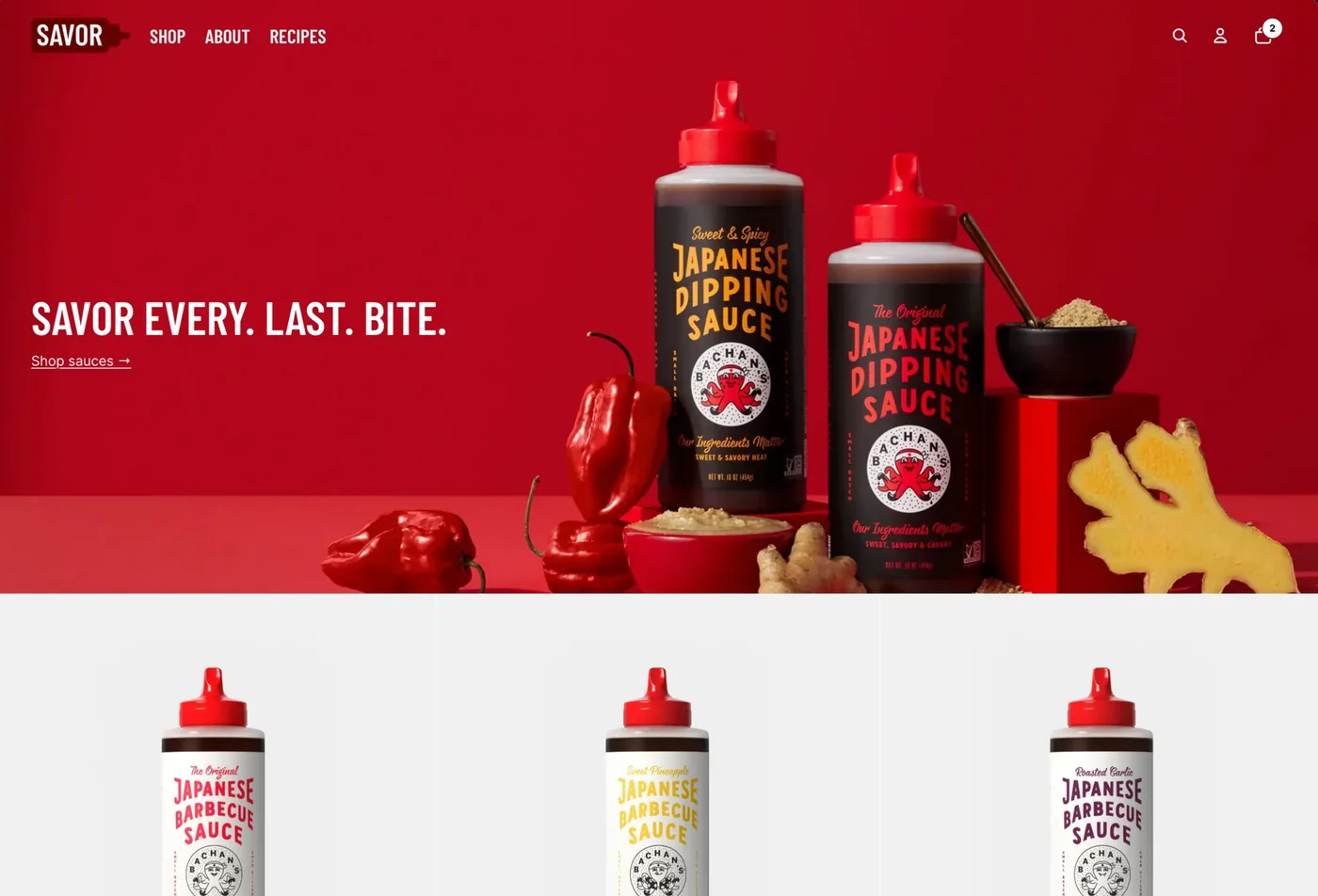
Savor is a free Online Store 2.0 theme published by Shopify, so updates arrive through the theme library with no third-party dependency. Unlike most themes that aim for general retail, Savor is built for a single category: food and drink. Bright product displays and full-width imagery are tuned to make dishes, jars, and bottles look appetizing, which is why it shows up on specialty food brands, beverage makers, and small-batch producers rather than across the whole platform.
Because it is a first-party theme, Savor edits through the drag-and-drop customizer with no code required, and it works with the wide library of Online Store 2.0 tutorials and sections. What it does differently from most free themes is commit fully to one niche, building in the details a food shopper expects rather than leaving them to apps. Here is where Savor sits across our dataset today.
How popular is Savor?
Savor is a small, specialist theme, and its share of the stores we scan each month has held fairly steady rather than climbing. That is what you would expect from a theme built for one category: it appeals strongly to the food and drink brands it targets and barely registers with anyone else, so it holds its niche rather than spreading across the platform.
Savor has held steady at about 0.4% of Shopify stores in our dataset over recent months.
One number says a lot about how Savor stores operate: they run fewer apps than the average Shopify store. Part of that is the theme, which builds ingredient sections, product recommendations, and quick buy in so owners need fewer add-ons, and part of it is the audience, since small food producers tend to keep their setups simple and let the product photography carry the store.
Savor design and layout
Savor’s design has one job and does it with focus. Bright, full-width imagery and appetizing product displays put the food itself front and center, so a jar of sauce or a bottle of cold brew reads as something you want rather than something you scroll past. For a specialty producer, that framing does real selling work, because in food the photograph is most of the pitch.
The trade-off is that the styling is narrow by design. Savor flatters food and drink and looks out of place on general retail, so it is not a theme to stretch across an unrelated catalog. It also depends heavily on your photography: strong, appetizing images make it sing, while weak product shots leave the open, image-led layout feeling empty. It rewards a tight, photogenic menu and a clear culinary identity.
Savor features
Savor’s feature set matches its category, with tools aimed at how food and drink actually sell rather than generic retail extras.
- Appetizing product media: high-resolution images and product video to make dishes, jars, and bottles look as appetizing as possible.
- Ingredient sections: the detail food shoppers expect, built into the product page.
- Product recommendations: pointing shoppers to complementary items, which suits pantry and gift-style buying.
- Practical selling: filtering, quick buy, and pre-order to round out a small food store.
- Standard Online Store 2.0 sections and settings, so tutorials and help written for Shopify’s free themes apply directly.
What you do not get is dependable stability, which is the theme’s real weak point and the reason for the section below. The category features are genuinely useful, but a few core pieces, the image carousel and variant handling in particular, are where owners report the most trouble.
How fast is the Savor theme?
Savor’s speed needs a careful read, and the live data below shows it. We measure Savor on real-world Core Web Vitals across live Savor stores, using Google’s Chrome UX Report field data rather than a lab test.
| Theme | CWV pass rate | Few apps | Median LCP |
|---|---|---|---|
| Impulse | 78.3% | 85.6% | 1.6s |
| Dawn | 71.1% | 79.9% | 1.6s |
| Savor | 61.6% | 66.7% | 1.6s |
Savor’s own demo leans on full-width, high-resolution food imagery that is heavy to paint, but real Savor stores post a stronger field Core Web Vitals score, though the share that fully passes is solid rather than exceptional, because live food stores tend to run leaner pages and very few apps. The practical takeaway: Savor can be fast, but its appetizing visuals demand discipline. Compress your product images hard, limit the number of large media blocks, and keep the app stack lean, and the field results follow.
What kinds of stores use Savor?
Savor’s store base reflects both its intended niche and the reality that free themes get borrowed widely. Food and drink is a large and defining group, well above its share on any general theme, alongside apparel and accessories, health and beauty, and home and garden. The food concentration is the signal that matters: this is the category the theme is built for and the one it is designed around.
By business model, subscription stores are the largest identifiable group, which fits food and drink brands running recurring boxes or pantry refills, ahead of dropshipping, print on demand, and wholesale. It is a theme for small, brand-led producers rather than high-volume general stores. For the full store-type and category breakdown, including how the mix shifts over time, see the live Savor usage statistics.
Which apps do Savor stores use?
The app stack on Savor stores is lean and tilts toward tools that suit a small food brand. Reviews apps sit at the top, as they do for most young brands, with email marketing, urgency tools, and subscriptions close behind. Here is what we detect most often on live Savor stores.
| Rank | App | % of stores | Category |
|---|---|---|---|
| 1 | Judge.me Product Reviews App | 29.5% | Product reviews |
| 2 | Klaviyo | 13.4% | Email Marketing |
| 3 | Loox ‑ Product Reviews App | 12.0% | Product reviews |
| 4 | Recharge | 9.2% | Subscriptions |
| 5 | Shopify Inbox | 5.9% | Support - Other |
| 6 | PageFly ✦ AI Page Builder | 4.4% | Page builder |
| 7 | Instafeed ‑ Instagram Feed | 3.9% | Marketing - Other |
| 8 | Swym Wishlist | 3.9% | Wishlists |
| 9 | Printful: Print on Demand | 3.8% | Print on demand (POD) |
| 10 | GemPages Landing Page Builder | 3.8% | Page builder |
The pattern fits a specialty food store: product reviews for credibility, email and countdown timers to drive action, and subscription tooling for the recurring-order brands that food and drink attracts. Because Savor builds ingredient sections, recommendations, and quick buy into the theme, owners reach for fewer add-ons than they would on a barer free theme, which helps keep the average app count down.
How much does Savor cost?
Savor is free. It is made by Shopify and installed straight from the Shopify Theme Store, with no license fee and no separate cost for updates. There is no paid tier for the theme itself. Your real costs are the apps you add and the Shopify plan you run your store on, not the theme.
Why is the Savor rating so low, and what should you watch for?
Savor holds roughly a 1.05 out of 5 rating on the Shopify Theme Store, the lowest of any current free theme and low by any standard. Unlike most free themes, where a soft rating mostly reflects beginners and a customization ceiling, Savor’s reviews describe concrete bugs, which is a more serious signal worth understanding before you commit.
Three issues surface most often. The first is iOS loading, where some owners report problems on iPhones that do not appear on desktop. The second is the image carousel, which several reviews single out as unreliable. The third is product variant handling, a core part of any store that a food shop with sizes or flavors cannot afford to have misbehave. None of these are about looks, and all three can affect real shoppers.
The practical response is to test hard before you rely on it. Preview your Savor store on an iPhone, click through your key products and every variant the way a customer would, and confirm the carousel behaves. Go in with modest expectations on the technical side and budget time to work around rough edges. If it behaves on your devices and your catalog, the appetizing design is a genuine bargain; if it does not, you will find out before a customer does.
Who should use Savor?
Savor is a strong free choice for a narrow kind of store. Reach for it if you are a small specialty food or drink producer, a beverage brand, or an artisan food maker with a tight, photogenic range and a focused menu of hero products. Strong food photography and a clear culinary identity are what make it work.
Pass on Savor if you sell general retail, run a large or varied catalog, or need a theme that just works without testing and maintenance. In those cases a general-purpose or steadier theme will serve you better. If you do choose Savor, lean into strong food photography, keep the menu focused, and run the iPhone-and-variant test above before you launch and after every update.
If you sell drinks specifically, our Shopify drinks and beverages themes roundup is worth a look too.
-
Is the Savor Shopify theme free?
Yes. Savor is a free Online Store 2.0 theme made by Shopify and installed from the Shopify Theme Store. There is no license fee and no charge for updates. Your only real costs are the apps you add and your Shopify plan, not the theme itself.
-
Which stores is the Savor Shopify theme designed for?
Savor is built specifically for food and drink. It suits small specialty producers, beverage brands, and artisan food makers with a tight, photogenic range and a focused menu of hero products. Its ingredient sections and product recommendations match how food shoppers browse. It is a poor fit for general retail or large, varied catalogs.
-
Why does Savor have such a low Theme Store rating?
Savor sits near 1.05 out of 5, the lowest of any free theme. Unlike most free themes, the complaints describe concrete bugs rather than customization limits. Owners most often raise iOS loading, the image carousel, and product variant handling. The design is genuinely appetizing, but you should test the theme hard on real devices before launch.
-
Does Savor work well on iPhone and iOS?
Some owners report loading and display problems on iPhones that do not appear on desktop, and an unreliable image carousel. These do not affect every store, but they are common enough to check. Preview your Savor store on a real iPhone, and click through your key products and variants, before you go live.
-
Is Savor a fast Shopify theme?
It can be, with care. The demo store scores modestly on Google PageSpeed because of its full-width, high-resolution food imagery, but real Savor stores post a stronger field Core Web Vitals score. The theme is not usually the bottleneck. Compress your images, limit large media blocks, and keep the app stack lean to keep a Savor store quick.
-
What types of stores use the Savor theme?
Savor is defined by food and drink, which is a much larger group on it than on general themes, alongside apparel, health and beauty, and home and garden. By business model, subscription brands are the largest identifiable group, which fits recurring food boxes. It suits small specialty producers more than large general stores. You can see the full breakdown on the live Savor statistics page.
Is Savor worth installing?
For a small food brand, and with eyes open, it can be. Savor makes food and drink look genuinely appetizing for nothing, and its ingredient sections and recommendations match how people actually shop for food, which is more than most free themes offer. The very low rating is a real warning, not noise, because it points at concrete bugs rather than taste, so the deciding factor is whether it behaves on your devices and your catalog. Test it thoroughly, especially on iPhone and across variants, and you will quickly know if the appetizing design is worth the risk. For the wider picture across Shopify’s free and paid themes, see our guide to Shopify theme reviews. And any time you spot a food store you admire, you can scan it to see whether it runs Savor and which apps it pairs with.