Hyper Shopify Theme Review 2026
Last modified: October 1, 2026

Hyper is a premium Shopify theme from FoxEcom, built for stores that sell at scale. Where most themes assume one shopper buying one item, Hyper assumes a buyer who orders in volume and comes back often, so it bakes in the wholesale and B2B mechanics that other themes leave to apps. It ships with 5 presets and carries one of the strongest positive ratings on the Shopify Theme Store. If you run a wholesale operation, take bulk orders, or manage a deep catalog with tiered pricing, Hyper is aimed squarely at you. If you sell a single product to retail customers and you are not on Shopify Plus, it is more engine than you need.
This review leans on our detection data for the real stores running Hyper, not just its demo. That data shows who actually chooses this theme, the apps they run beside it, and how their storefronts hold up in the field. It confirms the pattern FoxEcom markets: Hyper stores carry large catalogs and lean toward high-volume, catalog-heavy selling rather than a single hero product.
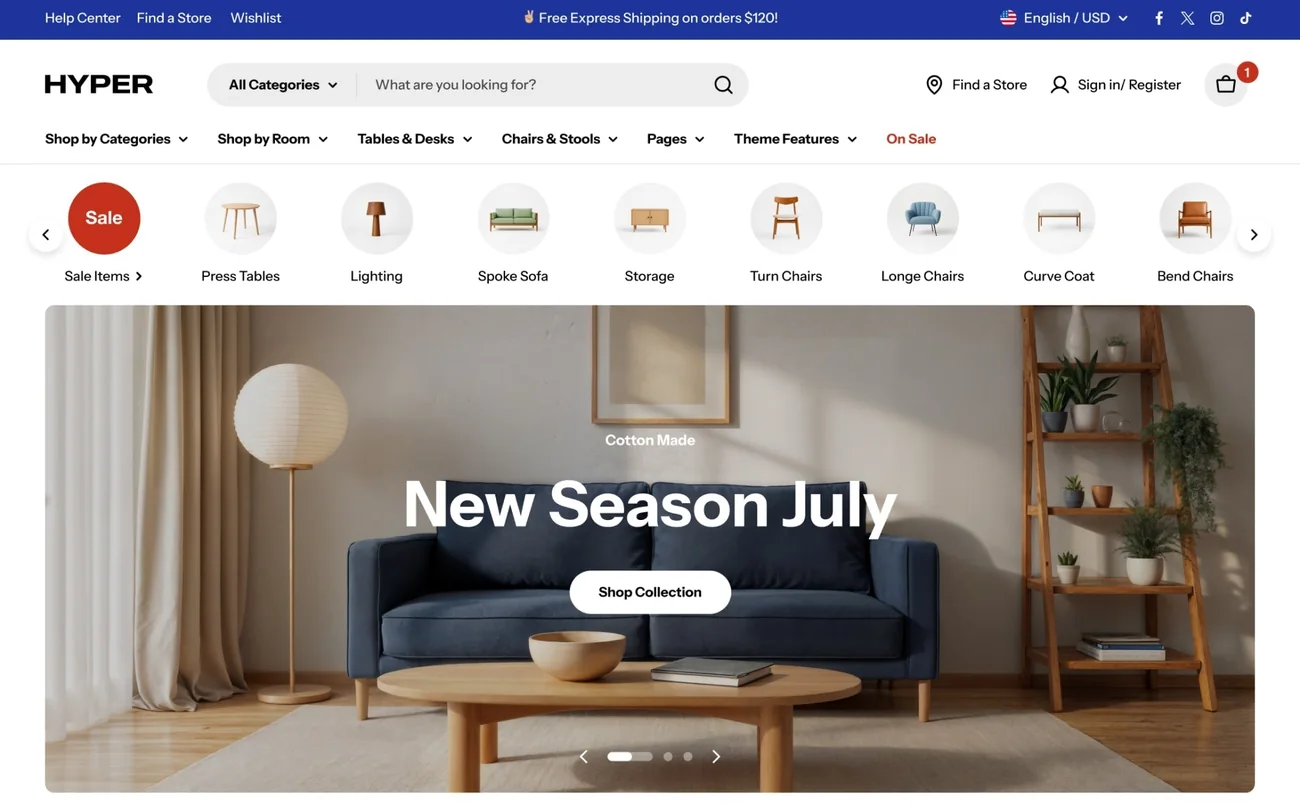
What Is Hyper?
Hyper is a paid Shopify theme from FoxEcom, a studio that builds for volume selling rather than boutique retail. It sells on the Shopify Theme Store as a one-time purchase, which brings official support, a free trial to test on your own products, and a public review history. On that last point Hyper stands out: it carries one of the highest positive ratings on the Theme Store, earned across hundreds of reviews, which is rare for a theme this feature-heavy.
The theme ships with 5 presets, named Hyper, Ceramide, Trove, Pillar, and Nexvo. Each dresses the same underlying theme for a different kind of store, so a furniture wholesaler and a fast-growing retail brand can each start from a layout that fits. What ties them together is a catalog-first mindset: deep navigation, heavy merchandising, and room for a lot of products.
What Apps Do Hyper Merchants Install?
The apps a store runs reveal what kind of business it is. Here is the real install pattern across the Hyper stores in our dataset.
| Rank | App | % of stores | Category |
|---|---|---|---|
| 1 | Judge.me Product Reviews App | 40.2% | Product reviews |
| 2 | Klaviyo | 32.4% | Email Marketing |
| 3 | Loox ‑ Product Reviews App | 16.0% | Product reviews |
| 4 | Recharge | 13.1% | Subscriptions |
| 5 | Trustpilot | 10.9% | Marketing - Other |
| 6 | Yotpo | 7.6% | Product reviews |
| 7 | Omnisend Email Marketing & SMS | 7.3% | Email Marketing |
| 8 | Swym Wishlist | 7.3% | Wishlists |
| 9 | Shopify Inbox | 7.3% | Support - Other |
| 10 | PageFly ✦ AI Page Builder | 6.9% | Page builder |
Product reviews lead the stack, which fits catalog stores that need social proof across a lot of SKUs, and email marketing sits right behind, the mark of merchants who treat their list as a core channel. Countdown timers and cross-sell tools show up more than on the average theme, matching Hyper’s promotion-heavy demos. Subscriptions and support tooling round it out. Taken together this is an operator running a real catalog and a real marketing engine, not someone testing a single product.
How Popular Is Hyper?
Hyper is a specialist premium theme rather than a mass-market default, and its adoption reflects that. Here is where it sits across the stores we track.
The detail that matters more than the rank is what these stores have in common. They run only a moderate number of apps, close to the dataset average, despite selling at volume. That is the fingerprint of a theme doing work other stores hand to apps, folding wholesale pricing, quick ordering, and merchandising into the theme itself rather than leaving it to a paid stack.
Speed deserves an honest look, because Hyper is a heavy, feature-rich theme and the stores that pick it tend to be large. Here is how its real stores perform in the field, measured from the Chrome UX Report rather than a single lab run.
| Theme | CWV pass rate | Few apps | Median LCP |
|---|---|---|---|
| Impulse | 78.4% | 85.4% | 1.6s |
| Dawn | 71.2% | 79.9% | 1.6s |
| Hyper | 61% | 74.3% | 1.6s |
The picture is solid but not class-leading. Median load time is good, and on lightly-loaded stores the pass rate climbs, which tells you the theme’s own code is capable. But interactivity trails the fastest themes, and the large, app-heavy catalogs Hyper attracts pull the field numbers down. If raw speed is your first priority, a lighter theme will edge it. If you need Hyper’s wholesale tooling, the performance is reasonable for what you are asking it to do.
Hyper’s Design and Presets
Hyper’s design is built around the catalog. Mega menus and enhanced search keep deep inventory browsable, category navigation sits front and center, and the layouts assume a store with a lot to show. The 5 presets set the tone: Hyper and Pillar read bold and retail-forward, Ceramide and Trove lean softer and more curated, and Nexvo is cleaner and more minimal. You pick the closest starting point and build out from there.
The honest note is that all of this depth is only worth it if you have the catalog to fill it. On a small store the navigation and merchandising blocks can feel empty, and the setup takes longer than a simple retail theme. Hyper rewards a real inventory and a plan for how to organize it.
Hyper’s Wholesale and B2B Features
What sets Hyper apart is the wholesale and B2B tooling it handles at the theme level, work most themes leave to paid apps. The pieces that matter most:
- Quick order list so a repeat buyer can add many SKUs by code in one pass, the way B2B customers actually shop.
- Quantity pricing and advanced pricing rules for tiered and bulk discounts, available on Shopify Plus.
- Multi-currency and right-to-left support for cross-border and international selling.
- Mega menus and enhanced search to keep a deep catalog navigable.
- Promo banners, countdown timers, and cross-selling for conversion on the retail side.
Some features need Shopify Plus
Hyper’s quantity pricing and advanced pricing rules run on Shopify Plus, not the basic plans. If you are not on Plus, you lose some of the exact wholesale tools that justify a premium theme, so confirm your plan covers what you are buying it for before you commit.
How Much Does Hyper Cost?
Hyper is a one-time purchase on the Shopify Theme Store, not a subscription, and it sits toward the premium end of the range. You pay once and own the theme, with its 5 presets, free updates, and FoxEcom’s support included. Because it is sold through Shopify, you can install it on a development store and test the wholesale features against your own catalog before you pay.
| Theme | Price |
|---|---|
| Hyper | $400 |
Premium, and plan-dependent
Hyper is a single payment rather than a monthly fee, which works out friendlier over a few years of use. But its value leans on the Shopify Plus features, so the real cost question is your Shopify plan, not just the theme. Try it on a development store first and confirm the current price on the listing before you buy.
Hyper Pros and Cons
Pros
- Built-in wholesale and B2B tooling: quick order list, bulk and tiered pricing
- One of the highest positive ratings on the Shopify Theme Store
- Deep catalog navigation with strong merchandising and search
- Multi-currency and right-to-left support for international selling
- One-time Theme Store price with a free trial and official support
Cons
- Several standout features require Shopify Plus
- Overkill for a small, single-product, retail-only store
- Real-world speed is solid but not class-leading
- A longer setup that only pays off with a large, organized catalog
Who Should Use Hyper?
Choose Hyper if you sell in bulk, run a B2B or wholesale side, or manage a deep catalog and want the ordering and pricing tools built in rather than assembled from apps. Distributors, suppliers, and high-growth brands with large, repeat-order catalogs are its natural home, especially on Shopify Plus. If you want a free starting point for wholesale first, our Trade review covers Shopify’s own B2B theme, and for a large retail catalog without the B2B engine, compare it with our Warehouse review.
Look elsewhere if you run a small, single-product, retail-only store, or you are not on Shopify Plus. A lighter theme will get you live faster and for less, and you will not be paying for wholesale tools you never switch on.
Is Hyper Worth It?
Our verdict
For a wholesale, B2B, or large-catalog store on Shopify Plus, Hyper is a strong buy: it folds the quick order list, bulk pricing, and tiered rules into the theme, and its rating shows merchants are happy with it. The catch is the plan dependency and a real setup curve. Skip it if you sell one product to retail buyers, run a small catalog, or are not on Plus, where its headline features stay switched off.
Hyper is a specialist, and for the stores it targets that focus is the point. Weigh it against the rest of the lineup in our complete guide to Shopify theme reviews, and check the live numbers any time on our Hyper usage statistics page.
-
Who makes the Hyper Shopify theme?
Hyper is built by FoxEcom, a studio that focuses on high-volume and wholesale stores. It is sold on the Shopify Theme Store as a one-time purchase, so it comes with official Theme Store support and a free trial you can run on your own products.
-
Is Hyper good for wholesale or B2B stores?
Yes, that is what it is built for. Hyper handles wholesale mechanics like a quick order list, quantity pricing, and tiered discount rules at the theme level, which most themes leave to paid apps. Some of those features run on Shopify Plus, so check your plan before you rely on them.
-
How much does the Hyper theme cost?
Hyper is a one-time purchase on the Shopify Theme Store, with no monthly fee, and it sits toward the premium end of the range. The price includes the theme, its 5 presets, free updates, and FoxEcom’s support. You can confirm the current figure on the Shopify Theme Store listing before you buy.
-
Is the Hyper Shopify theme fast?
Hyper’s real-world speed is solid but not class-leading. Its median load time is good and lightly-loaded stores do better, but interactivity trails the fastest themes, and the large, app-heavy catalogs it attracts pull the field numbers down. You can see the live Core Web Vitals data on our Hyper usage statistics page.
-
What presets does Hyper include?
Hyper ships with 5 presets: Hyper, Ceramide, Trove, Pillar, and Nexvo. Each dresses the same theme for a different kind of store, from bold and retail-forward to softer and more minimal, so you can pick the closest starting point and adjust from there.
-
Do I need Shopify Plus to use Hyper?
Not to install it, but to get the most from it. Hyper runs on any Shopify plan, yet its quantity pricing and advanced pricing rules are Shopify Plus features. If you are not on Plus and do not sell wholesale, you are paying for tools you will not switch on.