Milano Shopify Theme Review 2026
Last modified: October 1, 2026
Milano is a premium Shopify theme from BrainEcom, a Paris studio, built for fashion brands that want an editorial storefront without a long setup. It leans on large imagery and clean typography, with a set of conversion tools built into the theme itself. Those include a slide-out cart, quick buy, countdown timers, product bundles, and stock counters. The verdict upfront: Milano is a conversion-tuned theme that its merchants run with very few apps. Our detection data shows a specific kind of seller gravitates to it. The catch is a middling real-world speed record and a rating based on only a couple of reviews, so the theme is still young enough that you are partly buying on promise.
If you sell fashion and you want built-in urgency, reviews, and cash-on-delivery tooling without stitching together a dozen apps, Milano fits that brief closely. If you run a large catalog, need a proven speed record, or want a long review history before you commit, it will feel early. The sections below use live detection data from real Milano stores to show exactly who it suits.
What is the Milano Shopify theme?
Milano is a paid Online Store 2.0 theme, built and supported by BrainEcom. You buy it once from the Shopify Theme Store, with a lifetime license and updates included, rather than paying a monthly fee. It is pitched squarely at fashion: clothing, accessories, and other brands where the photography carries the page. The default look is editorial and restrained, with room for large imagery and a quieter, magazine-style layout.
Because it is a Theme Store product, Milano edits through Shopify’s drag-and-drop customizer, so most changes need no code. What separates it from a starter theme is how much selling machinery is built in, which we get to below. First, here is where Milano sits across our dataset of live Shopify stores today.
It is a niche premium theme with a small but real footprint. That is the kind of adoption you would expect from a newer paid design, one that has not had years to spread.
How popular is Milano, and is it growing?
Milano is a paid theme, so it will never match the free defaults on raw installs. The more useful question is the direction of travel. The trend below tracks the share of stores we scan each month that run Milano.
Milano has held steady at about 0.3% of Shopify stores in our dataset over recent months.
Adoption has held roughly steady rather than spiking, which is the normal shape for a young premium theme still finding its audience. One number about that audience stands out, and it says a lot about how these stores are run.
Milano stores run a strikingly lean app stack, well below the dataset average. That is the theme doing the work. Milano builds cart, upsell, urgency, and merchandising tools into itself, so owners reach for fewer add-ons than a barer theme would need. A lighter app list is also one of the biggest levers on real-world speed, which we look at next.
Milano design and layout
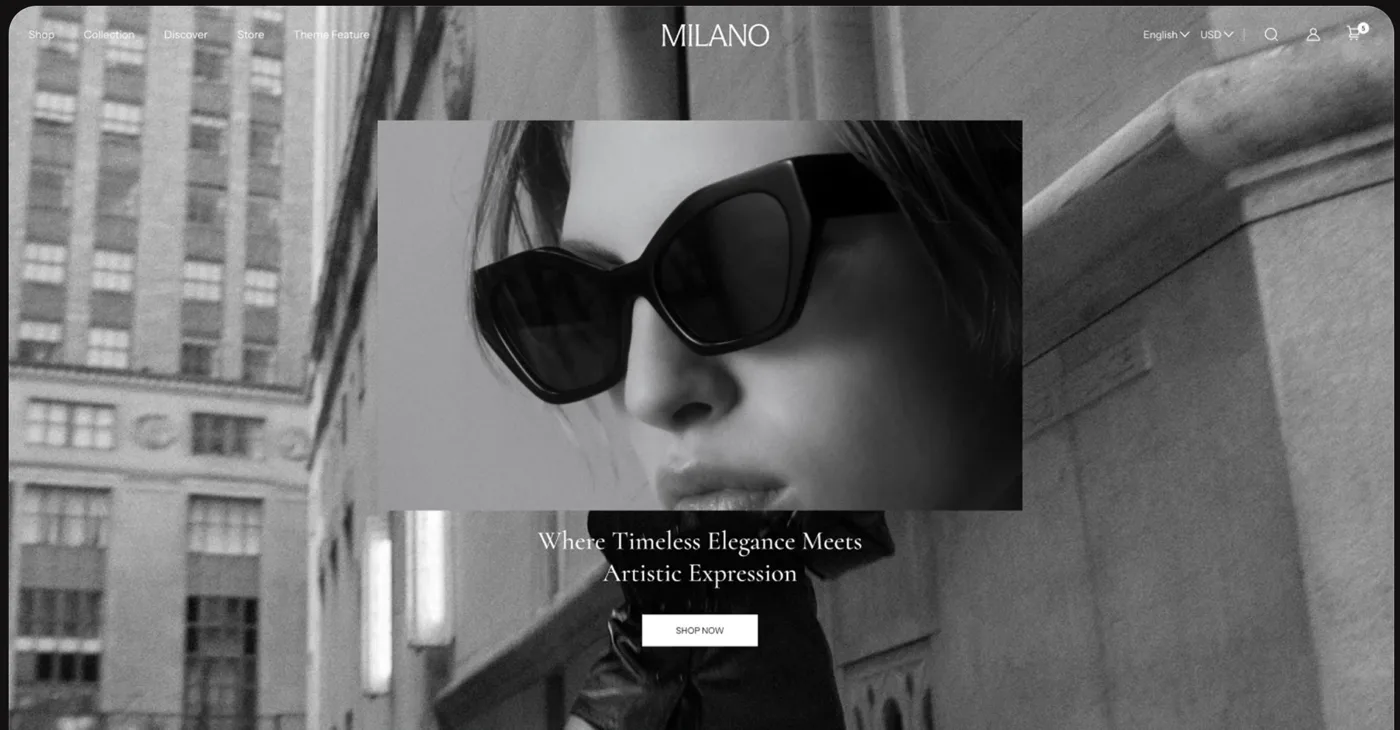
Milano’s default look is quiet and editorial. It leads with full-width imagery, generous whitespace, and clean serif typography. That styling flatters a considered fashion brand rather than a busy discount store. BrainEcom ships it in several preset styles, including Milano, Soleira, Monoring, Paradise, and Occhio. You can start from a mood close to your brand and adjust from there.
The trade-off is the same one every photo-led theme carries. On a brand with strong imagery, Milano looks expensive and does much of the selling for you. On a store with weak or inconsistent photos, the restraint reads as empty rather than elegant. Milano rewards art direction, and it assumes you already have it.
Milano features
For a fashion theme, Milano arrives with an unusual amount of selling tooling built in. Most of it is aimed at moving a shopper from the product page to the checkout without a detour through the app store.
- Cart and checkout: a slide-out cart, sticky cart, quick buy, gift wrapping, and in-store pickup options.
- Urgency and upsell: countdown timers, stock counters, product badges, promo popups, and cross-sell blocks.
- Merchandising: lookbooks, size charts, product videos, color swatches, image zoom, and a before-and-after slider.
- Discovery: enhanced search, mega menu, product filtering and sorting, and swatch filters for large ranges.
- Reach: EU translations for English, French, Italian, German, and Spanish, plus Shopify Plus support.
None of these features is rare on its own. What is unusual is finding all of them in one theme aimed at a single price. That bundle is the reason Milano stores run so few separate apps, and it is a real part of the theme’s value once you weigh it against the monthly cost of the apps it replaces.
How fast is the Milano theme?
Speed is where Milano is honest rather than exceptional, and the live data shows it. We measure it on real-world Core Web Vitals from live Milano stores, using Google’s Chrome UX Report field data rather than a lab score. The cards below show the full field, then the same theme filtered to stores running only a few apps.
| Theme | CWV pass rate | Few apps | Median LCP |
|---|---|---|---|
| Impulse | 78.4% | 85.7% | 1.6s |
| Dawn | 71.1% | 79.6% | 1.6s |
| Milano | 63.4% | 66.7% | 1.8s |
The pass rate sits in the middle of the pack rather than near the top, though the median load and responsiveness both land in Google’s good range. The more useful signal is the gap between the two cards. Filter down to lean stores and the pass rate climbs, which tells you the theme itself is capable of being quick and that most of the drag comes from heavy imagery and add-ons. Milano is image-forward by design, so the rule is simple. Compress your photos, keep hero video in check, and hold the app list short, and you will land on the better side of that split.
Which apps do Milano stores use?
The apps a theme’s stores install are the clearest signal of who those merchants are. On Milano, the pattern is unusually sharp, and it points to two distinct habits.
| Rank | App | % of stores | Category |
|---|---|---|---|
| 1 | Judge.me Product Reviews App | 96.2% | Product reviews |
| 2 | Recharge | 15.3% | Subscriptions |
| 3 | Pumper Bundles | 12.0% | Discounts |
| 4 | Releasit Cod Form | 8.9% | Pay later |
| 5 | Tiktok Pixel | 6.4% | Marketing - Other |
| 6 | Easysell Cod Form | 6.4% | Pay later |
| 7 | Klaviyo | 5.3% | Email Marketing |
| 8 | C Edd Estimated Delivery Date | 5.3% | Delivery and pickup |
| 9 | Loox ‑ Product Reviews App | 4.3% | Product reviews |
| 10 | PageFly ✦ AI Page Builder | 4.3% | Page builder |
The first habit is social proof. Almost every Milano store runs a product-reviews app, a level of adoption we rarely see this high, which tells you these sellers compete on trust and want star ratings on the page. The second habit is telling in a different way. Cash-on-delivery order forms, bundle tools, an estimated-delivery app, and a social pixel all show up far more than on a typical store. That is the fingerprint of cash-on-delivery and social-first fashion selling, common in European and emerging markets, where the sale closes on a form rather than a saved card. Milano suits that playbook well, because the urgency and bundle tools it needs are already built in.
What kinds of stores use Milano?
Milano skews clearly toward fashion. In our classification, apparel and accessories is by far the largest group, followed by health and beauty, then home and garden, with clothing and food-and-drink brands filling out the rest. That mix fits a photo-led theme built to make products look considered.
By business model, subscription brands are the standout group on Milano, ahead of wholesale or marketplace sellers. Read alongside the cash-on-delivery apps its stores favor, the picture is a theme used by direct-to-consumer fashion brands that sell on trust and urgency rather than sprawling catalogs. For the full store-type and category breakdown, including how the mix shifts over time, see the live Milano usage statistics.
How much does the Milano theme cost?
Milano is a one-time purchase of $300 from the Shopify Theme Store, with a lifetime license and no recurring fee. You can preview it and try it on your own products before you buy. At that price it undercuts the better-known premium fashion themes, which is part of its pitch. Here is how it lines up against two of them.
| Theme | Price |
|---|---|
| Milano | $300 |
| Prestige | $400 |
| Impulse | $500 |
The value case rests on the bundled tooling. Milano folds a slide-out cart, quick buy, countdown timers, bundles, and lookbooks into the theme. If you would otherwise pay monthly for those as separate apps, the lower sticker price and the saved app fees make the gap wider than the table alone suggests.
Milano pros and cons
Pros
- A lot of selling tooling built in, so cart, upsell, urgency, and merchandising come with the theme instead of as paid apps.
- Lower one-time price than most premium fashion themes, with a lifetime license and updates.
- Several preset styles, so different fashion brands can start close to their own look.
- Editorial, image-forward design that flatters brands with strong photography.
- EU translations and Shopify Plus support, useful for European and cross-border sellers.
- Early reviews are positive, and its stores clearly lean on the built-in conversion tools.
Cons
- Real-world speed is fair rather than strong, and the photo-led design punishes heavy images.
- The rating rests on only a couple of reviews so far, so there is little long-term track record to lean on.
- The restrained design needs real art direction. Weak photography makes it look bare rather than premium.
- Support runs through BrainEcom’s own channel rather than Shopify’s built-in theme support.
- Better suited to focused fashion catalogs than to very large, fast-changing product ranges.
Milano vs other fashion themes
If Milano is close but not quite right, three other themes cover its neighboring use cases:
- Ella is the pick for feature-heavy fashion and dropshipping stores that want even more built-in tooling and preset variety, at the cost of a busier setup. Read the Ella review.
- Prestige is the step up for high-end brands that sell on editorial storytelling and want a longer, proven track record, at a higher price. Read the Prestige review.
- Impulse suits promotion-led fashion catalogs that live on sales and variants and want a large, established review base behind the theme. Read the Impulse review.
Who should use Milano?
Reach for Milano if you run a focused fashion brand and you want conversion tooling without assembling it yourself. It fits review-driven sellers and cash-on-delivery stores especially well, since the urgency, bundle, and cart tools those playbooks rely on are already built in. If you have strong product photography and a catalog you can present with care, Milano will look expensive for a fairly modest price.
Pass on Milano if you need a proven speed record, a long review history, or a theme built for very large, fast-moving catalogs. New stores without settled photography should also wait, because the design will expose the gap. Before you commit, use the free preview to load the theme with your own products and images. That is the fastest way to see whether the restrained look works for your brand.
-
Who makes the Milano Shopify theme?
Milano is built and supported by BrainEcom, a Paris-based studio that sells premium Shopify themes. It is a one-time purchase from the Shopify Theme Store, with a lifetime license and updates included rather than a monthly fee. Because it is a Theme Store product, it edits through Shopify’s drag-and-drop customizer with no code needed for most changes.
-
Is the Milano theme good for dropshipping or cash-on-delivery stores?
Yes, our data suggests it is a common choice for them. Cash-on-delivery order forms, bundle apps, and an estimated-delivery tool show up on Milano stores far more than on a typical Shopify store. That fits the cash-on-delivery and social-first fashion playbook, and Milano helps because the urgency and bundle tools those sellers rely on are built into the theme.
-
Is the Milano Shopify theme fast?
Its real-world speed is fair rather than strong. Across live Milano stores in Google’s Chrome UX Report, a middling share pass Core Web Vitals, though median load and layout stability sit in Google’s good range. The pass rate climbs on stores that run only a few apps, so compressing images and keeping the app list short is the main lever on Milano’s speed.
-
What kinds of stores use the Milano theme?
Milano skews heavily to fashion. Apparel and accessories is the largest group, followed by health and beauty, home and garden, and clothing. By business model, subscription and direct-to-consumer brands stand out, many of them leaning on reviews and cash-on-delivery selling rather than large, slow-moving catalogs.
-
How much does the Milano theme cost?
Milano is a one-time purchase from the Shopify Theme Store, with a lifetime license and no recurring fee. It undercuts most of the better-known premium fashion themes on price. You can preview it and try it on your own products before buying, so you can test the preset styles against your real catalog first.
-
Is Milano worth it over a free Shopify theme?
It depends on how you sell. If you would otherwise pay monthly for a slide-out cart, quick view, countdown timers, bundles, and a reviews app, Milano folds most of that into a lower one-time price and the saved fees add up. If you sell a small, simple catalog and do not need those tools, a free theme like Dawn covers the basics.
Is Milano worth it?
For the right seller, yes. Milano is a conversion-focused fashion theme that folds a lot of paid tooling into one lower-priced license, and its merchants clearly use it. Our data draws a sharp picture. Almost every Milano store runs a reviews app, cash-on-delivery and bundle tools show up far more than average, and the app stack stays lean because the theme does the work. The trade-offs are a fair rather than fast speed record and a rating still built on a couple of reviews. If you sell fashion on trust and urgency and you want the tools built in, Milano earns a look. For the wider view across paid and free themes, see our Shopify theme reviews guide.