Booster Shopify Theme Review 2026
Last modified: September 14, 2026
Booster is a paid, all-in-one Shopify theme that builds a stack of conversion tools straight into the theme: countdown timers, upsells, social-proof popups, a sticky add-to-cart bar and a quick cart. It is sold on the developer’s own site instead of the Shopify Theme Store, which is the first thing that sets it apart from most themes we review. Our storefront detection shows it running on a small but steady share of live Shopify stores, most of them conversion-focused and dropshipping shops.
The promise is simple: one theme replaces several paid apps. Booster mostly delivers on that, but two things matter before you buy. Its real-world speed swings with how many extra apps a store still runs, and it asks for a larger upfront commitment than a free Theme Store theme. This review leans on data from the stores actually running Booster, not the marketing page.
What Is Booster?
Booster is a premium Shopify theme from PreviewX, currently on version 7.0 and built on Shopify’s Online Store 2.0 framework. Instead of shipping a plain storefront and expecting you to bolt on apps, it packs the common conversion features into the theme settings.
The developer markets Booster as powering more than 40,000 stores and converting far better than a standard theme. Those are its own figures, not ours, so treat them as a sales pitch rather than proof. What we can confirm is what its live stores look like, which apps they run, and how fast they load.
Out of the box you get tools that usually cost extra as separate apps:
- Upsell popups and frequently-bought-together cross-sells
- Countdown and promotion timers
- Social-proof notifications and recently-bought alerts
- Sticky add-to-cart bar and a slide-out cart
- Currency converter and estimated delivery dates
- Predictive search, mega menu and product filtering
It sits in the same category as Shrine PRO, another conversion theme sold outside the Theme Store, so the two are natural rivals.
What Apps Do Booster Merchants Install?
Because Booster already includes upsells and social proof, you might expect its stores to run almost no apps. The data says otherwise. Even Booster stores add reviews and marketing tools on top, which tells you where the theme stops and where merchants still reach for specialists.
| Rank | App | % of stores | Category |
|---|---|---|---|
| 1 | Loox ‑ Product Reviews App | 54.1% | Product reviews |
| 2 | Judge.me Product Reviews App | 50.5% | Product reviews |
| 3 | Klaviyo | 25.2% | Email Marketing |
| 4 | Recharge | 19.4% | Subscriptions |
| 5 | Yotpo | 9.5% | Product reviews |
| 6 | Releasit Cod Form | 7.7% | Pay later |
| 7 | Triplewhale | 7.7% | Analytics |
| 8 | Shopify Inbox | 7.2% | Support - Other |
| 9 | Swym Wishlist | 7.2% | Wishlists |
| 10 | Tiktok Pixel | 6.8% | Marketing - Other |
Reviews apps like Loox and Judge.me lead, followed by email and retention tools such as Klaviyo and Recharge. The COD order-form and TikTok pixel apps in the mix also confirm the dropshipping lean of its user base.
How Popular Is Booster?
Booster runs on 0.2% of the Shopify stores in our detection dataset. That is a niche share next to free Theme Store themes, but it has held steady rather than fading, and it is concentrated among stores that treat conversion rate as their main lever.
The average Booster store also runs a fair number of apps, which fits a merchant who wants a strong base theme and then adds a few specialists. You can see the live figures on our Booster usage statistics page.
How Fast Is Booster?
Speed is where an all-in-one theme has to prove itself, because every built-in tool is code the browser has to load. Across real Booster stores, 46.7% pass Google’s Core Web Vitals. Filter down to stores running only a few apps and that rate climbs, which shows the theme itself is not the problem: it is the extra apps merchants stack on top.
The developer’s own demo store passes Core Web Vitals comfortably, with a fast largest-contentful-paint and almost no layout shift. The takeaway is practical. Booster can be fast, but you keep that speed by being disciplined about how many apps you add once the theme already covers upsells, timers and social proof.
Booster Design and Layout
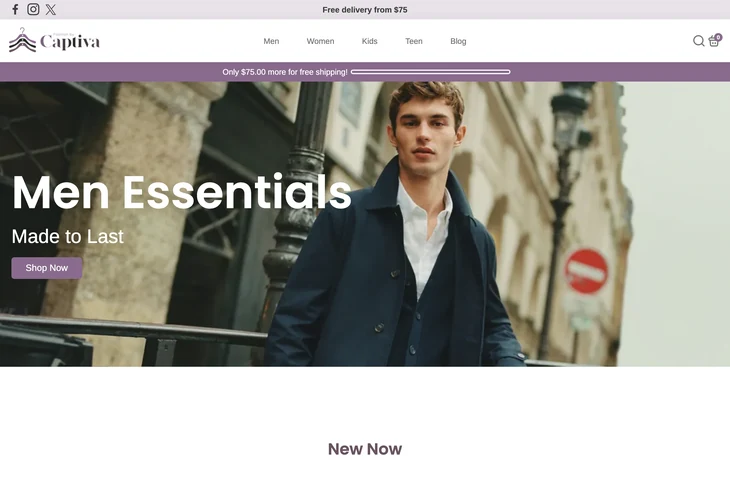
Booster’s look is built around selling, not minimalism. Product pages are dense by design: badges, timers, trust icons, variant swatches and add-to-cart all compete for attention above the fold. For a conversion-first store that is the point, and the layout gives you plenty of blocks to arrange.
The trade-off is restraint. Turn on every widget and a page can feel cluttered and pushy, which can work against trust for a considered-purchase brand. Themes like Minimog face the same tension, so plan which conversion elements you actually need before switching them all on.
Booster Features That Matter
Most of Booster’s value is in the tools you would otherwise pay for monthly. A few stand out:
- Upsells and cross-sells: frequently-bought-together blocks and cart upsells that would normally need a dedicated app.
- Sticky add-to-cart and quick buy: keeps the buy button in reach and shortens the path to checkout.
- Social proof: recently-bought and visitor-count notifications, useful in moderation and risky when overdone.
- Currency converter and delivery estimates: practical for cross-border and dropshipping stores.
- Predictive search and mega menu: helps larger catalogs stay browsable.
Not every feature earns its place. Fake-looking scarcity counters and inflated visitor numbers can undercut credibility, so use the ones that reflect reality and skip the rest.
How Much Does Booster Cost?
Booster is a paid theme, and you buy it from the developer’s site rather than the Shopify Theme Store. It is sold as a one-time lifetime license, with a yearly plan as a lower-commitment alternative, and it comes with a 7-day money-back guarantee if it is not a fit.
How to judge the price
Booster costs more upfront than a free theme, so compare it against what you already spend on conversion apps each month. If it replaces two or three paid subscriptions, the theme can pay for itself; if you only need a couple of its tools, a free theme plus one app may be cheaper.
Booster Pros and Cons
Pros
- Bundles conversion tools, so you run and pay for fewer apps
- Fast on lightly-loaded stores, with strong demo-store Core Web Vitals
- Built on Online Store 2.0 with flexible sections
- Good fit for dropshipping and cross-border selling
- 7-day money-back guarantee
Cons
- Sold outside the Shopify Theme Store, so there is no one-click Shopify trial or Shopify vetting
- Real-world speed drops as merchants add more apps
- Can look cluttered if every widget is switched on
- Higher upfront cost than a free Theme Store theme
- Some scarcity features can hurt trust if misused
Who Should Use Booster?
Booster fits conversion-focused and dropshipping stores that want their upsells, timers and social proof handled by the theme instead of a pile of apps. If you sell impulse or trend products and lean on urgency and cross-sells, its toolset lines up with how you sell.
It is less suited to simple catalogs, content-led brands or anyone who wants a clean, minimalist storefront. If that is you, a free theme like Dawn or a lighter premium option such as Ecomus will get you there with less to switch off.
Is Booster Worth It?
Our verdict
A strong choice for conversion and dropshipping stores that want an app-light setup, as long as you stay disciplined about extra apps and keep the design in check. Less compelling for simple or minimalist catalogs.
Booster is worth it if you would otherwise stack several conversion apps and you value having them in one place, tuned to work together. Our data backs the core claim: its lean stores are fast and its user base is exactly the conversion-driven crowd it is built for. Just go in knowing the speed is yours to protect and the design needs a careful hand.
Want to weigh it against other options? Our Shopify theme reviews guide lines up every theme we have tested, from free Theme Store picks to premium conversion themes.
-
Is Booster a good Shopify theme?
Booster is a good fit if you want conversion tools built into the theme instead of paying for separate apps. Our detection data shows its lean stores load fast and its users are mostly conversion-focused and dropshipping merchants, which is exactly who it is built for. It is less suited to simple catalogs or brands that want a minimalist look.
-
Is the Booster theme on the Shopify Theme Store?
No. Booster is sold on the developer’s own site, PreviewX, rather than through the Shopify Theme Store. That means there is no one-click Shopify trial and it does not go through Shopify’s theme review, so you buy a license directly and install it yourself. The developer offers a 7-day money-back guarantee instead of a free Shopify trial.
-
How much does the Booster theme cost?
Booster is a paid theme bought from the developer’s site, offered as either a yearly license or a one-time lifetime license, with a 7-day money-back guarantee. Prices change with regular promotions, so check the developer’s site for the current figure. Because it replaces several paid apps, the fair way to judge the cost is against what you already spend on conversion apps each month.
-
Is Booster good for dropshipping?
Yes. Booster is one of the more popular themes among dropshipping stores, and the apps its merchants run confirm it: COD order forms, TikTok pixels and marketing tools show up often. Its built-in upsells, timers and social proof match the urgency-led way dropshipping stores sell. Just keep the extra apps in check so the storefront stays fast.
-
Does Booster slow down your Shopify store?
Not on its own. Real Booster stores that run only a few apps pass Google’s Core Web Vitals at a healthy rate, and the developer’s demo store is fast. Speed drops mainly when merchants stack many extra apps on top of the theme’s built-in features. Since Booster already covers upsells and social proof, the way to stay fast is to avoid duplicating those with apps.
-
What apps does Booster replace?
Booster builds in tools that usually need separate apps: upsells and frequently-bought-together, countdown timers, social-proof popups, a sticky add-to-cart bar, a currency converter and delivery estimates. For many stores that removes two or three subscriptions. You may still want a dedicated reviews app like Loox or Judge.me and an email tool like Klaviyo, which is what most Booster stores actually do.