Atelier Shopify Theme Review 2026
Last modified: October 1, 2026
Atelier is one of Shopify’s free Horizon-collection themes, and it commits fully to a luxury look. Airy, editorial layouts and large hero media give a store a premium, gallery-quality feel that normally sits behind a paywall, which makes it a genuine draw for an artisan brand on a budget. The verdict upfront: Atelier can make a small, curated range feel genuinely upscale for free, and it is well suited to jewelry, fine food, and beauty. The catch is reliability. Its Theme Store rating is low even by free-theme standards, and the complaints are technical rather than cosmetic, so this is a theme to test on real devices before you launch.
If you sell a tight, photogenic catalog and want an editorial, boutique storefront without paying for a premium theme, Atelier is one of the more striking free options. If you run a large or fast-moving catalog, or you cannot spare time to test across browsers and phones, it is a riskier pick. The sections below use live detection data to show exactly where it fits and what to watch for.
What is the Atelier Shopify theme?
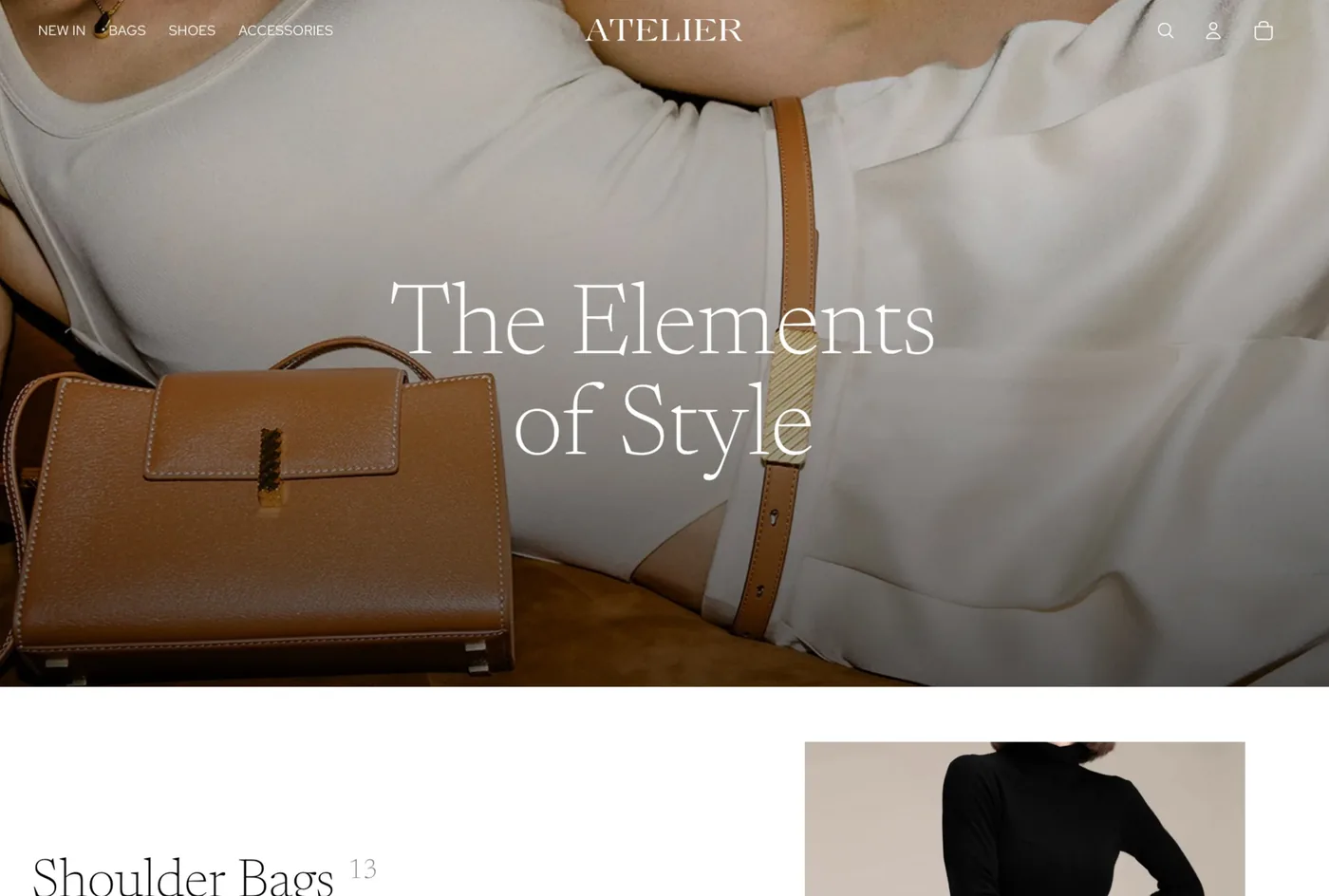
Atelier is a free Online Store 2.0 theme published by Shopify and part of its newer Horizon collection, so updates arrive through the theme library with no third-party dependency. It is pitched at small luxury and artisan brands: jewelry, fine food, beauty, and other makers who want their products framed like a gallery rather than stacked like a catalog. Airy spacing and large editorial media give it an upscale character straight out of the box.
Because it is a first-party theme, Atelier edits through the drag-and-drop customizer with no code required, and it works with the wide library of Online Store 2.0 tutorials and sections. What it offers that free themes rarely do is a fully committed luxury aesthetic, the kind of premium framing that usually costs money. Here is where Atelier sits across our dataset today.
How popular is Atelier?
Atelier is a newer, niche theme, so its overall share is small and has held fairly steady rather than climbing sharply. That is typical for a design-led theme with a specific audience: it appeals strongly to the artisan brands it is built for and less to everyone else, so it grows within its niche rather than across the whole platform.
Atelier has climbed from 0.6% to 0.7% of Shopify stores in our dataset over recent months.
One number says a lot about how Atelier stores operate: they run far fewer apps than the average Shopify store, one of the leanest app stacks we see. Part of that is the theme, which builds galleries, lookbooks, and stock counters in so owners need fewer add-ons, and part of it is the audience, since small curated brands tend to keep their tech simple.
Atelier design and layout
Atelier’s whole personality is upscale and editorial. The default layouts are airy, with generous whitespace and large hero media that treat each product like the subject of a photo shoot. For a small luxury range, that framing does real work: it signals quality before a shopper reads a single word, and it gives a boutique brand a considered, gallery-like presence that usually requires a paid theme or a designer.
The trade-off is that the style is demanding. Atelier flatters strong photography and punishes weak images, because there is nowhere for a mediocre product shot to hide in a layout this open. It also rewards restraint: the look holds when you keep the catalog tight and the pages uncluttered, and it starts to strain if you try to force a large, busy store into its calm, editorial structure.
Atelier features
Atelier’s features exist to support the styling rather than just decorate it, and they cover the practical needs of a small luxury catalog surprisingly well for a free theme.
- Product storytelling: zoom galleries, lookbooks, and video to carry the craft and detail.
- Trust and detail: size charts, ingredient displays, and stock counters for a considered product page.
- Curated browsing: editorial collection layouts that frame a small range like a gallery.
- Standard Online Store 2.0 sections and settings, so tutorials and help written for Shopify’s free themes apply directly.
What you do not get is bulletproof reliability, which is the theme’s real weak point and the reason for the section below. The tools are there, but a few of them, the image carousel in particular, are where owners report the most friction.
How fast is the Atelier theme?
Atelier’s speed needs a careful read, and the live data below shows it. We measure Atelier on real-world Core Web Vitals across live Atelier stores, using Google’s Chrome UX Report field data rather than a lab test.
| Theme | CWV pass rate | Few apps | Median LCP |
|---|---|---|---|
| Impulse | 78.4% | 85.4% | 1.6s |
| Dawn | 71.2% | 79.9% | 1.6s |
| Atelier | 63.3% | 69.6% | 1.7s |
Atelier’s own large hero media and image-heavy homepage are heavy to paint, but real Atelier stores tell a better story, posting strong field Core Web Vitals, because live boutique stores tend to run leaner pages and very few apps. The practical takeaway: Atelier can be fast, but its visuals demand discipline. Compress your hero images hard, limit the number of large media blocks, and keep the app stack lean, and the field results follow.
What kinds of stores use Atelier?
Atelier skews harder toward one niche than almost any theme we track. Apparel and accessories dominates its store base, followed at a distance by home and garden, health and beauty, and food and drink. That fits a theme designed to flatter photogenic, fashion-led products with an editorial eye.
By business model, subscription stores are the largest identifiable group, ahead of wholesale, print on demand, and dropshipping, though Atelier leans less on any single model than most themes. It is a theme for brand-led boutiques rather than high-volume reseller stores. For the full store-type and category breakdown, including how the mix shifts over time, see the live Atelier usage statistics.
Which apps do Atelier stores use?
The app stack on Atelier stores is among the leanest we see, which tells you a lot about who runs it. Reviews apps sit at the top, as they do for most young brands, with email marketing close behind and a notable showing from wishlist and Instagram-feed apps that suit a browse-led luxury store. Here is what we detect most often on live Atelier stores.
| Rank | App | % of stores | Category |
|---|---|---|---|
| 1 | Judge.me Product Reviews App | 26.9% | Product reviews |
| 2 | Klaviyo | 19.9% | Email Marketing |
| 3 | Loox ‑ Product Reviews App | 9.6% | Product reviews |
| 4 | Instafeed ‑ Instagram Feed | 6.2% | Marketing - Other |
| 5 | Recharge | 5.1% | Subscriptions |
| 6 | Shopify Inbox | 4.7% | Support - Other |
| 7 | Swym Wishlist | 3.9% | Wishlists |
| 8 | PageFly ✦ AI Page Builder | 3.4% | Page builder |
| 9 | Omnisend Email Marketing & SMS | 3.4% | Email Marketing |
| 10 | Kiwi Size Chart & Recommender | 3.0% | Upsell and cross-sell |
The pattern fits a curated boutique: product reviews for credibility, email to bring shoppers back, and browse-and-save tools like wishlists and Instagram feeds that match how people shop a considered range. Because Atelier builds galleries, lookbooks, and stock counters into the theme, owners reach for fewer add-ons than they would on a barer free theme, which is part of why the average app count is so low.
How much does Atelier cost?
Atelier is free. It is made by Shopify and installed straight from the Shopify Theme Store as part of the Horizon collection, with no license fee and no separate cost for updates. There is no paid tier for the theme itself. Your real costs are the apps you add and the Shopify plan you run your store on, not the theme.
Why is the Atelier rating low, and what should you watch for?
Atelier holds roughly a 1.5 out of 5 rating on the Shopify Theme Store, which is low even next to other free themes. Unlike most free themes, where a soft rating mostly reflects beginners and a customization ceiling, Atelier’s reviews point at something more specific and more important: technical reliability.
Two issues surface most often. The first is Android browser responsiveness, where some owners report layout and display problems that do not show up on desktop or on an iPhone. The second is the image carousel, which a number of reviews single out as glitchy. Neither is cosmetic, and both can affect real shoppers, so they are worth taking seriously rather than writing off as the usual free-theme grumbling.
The practical response is simple: test before you launch. Preview your Atelier store on real devices, give Android phones and tablets extra attention, and click through the carousel and product galleries the way a customer would. If it behaves on your devices and your catalog, the premium look is a genuine bargain. If it does not, you will know before it costs you a sale.
Who should use Atelier?
Atelier is a strong free starting point for a narrow kind of store. Reach for it if you are a small luxury or artisan brand in jewelry, fine food, or beauty, with a tight, photogenic catalog and photography strong enough to match the premium framing. Boutiques that want to look expensive without paying for a premium theme are exactly who it is for.
Pass on Atelier if you run a large or fast-moving catalog, need rock-solid cross-device reliability out of the box, or cannot spare time to test across browsers and phones before launch. In those cases a steadier theme, free or paid, will save you trouble. If you do choose Atelier, treat it as a design-led theme to style with restraint, keep the catalog curated, and test it hard on real devices first.
-
Is the Atelier Shopify theme free?
Yes. Atelier is a free Online Store 2.0 theme made by Shopify and installed from the Shopify Theme Store as part of the Horizon collection. There is no license fee and no charge for updates. Your only real costs are the apps you add and your Shopify plan, not the theme itself.
-
What is the Atelier Shopify theme best for?
Atelier is built for small luxury and artisan brands that want an editorial, gallery-style store. It fits jewelry, fine food, and beauty sellers with a tight, photogenic catalog and strong photography. It is a weaker fit for large or fast-moving catalogs, where its open, image-led layouts and reliability quirks become a liability.
-
Why does Atelier have such a low Theme Store rating?
Atelier sits near 1.5 out of 5, low even for a free theme. Unlike most free themes, the complaints are technical rather than about customization. Android browser responsiveness and the image carousel are the two issues owners raise most. The look is genuinely premium, but you should test the theme on real devices before launch.
-
Does Atelier work well on mobile and Android?
It works well on desktop and iPhone, but some owners report Android browser display and responsiveness problems, and a glitchy image carousel. These do not affect every store, but they are common enough to check. Preview your Atelier store on real Android phones and tablets, and click through the galleries, before you go live.
-
Is Atelier a fast Shopify theme?
It can be, with care. The demo store scores modestly on Google PageSpeed because of its large hero media and image-heavy homepage, but real Atelier stores post strong field Core Web Vitals. The theme is not usually the bottleneck. Compress your images, limit large media blocks, and keep the app stack lean to keep an Atelier store quick.
-
What types of stores use the Atelier theme?
Atelier skews very heavily to apparel and accessories, followed by home and garden, health and beauty, and food and drink. By business model, subscription brands are the largest identifiable group. It suits small, brand-led boutiques far more than large reseller or dropshipping stores. You can see the full breakdown on the live Atelier statistics page.
Is Atelier worth installing?
For the right brand, and with eyes open, yes. Atelier hands a small luxury store an editorial, gallery-quality look for nothing, which is rare and genuinely valuable when your products are photogenic and your range is tight. The low rating is a real caution, not noise, because it points at technical reliability rather than taste, so the deciding factor is whether it behaves on your devices and your catalog. Test it thoroughly, especially on Android, and you will quickly know if the premium look is a bargain for you. For the wider picture across Shopify’s free and paid themes, see our guide to Shopify theme reviews. And any time you spot a boutique store you admire, you can scan it to see whether it runs Atelier and which apps it pairs with.