TinySEO Shopify App Review, Tested 2026
Last modified: September 29, 2026
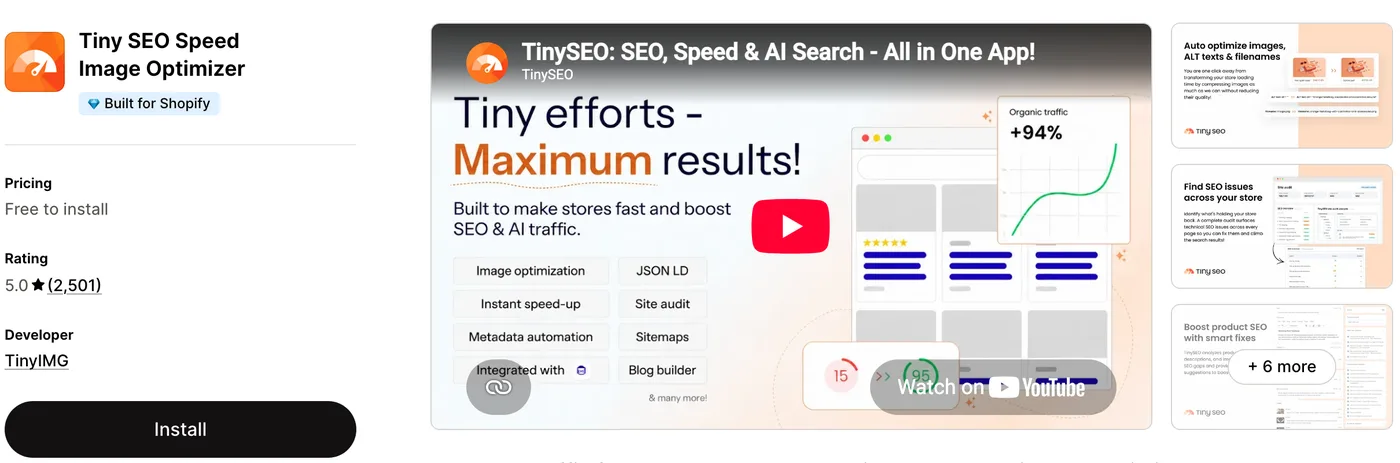
TinySEO, built by TinyIMG, bundles three jobs most Shopify stores otherwise split across separate apps: image compression, technical SEO fixes, and page-speed cleanup. It scans your store, compresses and resizes images, writes ALT text and metadata, adds structured data, fixes broken links with redirects, and minifies code, all from one dashboard. The verdict upfront: for a store that has never had a dedicated SEO or speed app, TinySEO is an easy, low-cost win, because it automates a long checklist of fixes that are tedious to do by hand, and it holds a 5.0 out of 5 rating from more than 2,500 reviews on the Shopify App Store. The honest catch is that it overlaps with work a good theme and Shopify already do, so the value depends on how much technical debt your store has built up.
If your product images are heavy, your ALT text is empty, and your SEO has never been touched, TinySEO pays for itself quickly, and there is a free plan to start. If you already run a tuned theme and a separate SEO tool, the overlap is real, so weigh it against what you have. For a wider view of the category, see how the Shopify SEO apps compare. The developer is mid-rebrand from TinyIMG to TinySEO, but it is the same app and team. The sections below use live detection data to show how widely it is installed, what it does, what it costs, and the kind of store it fits.
What is TinySEO?
TinySEO is a Shopify app from TinyIMG that rolls store optimization into one place. On the image side it compresses and resizes files, converts them to lighter formats, generates ALT text and cleaner filenames, and keeps a 30-day backup of the originals. On the SEO side it adds JSON-LD structured data, builds HTML sitemaps, detects broken links and fixes them with 301 redirects, runs technical audits, and submits pages through IndexNow so search engines see changes faster. A newer set of AI features drafts product titles, descriptions and metadata. Here is how widely it is installed across our dataset.
How popular is TinySEO?
TinySEO is one of the larger optimization tools in its group. In our detection taxonomy it files under image and media apps, because compressed images and generated ALT text are the footprint we can read on the storefront, and there it ranks second, used more often than the next tool in the category. The stores running it lean toward deeper catalogs, which fits: the more products and images a store carries, the more there is to compress and tag.
The trend is quietly positive. Its share of Shopify stores has climbed over the past several months rather than slipping, which lines up with a rebrand from image optimizer to full SEO suite and a steady flow of new installs.
Tinyseo has climbed from 0.9% to 1.1% of Shopify stores in our dataset over recent months.
What does TinySEO do?
Three areas. First, images: automatic compression, resizing and format conversion, ALT text and filename generation, lazy loading, and a backup of the originals so nothing is lost. Heavy images are the most common cause of a slow Shopify store, and this is the part of the app that shows up most directly in load times. Second, technical SEO: structured data and JSON-LD, HTML sitemaps, broken-link detection with 301 redirects, on-page audits, and page indexing through IndexNow.
Third, speed and code: JavaScript and CSS minification plus asset preloading. Layered on top is a set of AI tools that draft product titles, descriptions and metadata, and even build blog content. A slow store hurts both rankings and conversions, so if yours has never had these fixes applied, our guide on why a Shopify theme runs slow covers the wider picture of what actually weighs a store down.
Is TinySEO worth it?
For a store carrying technical debt, yes. Empty ALT text, uncompressed images, missing schema and dead links are exactly the sort of tedious, high-volume fixes an automated tool handles well, and TinySEO does them cheaply. The free plan is enough to see the difference on a small catalog before you pay. Just judge the speed gain on your own pages after install, because in-store speed scores are easy to inflate.
Where it makes less sense is a store that already runs a fast, well-built theme and a dedicated SEO app. Much of what TinySEO automates, image compression and basic metadata, is also handled by modern themes and by Shopify itself, so the gain shrinks the cleaner your setup already is. It also cannot invent rankings: it fixes the technical groundwork, but content and links still decide where you land. Our Shopify SEO checklist covers the theme-level settings an app cannot change for you.
What TinySEO costs
TinySEO has a genuine free plan that covers a set number of image optimizations each month, enough to trial it on a small store. Paid tiers start at a low monthly price and step up as your optimization volume grows, with cheaper per-image rates on the higher plans and a free trial before you commit. Because billing is tied to how many images you process, check your catalog size against the current plan limits on the App Store before you choose a tier.
Which themes and apps run with TinySEO?
Because we detect both themes and apps, we can see the company TinySEO keeps. Its most common theme is Shopify’s free Dawn, followed by the premium Prestige and the newer Horizon, a spread that says TinySEO is theme-agnostic rather than tied to one look. Here are the themes most often running it.
| Rank | Theme | % of stores |
|---|---|---|
| 1 | Dawn | 11.5% |
| 2 | Prestige | 6.6% |
| 3 | Horizon | 4.5% |
| 4 | Impact | 3.4% |
| 5 | Impulse | 3.4% |
| 6 | Concept | 3.0% |
| 7 | Kalles | 2.6% |
| 8 | Be Yours | 2.5% |
| 9 | Ella | 2.2% |
| 10 | Broadcast | 2.2% |
That mix of free defaults and premium themes matches an app that solves a universal problem rather than a niche one. Most TinySEO stores also run an email tool and a reviews app alongside it, the standard core of a Shopify stack. For the full breakdown of themes, paired apps and store types, see the live TinySEO usage statistics.
What kinds of stores use TinySEO?
TinySEO stores tend to carry deeper catalogs than average, which is the profile you would expect: more products mean more images to compress and more pages to tag, so the payback from automation grows with catalog size. They span verticals rather than clustering in one, from fashion to home goods, because image weight and technical SEO are problems every store eventually meets. It is less common on tiny, single-product stores, where the fixes can be done by hand in an afternoon.
Where the value can shrink
Two things to weigh. Modern Shopify themes and the platform itself already serve responsive, reasonably compressed images, so on a clean, fast store the speed gain from another optimizer can be smaller than the marketing suggests. And an image-heavy app processes files continuously, so match your plan to your real catalog size rather than the top tier, and confirm the fixes are landing by testing your own pages after install rather than trusting a single in-app score.
TinySEO pros and cons
Pros
- Combines image optimization, technical SEO and speed fixes in one app
- Automates tedious, high-volume jobs like ALT text, compression and broken-link redirects
- A 5.0 App Store rating from a large, growing review base
- Genuine free plan, with paid tiers that scale to catalog size
Cons
- Overlaps with what a modern theme and Shopify already do, so gains shrink on a clean store
- Billing is tied to image volume, so costs rise with a large or fast-growing catalog
- Fixes the technical groundwork but cannot, on its own, lift rankings without content and links
- The AI content features help but still need editing before they go live
Who should use TinySEO?
Reach for TinySEO if your store has heavy images, empty or weak ALT text, or an SEO setup that has never been touched, and you want one app to clear the backlog instead of stitching together several tools. Start on the free plan, run its audit, and let it work through the fixes, then move to a paid tier once you see pages loading faster and metadata filling in. For a store with a large catalog and real technical debt, it is one of the higher-return, lower-effort apps you can add. If you want the most-installed all-in-one option to compare against, see our Avada SEO review. For an all-in-one option that also bundles schema and page speed, see our Tapita SEO Speed review.
Trial it critically if you already run a fast, modern theme and a dedicated SEO tool, because the overlap means you may be paying for work already done. In that case, install it, compare your own before-and-after pages, and keep it only if the difference is real.
Our verdict
TinySEO is our pick for stores carrying image and technical-SEO debt that want one tool to clear it. It automates the tedious fixes cheaply, backs them with a 5.0 App Store rating, and starts free. On a store that already runs a tuned theme and a dedicated SEO app the overlap is real, so trial it against your own pages before you commit. For most stores that have never had these fixes applied, it earns its place.
-
Is TinySEO free?
TinySEO has a genuine free plan that covers a set number of image optimizations each month, which is enough to test it on a small store. Paid tiers raise the monthly limits, drop the per-image rate, and add the full SEO and AI toolset, with a free trial before you are billed. Check the current plan limits on the Shopify App Store to match a tier to your catalog size.
-
Is TinySEO the same as TinyIMG?
Yes. TinySEO is built by TinyIMG, the same developer behind the long-running TinyIMG image optimizer, and the company is rebranding the app from TinyIMG to TinySEO. It is one product and one team, now positioned as a full SEO and speed suite rather than an image tool alone.
-
Does TinySEO actually improve Shopify store speed?
It targets the most common causes of a slow store: it compresses and resizes images, converts them to lighter formats, enables lazy loading, and minifies JavaScript and CSS. The real gain depends on how heavy your store was to begin with, so test your own pages before and after install rather than trusting a single in-app score.
-
Will TinySEO help my store rank on Google?
It fixes the technical groundwork that search engines reward: ALT text, structured data, HTML sitemaps, broken-link redirects and faster indexing through IndexNow. Those remove obstacles, but rankings still depend on your content and backlinks, so treat TinySEO as the technical layer rather than a guarantee of higher positions.
-
Does TinySEO work with any Shopify theme?
Yes. In our detection data TinySEO runs across a wide spread of themes, most often Shopify’s free Dawn, the premium Prestige and the newer Horizon, so it is not tied to one theme or look. It works alongside your existing theme rather than replacing any of its settings.
-
Is TinySEO safe to install, and will it slow my store down?
TinySEO is a widely installed app with a 5.0 App Store rating and a large review base, and it keeps a backup of your original images so changes can be reversed. Like any app it adds some overhead, but its purpose is to reduce page weight, not add to it. Confirm the net effect by checking your own store speed after install.
Is TinySEO worth it?
For a store with heavy images or neglected technical SEO, yes. The data shows why it keeps growing: it is one of the most-installed image and SEO optimization tools in our dataset, it works across free and premium themes alike, and it automates a long list of fixes, from compression and ALT text to schema and broken-link redirects, that are tedious to do by hand. The honest caution is overlap: a modern theme and a dedicated SEO app already cover some of this, so trial it on your own pages before you settle on a tier. To see how it fits alongside everything else, browse our guide to the most-installed Shopify apps. And any time you spot a fast, well-optimized store, you can scan it to check whether it runs TinySEO and what theme and apps sit alongside it.