Unsen Shopify Theme Review 2026
Last modified: September 28, 2026
Unsen is a multipurpose Shopify theme from The4, the studio behind Ecomus and Kalles, sold on ThemeForest rather than the Shopify Theme Store. It is built around conversion: swatches, product filters, a mobile bottom bar and cross-sell tools ship in the theme instead of as separate apps. It holds a 4.98/5 rating from buyers, and our storefront detection shows it running on a small, steady slice of live Shopify stores.
The short version: Unsen is a lot of theme for a one-time $79, and its value is in the features it folds in that a store would otherwise rent as apps. The trade-off is the model. This is a ThemeForest license with vendor support, not a Shopify-vetted Theme Store theme, so you take on more of the setup and upkeep yourself. This review uses live data from the stores actually running Unsen, not the sales page.
What Is Unsen?
Unsen is a paid Shopify theme made by The4, a long-running ThemeForest developer whose catalogue also includes Ecomus and Kalles. It is sold as a one-time ThemeForest purchase rather than through Shopify’s Theme Store, and it ships with more than 40 prebuilt demos across fashion, furniture, cosmetics, electronics and other niches, so you start close to your market instead of from a blank layout.
Where a lot of themes leave conversion to apps, Unsen tries to bring the toolkit inside the theme. The features that stand out are the ones a store usually pays monthly for elsewhere:
- Colour and image swatches built in, without a separate swatch app
- AJAX filtering by size, colour, price and category
- A mobile bottom navigation bar that gives the storefront an app-like feel
- Built-in mega menu for a deep catalogue
- Frequently-bought-together and cart-slide cross-sell
- Product 360, 3D and video, plus trust badges, countdown and stock alerts
How Fast Is Unsen?
Speed is where the detection data earns its keep, because it comes from real stores rather than an empty demo. Across live Unsen stores, 74.6% pass Google’s Core Web Vitals, and the rate holds up on stores running only a few apps.
| Theme | CWV pass rate | Few apps | Median LCP |
|---|---|---|---|
| Impulse | 78.2% | 85.4% | 1.6s |
| Unsen | 74.6% | 76% | 1.9s |
| Dawn | 71% | 79.8% | 1.6s |
That matters because a feature-heavy theme is exactly the kind that can slow a store down. Plenty of themes look quick on a demo and then drag once a merchant loads apps and products. Unsen’s field numbers come from busy, real stores, so the largest-contentful-paint and steady layout are close to what shoppers actually get.
You can see the full, always-updated picture, including its adoption and the apps its stores run, on the Unsen usage statistics page.
Unsen Design and Layout
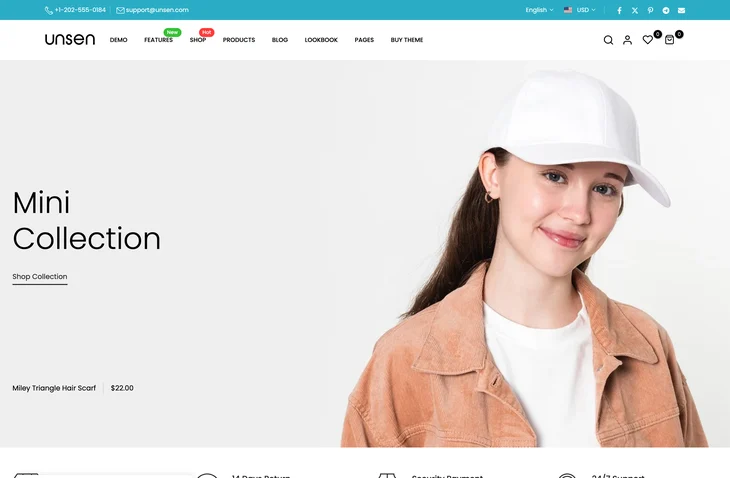
Unsen’s design is modern and dense, built to show a lot of product without feeling cluttered. The 40-plus demos lean commercial rather than minimal, with strong imagery, promo blocks and quick-shop layouts, so it fits stores that merchandise hard and want the storefront doing sales work. The presets give you a running start close to your niche.
The flip side is that all that structure expects content to fill it. On a lean catalogue the busier demos can feel like more than you need, and the cleaner presets are the better starting point. It rewards a store with range and photography to fill the layout.
Unsen Features That Matter
Most themes list dozens of features. These are the ones that change what you pay for elsewhere:
- Built-in swatches: colour and image swatches on product and collection pages, without a swatch app running alongside.
- AJAX filters: instant filtering by size, colour and price keeps a big catalogue browsable.
- Mobile bottom bar: an app-style navigation bar that keeps key actions in thumb reach on mobile.
- Cross-sell tools: frequently-bought-together and a cart slide push order value without a bundling app.
- Urgency add-ons: trust badges, countdowns and stock alerts are included rather than bolted on.
The honest limit is that built-in features rarely go as deep as a specialist app. A dedicated reviews or bundling tool will do more than Unsen’s version, so the saving is real but the ceiling is lower.
How Much Does Unsen Cost?
Unsen is a one-time ThemeForest purchase at $79, which is low for how much it packs in, and there is no monthly theme fee after that. What you are weighing is not just the price against other themes, but the price against the stack of apps the built-in features stand in for.
How to judge the price
The one-time cost is easy to justify if Unsen’s built-in swatches, filters, cross-sell and urgency tools replace apps you would otherwise pay for every month. Against that stack it pays back quickly. The part that is not in the sticker price is the model: ThemeForest support and updates come from the developer, not Shopify, so budget your own setup time and keep the licence and documentation handy.
Unsen Pros and Cons
Pros
- Bundles conversion features, swatches, filters, cross-sell, urgency, that stores usually rent as apps
- Low one-time price with no monthly theme fee
- Quick on real, live stores, not just on a demo
- More than 40 prebuilt demos to start close to your niche
- High buyer rating across thousands of sales
Cons
- ThemeForest licence with vendor support, not a Shopify-vetted Theme Store theme
- Built-in tools are handy but shallower than specialist apps
- Feature-dense demos are more than a small catalogue needs
- Setup, updates and support lean more on you and the developer
Who Should Use Unsen?
Unsen fits a store that wants a conversion-focused build and would rather pay once for the toolkit than rent it app by app. If you have the catalogue and photography to fill a busy layout, and you are comfortable owning setup and updates, the built-in swatches, filters and cross-sell carry real value for the price.
It is a weaker fit if you want Shopify’s own theme vetting and one-click updates, or if your catalogue is small. In that case a Theme Store theme is the safer path. For a large-catalogue Theme Store option, compare it with Warehouse, and for a conversion-first Theme Store theme, look at Impulse before you commit.
Is Unsen Worth It?
Our verdict
Good value for a store that wants conversion features built into the theme and is happy with the ThemeForest model. The one-time price makes sense when the built-in tools replace apps you would pay for monthly.
Unsen earns its place for the stores it is built for. The data supports the pitch: it is genuinely quick on real stores, its buyers rate it highly, and the feature set folds in tools that otherwise cost a monthly stack. Pay for it when you want that toolkit in one place and can own the upkeep, and it holds up as a conversion-focused build. Want to compare it with the rest of the field first? Our Shopify theme reviews guide lines up every theme we have tested.
-
Is Unsen on the Shopify Theme Store?
No. Unsen is sold on ThemeForest, not Shopify’s official Theme Store, and it is made by the developer The4. That means a one-time license and vendor-provided support and updates, rather than Shopify’s own theme review and one-click updates. It still installs on any Shopify store, but you take on more of the setup and upkeep yourself.
-
Who makes the Unsen Shopify theme?
Unsen is built by The4, a long-running theme developer on ThemeForest whose catalogue also includes Ecomus and Kalles. The4 focuses on multipurpose, conversion-oriented themes with large numbers of prebuilt demos. Because it is a The4 theme, Unsen shares the same feature-heavy approach and demo-driven setup as the rest of that developer’s range.
-
How much does the Unsen theme cost?
Unsen is a one-time ThemeForest purchase rather than a monthly subscription, and it is priced low for how many features it includes. There is no recurring theme fee after you buy it. The more useful way to judge the cost is against the apps its built-in tools replace, since that is where the one-time price tends to pay back. The current figure is on its listing and in our review.
-
Does Unsen slow down a Shopify store?
Our detection data shows most live Unsen stores pass Google’s Core Web Vitals, which is reassuring for a feature-heavy theme. A theme that bundles swatches, filters and cross-sell can add weight, so the field numbers from real stores matter more than a demo. After installing, check your own page speed once your apps and products are loaded, since your configuration is what shoppers actually experience.
-
Can Unsen replace conversion apps on a Shopify store?
Partly. Unsen builds in colour and image swatches, product filters, frequently-bought-together, a mobile bottom bar and urgency tools that stores often add as separate apps. For many stores that removes a monthly app or two. The trade-off is depth: a dedicated reviews or bundling app usually goes further than Unsen’s built-in version, so heavy users of one feature may still want the specialist tool.
-
Who should use the Unsen theme?
Unsen suits a store that wants a conversion-focused build and would rather pay once than rent features app by app, with the catalogue and photography to fill a busy layout. It is a weaker fit for a small catalogue, or for a merchant who wants Shopify’s own vetting and one-click updates. In those cases a Theme Store theme is the safer path.