Inova Shopify Theme Review 2026
Last modified: October 4, 2026

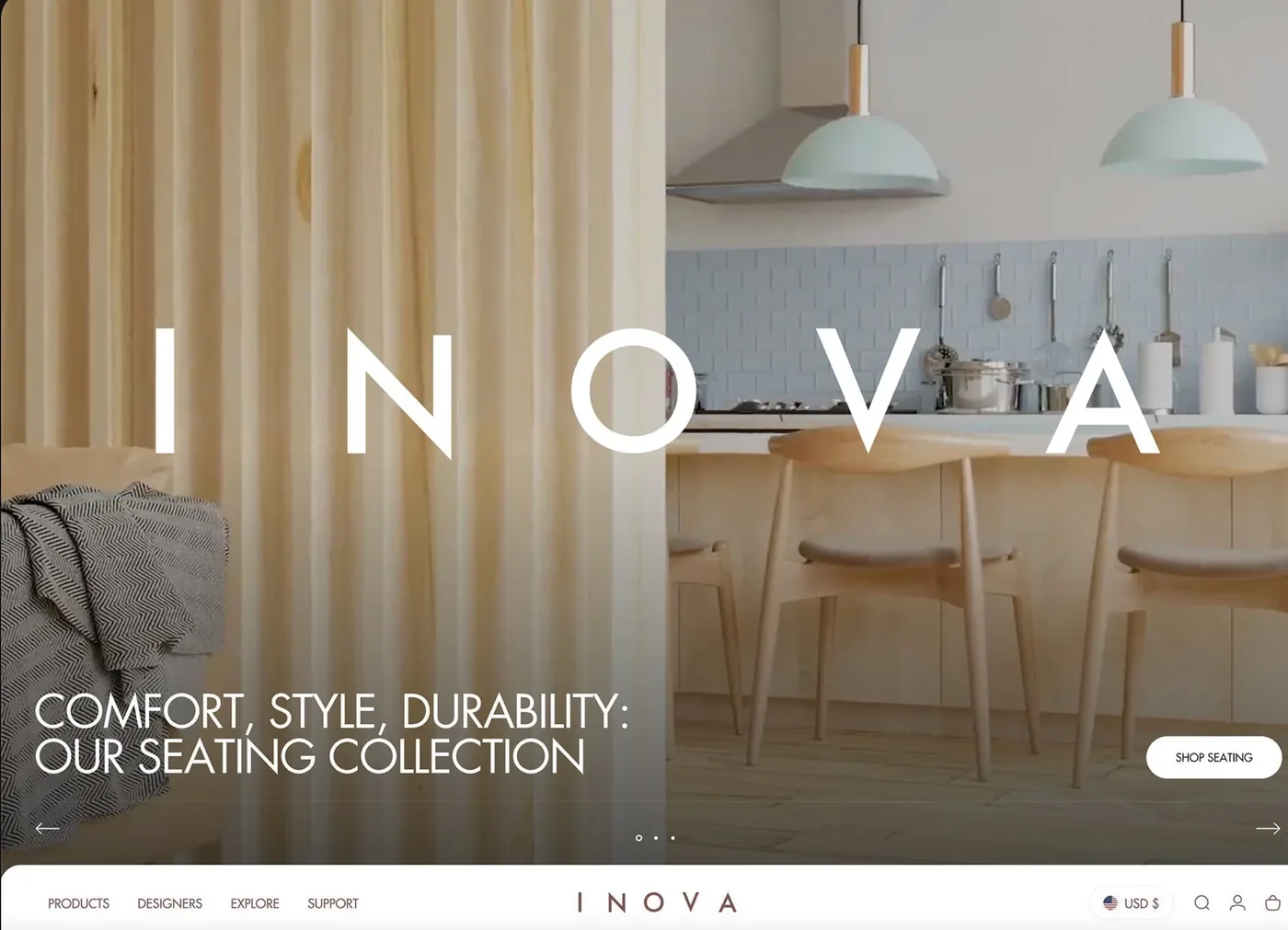
Inova is one of two design presets bundled with the Concept Shopify theme by RoarTheme, priced at $400 as a one-time purchase. It is a stripped-back, minimalist style built around generous whitespace, restrained typography, and product photography that carries most of the visual weight. Inova is the preset most buyers of Concept end up researching separately, because its design philosophy is different enough from the default Concept preset that the decision to use it is really about whether the aesthetic fits your brand.
This review focuses only on the Inova preset: the visual language, the layout defaults, real performance data from live stores, who the preset genuinely fits, and where it will hold you back. If you want a broader look at everything Concept ships with, the Concept theme review covers the full feature list.
What Is the Inova Preset?
Inova is a preset (also called a style) inside the Concept Shopify theme. RoarTheme sells Concept for $400 and includes two presets: Concept (the bolder, higher-density default) and Inova (the minimalist alternative). Both share the same underlying code, the same feature set, and the same 50+ Shopify OS 2.0 sections. The difference sits entirely in the visual defaults: typography scale, grid density, color palette, and the way each preset uses whitespace.
When you install Concept, you can toggle between the two presets from the theme editor. So if you buy Concept for the Inova look, you also get the default Concept preset as an option, and you can switch between them without buying a second license. Latest release as of writing is version 5.3.3 (May 2026), which focused on storefront performance and translation fixes.
View the Inova preset on the Shopify Theme Store
How Popular Is Concept (and Inova)?
Because Inova ships inside Concept rather than as a standalone theme, its adoption is the Concept theme’s. Based on our Shopify store dataset, the live figures below show how widely Concept is used and how that has trended.
Concept Usage Statistics
Concept, the theme Inova runs on, at a glance from our Shopify store dataset, refreshed daily.
Its adoption has held steady month to month rather than spiking, which the trend below tracks.
Concept has held steady at about 1.4% of Shopify stores in our dataset over recent months.
Who Is Inova Best For?
Inova is designed for brands where the aesthetic is calm, refined, and product-first. Concrete niches where the preset works well:
- Home decor and furniture. Inova’s showroom feel matches how furniture buyers browse: fewer items on screen, more room to appreciate the piece. RoarTheme’s own demo is furniture-inspired for this reason.
- Boutique fashion and accessories. Small-catalog fashion brands (under 200 SKUs) where photography is the differentiator get the most out of Inova. Larger catalogs suffer from the lower grid density.
- Skincare, wellness, and clean beauty. The whitespace-heavy layout matches the visual grammar of the category, and product pages give room for ingredient callouts without feeling cluttered.
- High-end electronics and design objects. Brands like HeyBike and Sharge run the Inova preset live because the layout treats each product as a hero.
- Baby, kids, and gift stores where the audience responds to calm, editorial-style photography over promotional urgency.
What Does Inova Actually Look Like?
Inova’s visual language is deliberately restrained. Product grids default to two columns on collection pages rather than three or four. Hero sections are quieter than the default Concept preset, with more of the image left unobscured and text placed to the side rather than overlaid. Typography runs a sharper, higher-contrast sans-serif with generous line spacing.
The color palette defaults to stark black, white, and neutral tones, which is what most people describe as the “showroom” look. Product pages give substantial space to imagery: gallery-first layouts, image zoom and rollover, and hotspots on lifestyle shots that link to individual products. Compared to the default Concept preset, Inova reads more like a design magazine and less like a storefront.
Every feature the default Concept preset offers is present in Inova: color swatches, size charts, sticky cart, quick buy, product videos, before/after sliders, and mega menu. Turning those on will not change the layout skeleton, so the minimalist frame stays intact even when you add merchandising elements.
Inova Speed and Core Web Vitals
Because both presets share the same code, the choice of preset does not meaningfully affect performance. Rather than quote a fixed number, the live data below shows how the Concept theme that Inova runs on performs on real-world Core Web Vitals across the stores running it.
| Theme | CWV pass rate | Few apps | Median LCP |
|---|---|---|---|
| Impulse | 78.3% | 85.7% | 1.6s |
| Concept | 75.8% | 83.6% | 1.5s |
| Dawn | 71.1% | 79.6% | 1.6s |
In practice it scores faster than most themes we track, and the callouts below put that speed and its adoption in context.
Concept Performance and Adoption
How Concept, the theme Inova runs on, compares across the Shopify stores in our dataset.
The caveat is real-world performance. Inova leans on full-bleed imagery, so the fastest way to drop your score is uploading unoptimized hero videos or 4MB product photos. RoarTheme’s 5.3.3 release notes explicitly flagged storefront performance improvements, so recent installs should be starting from a better baseline than earlier versions.
Practical rule for Inova: keep hero images under 300KB, use WebP for product photography, and avoid autoplay video above the fold. Do that and you will land in the low-to-mid 80s on mobile. Miss it and you can drop into the 40s, which is what happens on some live Inova stores that never optimized their assets.
Inova Pricing
The Concept theme, which includes both presets, is $400 as a one-time purchase from the Shopify Theme Store. There are no recurring license fees, and RoarTheme provides lifetime updates. The theme has been priced at this level since April 2025 following a modest increase. Free trial and preview are available before purchase, so you can test the Inova preset on your actual products without paying.
At $400, Inova sits alongside other premium Shopify themes like Prestige, Impact, and Palo Alto. The value calculation is straightforward: if you would otherwise pay a monthly fee for third-party apps to add the features Concept bundles (cart drawer, mega menu, quick view, cross-sell recommendations), the theme pays for itself in the first year.
Which Apps Concept Stores Run
Concept bundles a lot natively, from cart drawer to mega menu, but most stores still add a few apps. The live breakdown below shows the tools Concept stores most commonly install, a useful sense of what pairs well with the theme and its presets.
| Rank | App | % of stores | Category |
|---|---|---|---|
| 1 | Judge.me Product Reviews App | 43.2% | Product reviews |
| 2 | Klaviyo | 40.9% | Email Marketing |
| 3 | Loox ‑ Product Reviews App | 20.9% | Product reviews |
| 4 | Recharge | 14.4% | Subscriptions |
| 5 | Trustpilot | 10.1% | Marketing - Other |
| 6 | Yotpo | 9.8% | Product reviews |
| 7 | Triplewhale | 9.4% | Analytics |
| 8 | Shopify Inbox | 8.5% | Support - Other |
| 9 | PageFly ✦ AI Page Builder | 7.4% | Page builder |
| 10 | Rebuy Personalization Engine | 7.2% | Checkout - Other |
Inova Pros and Cons
Pros
- Two presets in one license, so you get both Inova and default Concept for $400 and can switch if your brand direction changes
- Solid mobile speed baseline as long as image discipline is maintained
- Shopify OS 2.0 sections mean no-code customization for most changes
- Built-in features (cart drawer, mega menu, quick buy, cross-sell) reduce app dependency
- Responsive support from RoarTheme via their ticket system, with review data pointing to fast response times
- Latest 5.3.3 release (May 2026) specifically improved performance and translations
Cons
- Requires strong product photography, since without it the layout looks bare rather than minimal
- Two-column default grid limits browsability for catalogs above 200 products
- Not built for flash-sale merchandising; promotional banners and countdown timers clash with the aesthetic
- $400 upfront is significant for early-stage stores; free themes like Dawn cover the basics until brand direction is set
- Support is via RoarTheme’s ticket system, not Shopify’s built-in support channel
Where Does Inova Fall Short?
Two failure modes come up repeatedly. First: catalog size. Inova’s two-column default grid is a deliberate choice for aesthetic impact, but it means every product needs to earn its screen space. Stores with 500+ SKUs end up either fighting the theme (forcing three or four columns and losing the visual language) or accepting that customers will scroll far to see the range. If you fall into the second category, a denser theme like Expanse or Impact is a better fit.
Second: promotional density. Inova is not a flash-sale theme. Countdown timers, urgent banners, and sticky “only 3 left” alerts look wrong against the minimalist frame. The theme has all those features available, but turning them on creates a visual contradiction between the calm layout and the aggressive merchandising. If discount-driven urgency is your positioning, Broadcast or Impact will serve you better.
Third, less common but worth noting: the theme rewards brands that already have a defined visual identity. If you are still figuring out photography style, brand colors, or product presentation, Inova will amplify whatever inconsistency exists. Themes that hide more behind graphic elements (Prestige, for example) are more forgiving during the early brand-building phase.
Inova vs the Default Concept Preset
The most useful comparison is between the two presets bundled in the Concept license. Same code, same features, different visual defaults:
- Grid density: Concept default is 3-column product grids, Inova is 2-column with more space between items
- Typography: Concept default uses warmer serif and sans pairings, Inova uses sharper high-contrast sans with more whitespace between lines
- Color palette: Concept default leans muted earth tones, Inova stays with stark black, white, and neutral
- Hero layout: Concept default is cinematic with centered text overlays, Inova is restrained with more image visible
- Overall feel: Concept default reads as premium editorial, Inova reads as luxury showroom
Because you get both presets in the same license, the practical answer is: pick whichever matches your brand today, and know you can switch if positioning changes. Full breakdown of both presets sits in the Concept theme review.
Alternatives to Inova
If Inova is close but not quite right, three themes are worth considering:
- Palo Alto: Similar minimalist aesthetic with West Coast design sensibility. Better for tech-forward and lifestyle brands where the minimalism should feel modern rather than luxury. Read the Palo Alto review.
- Prestige: Denser layout and more graphic support, still premium but more forgiving for brands still developing their photography. Read the Prestige review.
- Symmetry: Long-standing premium theme with a warmer, more editorial approach than Inova. Better for storytelling-heavy brands where copy carries some of the weight. Read the Symmetry review.
Inova also appears as one of our top picks in the Best Shopify Home Decor Themes roundup, alongside its niche siblings.
Should You Buy Inova?
Buy Concept for the Inova preset if your brand meets three tests. First, your product photography is already at a level where each shot can carry a page. Second, your catalog is under 300 products, or your top sellers are concentrated enough that browsability is not the priority. Third, your merchandising strategy does not depend on promotional urgency or flash sales.
If all three land, Inova gives you a $400 foundation that will look correct from launch and stay current across future updates. If any of the three miss, the theme will fight you rather than support you, and either the default Concept preset or a different theme entirely will serve you better.
View the Inova preset on the Shopify Theme Store
Conclusion
Inova is the preset for brands that already know what they look like. It is a specific design bet: minimalist grid, showroom typography, product photography as the hero. The $400 Concept license bundles it with the default Concept preset, so the downside risk of picking wrong is small. But making Inova work still requires the brand assets it assumes you have. Read the full Concept theme review for the broader feature set, or check Best Shopify Home Decor Themes if you are still comparing options in Inova’s core niche.
-
Is Inova a standalone Shopify theme?
No. Inova is a preset (visual style) of the Concept Shopify theme by RoarTheme. When you purchase Concept for $400, you get access to both the Inova preset and the default Concept preset in the same license and can switch between them from the theme editor.
-
How much does the Inova Shopify theme cost?
Inova costs $400 as part of the Concept theme purchase from the Shopify Theme Store. That is a one-time payment with lifetime updates from RoarTheme, and there are no recurring fees. The price rose 5% from $380 in April 2025 and has been stable since.
-
What kinds of stores does Inova work best for?
Inova is designed for boutique-scale stores in home decor, furniture, fashion, skincare, wellness, and high-end electronics. It suits brands with strong product photography and calm, showroom-style presentation. Larger catalogs (500+ SKUs) or flash-sale-driven stores are a poor match for the two-column, whitespace-heavy layout.
-
How fast is the Inova theme?
Inova’s real-world speed depends far more on how you build your store than on the theme itself. We measure themes on field Core Web Vitals, the pass rate among real Chrome users rather than a lab score, and most well-built Shopify themes cluster in the 70 to 80 percent range once apps and images are under control. Hero videos and unoptimized photos are the fastest way to push any theme below that. Keep images compressed and your app list lean and Inova performs well.
-
What is the difference between the Inova preset and the default Concept preset?
Inova is stark, minimalist, and showroom-style with two-column grids and generous whitespace. The default Concept preset is denser, warmer, and more editorial, using three-column grids and cinematic hero sections. Both presets share the same code and features. The difference sits in typography, color, and layout defaults.