Ride Shopify Theme Review 2026
Last modified: October 1, 2026

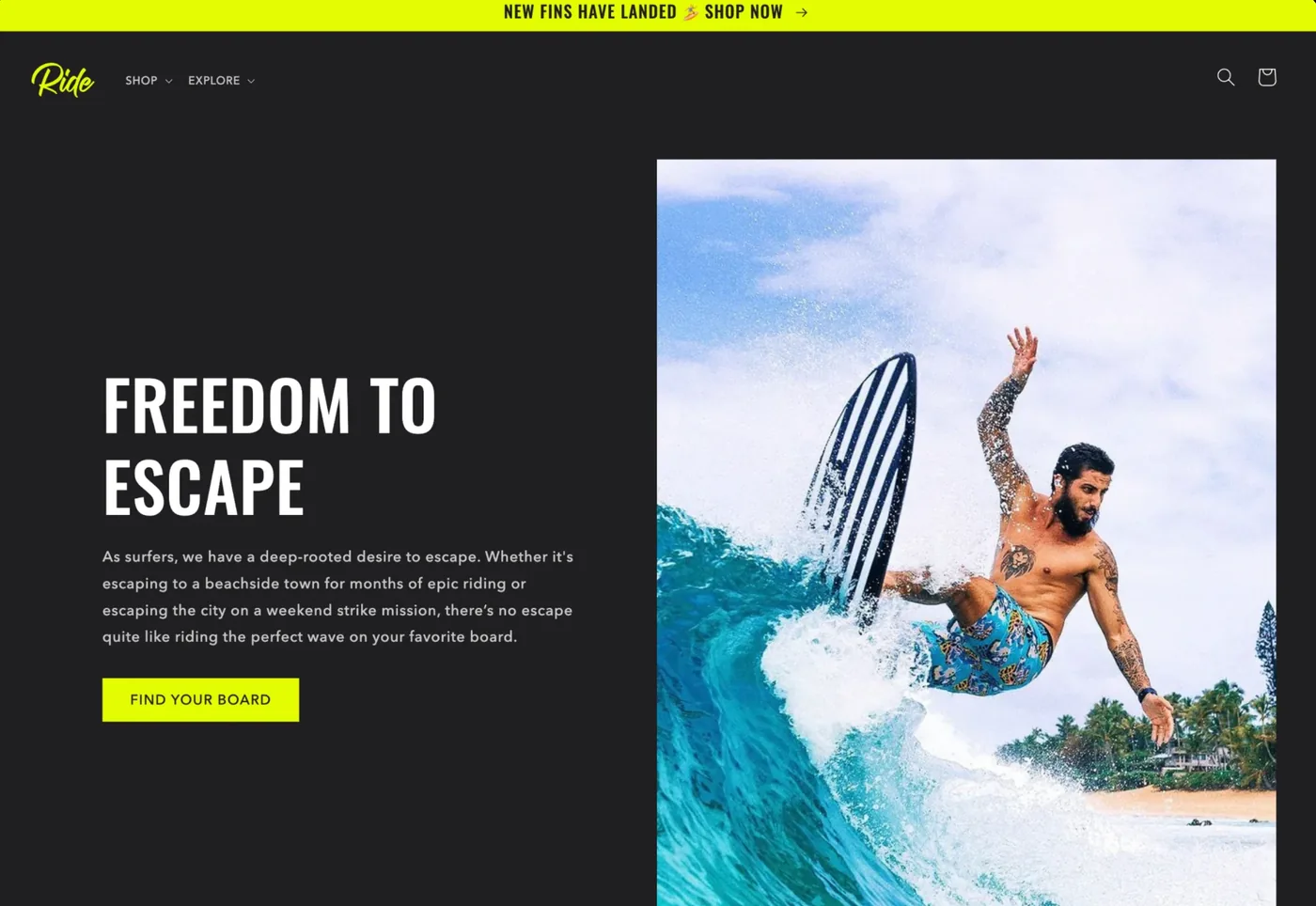
Ride is a free Shopify theme with the energy of the sports aisle. Dark backgrounds, bold type, and punchy accent colors give it a fast, athletic feel out of the box, and it ships with something most free themes do not: dedicated layouts for individual products and for teams. That makes it a natural home for a sports brand rather than a catch-all shop. The verdict upfront: Ride is a genuinely distinctive free pick for sporting goods, activewear, and sports-lifestyle stores, and the team layouts are a real bonus for clubs and merch stores. The catch is that reviews are mixed on a small sample, and the friction tends to land in two places: technical rough edges, and limited flexibility in how product listings are organized.
If you sell sports or athletic gear, want a bold, high-energy storefront without paying for a premium theme, and you are willing to plan your catalog structure carefully, Ride is worth a serious look. If you sell outside that lane or need deep control over how collections are laid out, it is a narrower fit. The sections below use live detection data to show exactly where it fits and what to plan for.
What is the Ride Shopify theme?
Ride is a free Online Store 2.0 theme published by Shopify, so updates arrive through the theme library with no third-party dependency. Where most free themes aim for general retail, Ride commits to a single mood: sport. Its dark, high-energy styling is built for athletic brands, and it ships with dedicated layouts for individual products and for teams, which is what sets it apart from a general-purpose free theme.
Because it is a first-party theme, Ride edits through the drag-and-drop customizer with no code required, and it works with the wide library of Online Store 2.0 tutorials and sections. What it does differently is lean into a niche and give a sports brand purpose-built tools, from product-focused pages to team merchandising layouts, rather than leaving all of that to apps. Here is where Ride sits across our dataset today.
How popular is Ride?
Ride is a smaller, specialist theme, and its share of the stores we scan each month has held steady rather than climbing. That is what you would expect from a theme built for one mood: it appeals strongly to the sports and athletic brands it targets and barely registers elsewhere, so it holds a small, focused niche rather than spreading across the platform.
Ride has held steady at about 0.2% of Shopify stores in our dataset over recent months.
Two numbers stand out about how Ride stores behave. Ride’s stores post strong real-world Core Web Vitals, and the stores running it lean on fewer apps than average. A lighter app stack is one of the biggest levers on real-world speed, so Ride stores tend to stay quick partly because their owners add less, and partly because the theme builds search, filtering, and merchandising in.
Ride design and layout
Ride’s design has a clear point of view. Dark backgrounds, bold type, and punchy accent colors give it a fast, athletic energy that reads as sport before a shopper processes a single product. For an activewear or gear brand, that mood does real work, because it signals the category instantly and frames action-led photography the way it deserves.
The dedicated product and team layouts are the standout, and getting them in a free theme is genuinely unusual. The product layouts give gear room to be inspected, and the team layouts open the door to club kits, league merch, and roster-style pages that a general theme simply cannot do out of the box. The trade-off is that the styling is narrow: Ride flatters sport and looks out of place on a soft, minimal, or luxury catalog, so it is a theme to choose for the mood, not to stretch across an unrelated brand.
Ride features
Ride’s practical tools back up the styling, with a feature set aimed at a deep sports catalog rather than generic retail.
- Product inspection: color swatches, image zoom, and video so shoppers can examine gear closely.
- Deep-catalog navigation: search, mega menus, and filtering to find the right size, model, or category fast.
- Merchandising room: blogs, product recommendations, and promotional banners for seasonal drops and team merch.
- Dedicated layouts: purpose-built product and team pages, the theme’s signature feature.
- Standard Online Store 2.0 sections and settings, so tutorials and help written for Shopify’s free themes apply directly.
What you do not get is deep control over how product listings are organized, which is one of the two friction points owners raise and the reason planning your catalog structure early matters, as covered below.
How fast is the Ride theme?
Speed is one of Ride’s clear strengths. The live card below shows its real-world Core Web Vitals from the Chrome UX Report across the stores running it, and Ride’s stores sit on the fast side of the themes we measure.
| Theme | CWV pass rate | Few apps | Median LCP |
|---|---|---|---|
| Ride | 84.5% | 85.7% | 1.4s |
| Impulse | 78.4% | 85.4% | 1.6s |
| Dawn | 71.2% | 79.9% | 1.6s |
Ride’s stores pass Core Web Vitals at a strong rate, which is a good sign for a theme aimed at browse-heavy sports catalogs. Either way, the usual rules apply: your own speed depends on how you use it, so compress your images, go easy on large media blocks, and keep the app stack lean to hold that advantage.
What kinds of stores use Ride?
Ride’s store base reflects its sporting focus. Apparel and accessories leads, with T-shirts a large group in their own right, and a notable share of vehicles and parts stores, which fits the theme’s ride-and-gear energy. Home and garden, health and beauty, and food and drink round out the mix, the latter often sports nutrition and supplements.
By business model, subscription stores are the largest identifiable group, which suits gear clubs and supplement refills, ahead of print on demand, dropshipping, and wholesale. It is a theme for brand-led sports and merch stores with a real catalog rather than tiny or general shops. For the full store-type and category breakdown, including how the mix shifts over time, see the live Ride usage statistics.
Which apps do Ride stores use?
The app stack on Ride stores is fairly lean and tilts toward tools that suit a sports brand. Reviews apps sit at the top, as they do for most young brands, with email marketing, subscriptions, and urgency tools close behind and a showing from print-on-demand for team and merch stores. Here is what we detect most often on live Ride stores.
| Rank | App | % of stores | Category |
|---|---|---|---|
| 1 | Judge.me Product Reviews App | 34.0% | Product reviews |
| 2 | Klaviyo | 17.2% | Email Marketing |
| 3 | Loox ‑ Product Reviews App | 16.8% | Product reviews |
| 4 | Recharge | 11.6% | Subscriptions |
| 5 | Shopify Inbox | 10.9% | Support - Other |
| 6 | PageFly ✦ AI Page Builder | 7.6% | Page builder |
| 7 | Printful: Print on Demand | 5.9% | Print on demand (POD) |
| 8 | Omnisend Email Marketing & SMS | 4.6% | Email Marketing |
| 9 | Reconvert | 3.6% | Upsell and cross-sell |
| 10 | Yotpo | 3.6% | Product reviews |
The pattern fits an athletic brand: product reviews for credibility, email and countdown timers to drive seasonal drops, and subscriptions for gear clubs and supplement refills. Print on demand shows up more than on most themes, which tracks with the team-merch use case the layouts are built for. Because Ride builds search, filtering, and merchandising into the theme, owners reach for fewer add-ons than they would on a barer free theme.
How much does Ride cost?
Ride is free. It is made by Shopify and installed straight from the Shopify Theme Store, with no license fee and no separate cost for updates. There is no paid tier for the theme itself. Your real costs are the apps you add and the Shopify plan you run your store on, not the theme.
What are Ride’s weak points, and how do you plan around them?
Ride’s Theme Store rating is mixed, and it sits on a small review sample, so it is worth reading the specific criticism rather than the number alone. The complaints cluster in two places, and both are manageable if you know about them going in.
The first is technical rough edges, the kind of small bugs and quirks that show up on a newer, niche theme with a smaller user base finding and reporting them. The second, and the more structural one, is flexibility in how product listings are organized. Some owners want more control over how collections, categories, and product groupings are laid out than Ride gives them, which matters most for a deep sports catalog with many sizes and models.
The practical response is to plan before you build. Decide how your products, sizes, and categories should be organized up front, so you are designing around Ride’s structure rather than fighting it later. Then test your key collection and product pages early, so the listing limits do not surprise you after you have built the store. Handle it that way and Ride’s quirks stay manageable; leave the structure to chance and they are what the mixed reviews describe.
Who should use Ride?
Ride is a strong free choice for a specific kind of store. Reach for it if you sell sporting goods, activewear, or sports-lifestyle products, want a bold, dark, high-energy storefront, and have confident, action-led photography to match. The team layouts make it an especially good fit for clubs, leagues, and merch stores that a general theme cannot serve out of the box.
Pass on Ride if you sell outside the sports lane, need a soft, minimal, or luxury look, or require deep control over how your collections and listings are structured. In those cases a general-purpose or more flexible theme will serve you better. If you do choose Ride, lean into the athletic styling and team layouts, and settle your catalog structure before you build, not after.
Ride also features in our roundups of the best surf shop themes and free Shopify themes.
-
Is the Ride Shopify theme free?
Yes. Ride is a free Online Store 2.0 theme made by Shopify and installed from the Shopify Theme Store. There is no license fee and no charge for updates. Your only real costs are the apps you add and your Shopify plan, not the theme itself.
-
What is the Ride Shopify theme best for?
Ride is built for sports and athletic brands. It suits sporting goods, activewear, and sports-lifestyle stores with a moderate catalog and confident, action-led photography. Its dark, high-energy styling and dedicated team layouts make it a strong fit for clubs, leagues, and merch stores, and a weak fit for soft, minimal, or luxury brands.
-
Does Ride have team layouts?
Yes, and they are its signature feature. Ride ships with dedicated layouts for both individual products and teams, which is unusual in a free theme. The team layouts suit club kits, league merch, and roster-style pages that a general-purpose theme cannot produce out of the box, which is a big part of why sports brands choose it.
-
What are Ride’s main weaknesses?
Ride’s reviews are mixed on a small sample, and the criticism lands in two places. Some owners hit technical rough edges typical of a newer niche theme, and others want more flexibility in how product listings are organized. The fix is to plan your collection and category structure before you build, then test your key pages early.
-
Is Ride a fast Shopify theme?
Yes. Ride tests faster on Google PageSpeed than most themes we measure, so speed is one of its strengths. Because it is a smaller theme, there is not yet enough field data for a stable real-world Core Web Vitals reading, so the lab score is the best signal. Compress your images and keep the app stack lean to hold that advantage.
-
What types of stores use the Ride theme?
Ride skews to apparel and accessories, with T-shirts a large group and a notable share of vehicles and parts stores, which fits its sporting energy. By business model, subscription brands are the largest identifiable group, suiting gear clubs and supplement refills. It suits sports and merch stores more than general retail. You can see the full breakdown on the live Ride statistics page.
Is Ride worth installing?
For a sports or athletic brand, yes, with a little planning. Ride gives an athletic store a bold, high-energy look for nothing, tests fast, and hands you dedicated product and team layouts that most free themes cannot match. The mixed reviews are worth taking seriously, but they point at technical rough edges and listing flexibility rather than the core design, so the deciding factor is whether you sort out your catalog structure before you build. Do that, and Ride is a distinctive free bargain for the right brand. For the wider picture across Shopify’s free and paid themes, see our guide to Shopify theme reviews. And any time you spot a sports store you admire, you can scan it to see whether it runs Ride and which apps it pairs with.