Essential Countdown Timer Review: Do Timers Work? 2026
Last modified: August 31, 2026
Essential Countdown Timer Bar is a Shopify app that puts a ticking clock on your store, on a top announcement bar, a product page, or the cart, so shoppers can see how long a price, a drop, or a sale has left. Made by Essential Apps, it is one of the most-installed countdown tools on the platform, and it stands out for two reasons: it has a free plan, and it holds a rare 5.0 rating across more than 1,500 reviews on the Shopify App Store. The verdict upfront: on a genuine deadline, a countdown is a cheap and effective way to nudge an on-the-fence shopper into buying now, and a free, heavily reviewed app like this is an easy way to add one. The honest catch is that urgency only works when it is real. A timer pointed at a fake deadline erodes trust the moment a shopper notices, so this is a tactic to use with discipline, not a switch to leave on.
Countdown timers are a crowded category on Shopify, with many near-identical apps, so how you use one matters more than which you install. Essential Countdown Timer earns its place by being free to start and simple to run across the main spots a timer belongs. The sections below use live detection data to show how widely countdown timers are used, what this app does, whether timers actually work, and where they backfire.
What is Essential Countdown Timer?
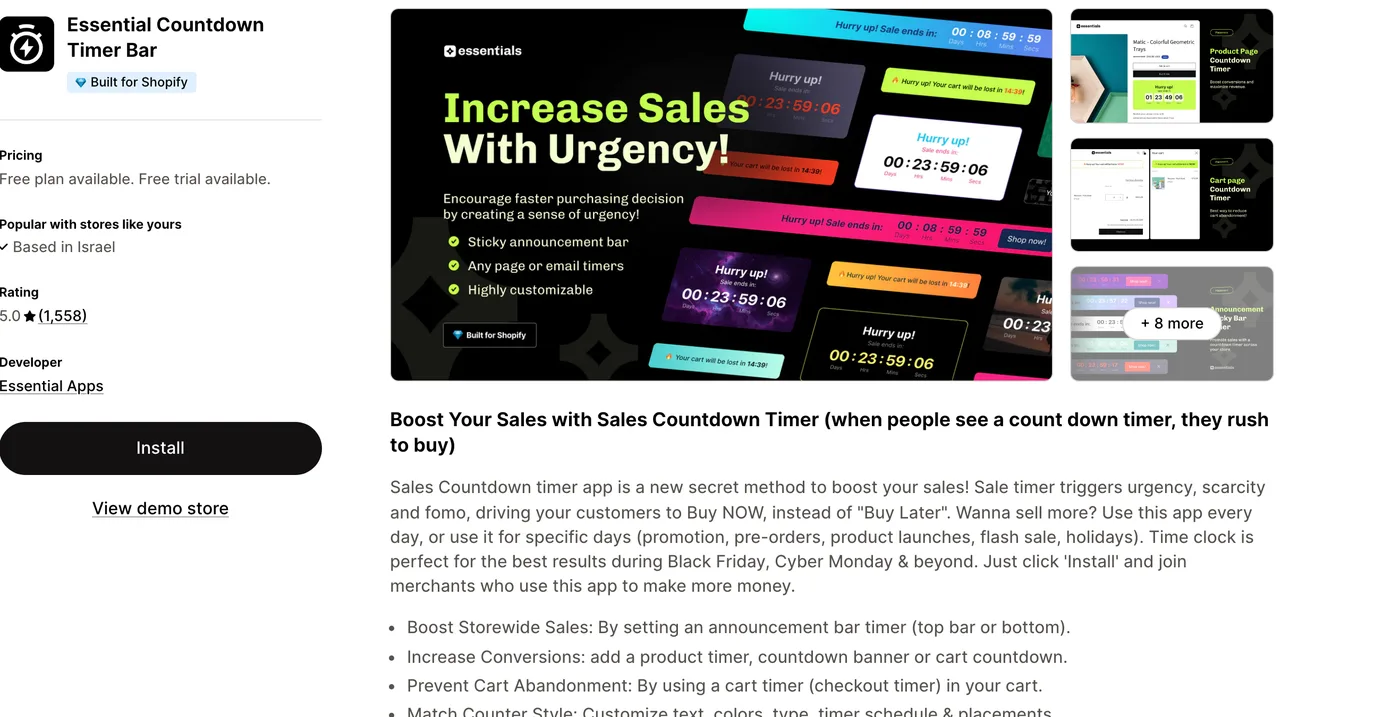
Essential Countdown Timer Bar is a countdown app built by Essential Apps. It shows a countdown clock in the places that create urgency: a sticky bar across the top of your store, a timer on the product page next to the add-to-cart button, and a cart timer that suggests a reservation is about to expire. You can schedule each timer to start and stop on its own, style it to match your theme, and run it store-wide or only for a specific sale. It has a free plan, with paid features from a low monthly price, and a 5.0 rating across more than 1,500 reviews. It is built for flash sales, product launches, and peak events like Black Friday. Here is how widely we detect countdown timers like it across our dataset.
How popular are countdown timers?
Countdown timers are everywhere on Shopify. Live detection puts this kind of app among the most-installed of any category, and it ranks near the top of conversion tools, used far more than the next one in line. That ubiquity is a signal in itself: urgency is one of the most reached-for conversion levers on the platform, especially among stores built to sell on promotions.
One trend is worth flagging. The share of stores running a countdown timer each month has dipped slightly rather than grown, which lines up with a broader shift away from aggressive urgency tactics as shoppers grow wise to them. Timers remain hugely popular, but the direction hints that heavy-handed countdowns are losing some of their shine.
Countdown Timer has slipped from 16.6% to 15.5% of Shopify stores in our dataset over recent months.
What does a countdown timer do?
A countdown timer creates a deadline and makes it visible. In practice that takes a few forms: a product-page timer counting down a flash price, a top-of-site banner for a store-wide sale, a cart timer suggesting a reservation will expire, or a launch clock ticking toward a drop. Essential Countdown Timer covers all of these, and most timer apps let you style the clock to match your theme and schedule it to start and stop on its own.
The mechanism behind it is loss aversion. People are more motivated to avoid missing out than to gain something equivalent, so a visible clock reframes a purchase as a chance about to disappear. That is genuinely effective when the deadline is real, which is the whole game with urgency: the tool is only as honest, and as persuasive over time, as the scarcity it displays.
Do countdown timers actually work?
Yes, on a real deadline. When a sale genuinely ends at midnight or a drop is truly limited, a countdown gives an undecided shopper the last nudge to commit, and because apps like this one are free or cheap, the return on a well-run promotion is easy to justify. This is why conversion-led stores keep a timer installed and switch it on for every genuine event.
Where it stops working is repetition without truth. A shopper who sees the same offer ending soon on every visit learns the deadline is theatre, and once that happens the timer does worse than nothing: it signals that your store cries wolf. The evidence for urgency is strong when the scarcity is real and weak to negative when it is manufactured, so treat any timer as an amplifier for genuine promotions, not a permanent fixture.
The fake-urgency trap
The most common mistake with a countdown timer is pointing it at a deadline that does not exist. A timer that resets to the same number on every page load, or an offer that has been ending soon for six months, is the classic tell, and modern shoppers spot it quickly. The short-term bump is real, but so is the longer-term cost: once a customer catches the trick, they discount not just the timer but your prices and claims generally.
Keep the deadline real
The fix is discipline, not a different app. Run timers only on promotions that truly end, let them expire and stay expired, and match the on-site urgency to the reality in your emails and ads. Used that way, a countdown is a fair nudge that respects the shopper. Used to fake scarcity, it is a trust problem you are paying to create.
What makes Essential Countdown Timer stand out?
In a category full of look-alike apps, a few things set Essential Countdown Timer apart. The first is price: a genuine free plan, so you can add a basic sale timer without paying, then upgrade from a low monthly price if you need the advanced placements. The second is its review record, a 5.0 rating across more than 1,500 reviews, which is unusually high and consistent for a timer app. The third is coverage: it handles the three placements that matter, the announcement bar, the product page, and the cart, with scheduling and styling built in. None of that changes the golden rule, that a timer only works on a real deadline, but it makes this one a low-risk way to add urgency the honest way.
What Essential Countdown Timer costs
Essential Countdown Timer Bar has a free plan that covers a basic sale or launch timer, plus a free trial on its paid features for the advanced placements and scheduling. Its pricing is , with a low monthly entry for the paid tiers. For most stores the free tier is enough to run a genuine sale countdown, and you only pay when you need more. That low entry price is a big part of why it is so widely installed.
Which themes and apps run with countdown timers?
Because we detect both themes and apps, we can see the company a countdown timer keeps, and it is revealing. Its single most common theme is not the default Dawn but Shrine PRO, a conversion-built theme, which is a strong tell about who installs urgency tools: stores designed to sell hard. Here are the themes most commonly running a countdown timer.
| Rank | Theme | % of stores |
|---|---|---|
| 1 | Shrine PRO | 16.9% |
| 2 | Dawn | 10.1% |
| 3 | Prestige | 5.0% |
| 4 | Horizon | 3.4% |
| 5 | Impulse | 3.0% |
| 6 | Impact | 2.9% |
| 7 | Eurus | 2.4% |
| 8 | Release | 1.8% |
| 9 | Minimog OS 2.0 | 1.8% |
| 10 | Glozin | 1.7% |
On the app side, a countdown timer sits inside a full conversion-and-retention stack. Most stores running one also run a major email platform and one or more reviews apps, and many run subscriptions and bundles too, so they carry heavier app stacks than the average store. That company confirms the profile: this is a tool for stores actively working their conversion rate. For the full breakdown of themes, paired apps, and store types, see the live countdown timer usage statistics.
Essential Countdown Timer pros and cons
Pros
- A genuine free plan, so you can add a sale timer at no cost
- A rare 5.0 rating across more than 1,500 App Store reviews
- Covers the announcement bar, product page, and cart
- Scheduling and theme styling built in
Cons
- Only useful if your store runs genuine deadlines
- Countdown timers are a crowded, look-alike category
- Advanced placements need the paid tier
- Results depend entirely on honest use
Who should use Essential Countdown Timer?
Reach for Essential Countdown Timer if your store runs genuine promotions, flash sales, product drops, or limited offers, and you want a fair last nudge to move shoppers before a real deadline. It is a strong first pick because the free plan lets you test the idea at no cost, and if it works for you the paid tier is inexpensive. As with any timer, the decision is less about which of the many near-identical apps you choose and more about using it honestly.
Skip it, or use it sparingly, if your store has steady everyday pricing and rarely runs a true deadline. Installing a timer just to have one leads straight to the fake-urgency trap, and the trust cost is not worth the short-lived bump. A countdown is a way to amplify real scarcity, so if you do not have any, the tool has nothing honest to do.
-
Do countdown timers increase sales?
On a genuine deadline, yes. A visible clock uses loss aversion to nudge an undecided shopper to buy before a real sale or drop ends, and because most timer apps are cheap or free, the return on a well-run promotion is easy to justify. The effect weakens or reverses when the deadline is fake, so the lift depends on the urgency being real.
-
Is Essential Countdown Timer free?
Yes. Essential Countdown Timer Bar has a free plan, plus a free trial on its paid features, which start at a low monthly price. That free tier covers a basic sale or launch timer for most stores, and you only pay if you need the advanced placements and scheduling. The low entry price is a big reason it is so widely installed.
-
Is fake urgency bad for my store?
Yes. A timer that resets on every visit, or an offer that is always ending but never does, gets spotted by modern shoppers and erodes trust in your prices and claims generally. The short-term bump is real, but the longer-term cost to credibility is worse. Only run timers on promotions that genuinely end.
-
Is Essential Countdown Timer any good?
It is one of the better-reviewed options in a crowded category, holding a rare 5.0 rating across more than 1,500 reviews on the Shopify App Store. Made by Essential Apps, it covers the main placements, an announcement bar, product pages, and the cart, and it is free to start. As with any timer, the results depend on pointing it at a real deadline rather than a fake one.
-
Which stores use countdown timers most?
Conversion-focused stores that sell on promotions. Apparel and accessories leads, followed by health and beauty and similar categories where sales, drops, and limited editions are routine. In our data these stores run heavier app stacks and favor sell-hard themes, with Shrine PRO the single most common theme running a countdown timer.
-
Do countdown timers hurt SEO?
Not directly. A countdown timer does not harm your search rankings on its own, though a poorly built one that loads heavy scripts can slow your pages, which speed-sensitive rankings do care about. The bigger risk is to trust rather than SEO: fake urgency damages credibility with shoppers, which matters more to conversions than to search.
Is Essential Countdown Timer worth it?
For a store that runs real promotions, yes. Essential Countdown Timer Bar is free to start, unusually well reviewed at 5.0 across more than 1,500 ratings, and it covers the placements that matter, from the announcement bar to the cart. The data shows how mainstream countdown timers have become: they are one of the most-used conversion tools on Shopify, most at home on sell-hard themes like Shrine PRO. The catch is entirely in the using: point a timer at a fake deadline and it erodes the trust it is meant to build, which is why adoption has softened as shoppers wise up. Treat it as an amplifier for real scarcity, not a permanent fixture, and it earns its keep. To weigh it against the alternatives, see our roundup of Shopify countdown timer apps, or browse our wider guide to the best Shopify apps. And any time you spot a store running a slick sale countdown, you can scan it to see which timer it uses and what theme and apps it pairs with.