Minion Shopify Theme Review 2026
Last modified: October 7, 2026
Minion is a paid multipurpose theme sold on the Shopify Theme Store by the developer Softali, licensed once and shipped with five preset designs that each target a different kind of store. The question most owners actually have is whether a paid multipurpose theme earns its place over a free option like Dawn, and the honest answer from our live detection data is that it comes down to how much you care about page speed. Minion gives you flexibility and a one-time price, but on real storefronts its Core Web Vitals trail the faster themes merchants reach for most.
We detect Minion on a small slice of live Shopify stores, and the ones running it tend to be established shops with large catalogs rather than lean new brands. That profile shapes the verdict below: Minion is a reasonable pick if you want several layout starting points from a single license and you are willing to do some speed tuning, and a weaker pick if out-of-the-box performance is your priority.
View Minion on the Shopify Theme Store
What is the Minion theme?
Minion is a multipurpose Shopify theme from Softali, available on the Shopify Theme Store for a one-time price of $100. “Multipurpose” is the key word: instead of one fixed look, it ships five preset designs (named devices, domestic, furry, looks, and minion) so a single license covers several store styles. That suits an owner who wants options without buying a new theme for each idea.
It currently holds a 82% positive rating across 33 Theme Store reviews. That is a modest review count, so the score reflects a smaller pool of feedback than you get from the headline themes, and it is worth reading those reviews before you commit rather than treating the number as settled.
How many stores run Minion?
Across our live detection dataset, Minion appears on 0.1% of Shopify stores, and the stores that do run it carry more apps than the typical store.
The app-heavy pattern is the tell. Stores on Minion are not usually fresh single-product launches; they look like longer-running shops that have accumulated inventory and tooling over time. If you are early and lean, that is a mismatch worth noting before you buy.
Is Minion gaining ground?
Adoption has held steady at a small share over recent months rather than climbing, which matches a paid multipurpose theme with a loyal but limited following rather than a breakout.
Minion has held steady at about <0.1% of Shopify stores in our dataset over recent months.
A small, flat share has a practical consequence for you: fewer stores running Minion means the compatibility path with popular apps is less well trodden, so expect to test third-party apps yourself rather than assume someone has already hit the same combination.
How fast is Minion?
This is where Minion needs scrutiny. We measure theme speed from the Chrome UX Report, which is real-world Core Web Vitals from actual shoppers, not a lab score. On all real Minion stores, 61.8% pass Core Web Vitals. The table below lines Minion up against the free Dawn and the popular Impulse on the same field data.
| Theme | CWV pass rate | Few apps | Median LCP |
|---|---|---|---|
| Impulse | 78.4% | 85.4% | 1.6s |
| Dawn | 71.1% | 79.7% | 1.6s |
| Minion | 61.8% | 77.8% | 1.9s |
Two things stand out. Minion sits behind both comparison themes on the all-stores pass rate, and the gap narrows but does not close when you isolate lightly-loaded stores (the “few apps” column), which tells you some of the slowdown is the stores piling on apps and some is the theme itself. If you install Minion, budget time for image compression, trimming apps, and testing your real pages, because the theme will not hand you a passing score for free.
Minion design and layout
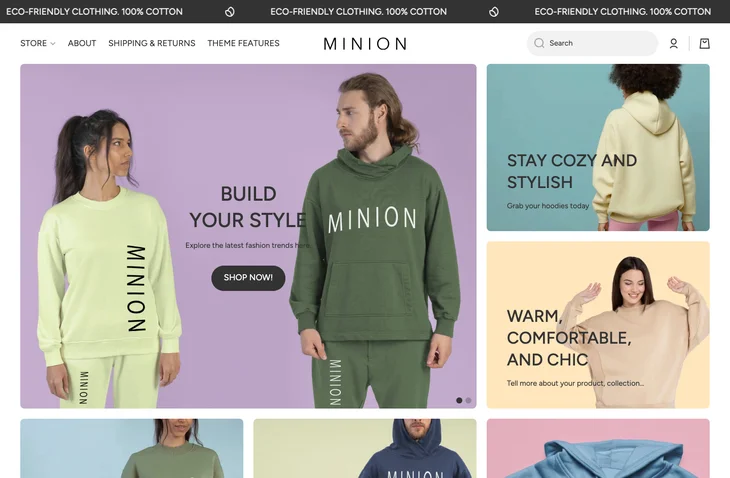
Each of the five presets gives you a different front door. The default “looks” style leads with a clean hero and a product grid, while the others lean toward device, home-goods, and pet or lifestyle catalogs. All of them are built on the same underlying theme, so once you pick a preset you are customizing layout sections, colors, and typography through the standard Shopify theme editor rather than touching code.
In practice the flexibility is real but it is template flexibility, not a page builder. You get sensible section options for home, collection, and product pages, and you will reach for a dedicated page-builder app if you want pixel-level landing pages. For a store that wants a solid, conventional storefront with room to restyle, the preset library is the main draw.
Which apps do Minion stores run?
Because we detect themes and apps together, we can see what Minion stores actually install. The mix leans toward reviews, email, and subscriptions, which again points at established shops rather than first launches.
| Rank | App | % of stores | Category |
|---|---|---|---|
| 1 | Judge.me Product Reviews App | 41.3% | Product reviews |
| 2 | Klaviyo | 26.1% | Email Marketing |
| 3 | Recharge | 23.9% | Subscriptions |
| 4 | Loox ‑ Product Reviews App | 22.8% | Product reviews |
| 5 | Yotpo | 13.0% | Product reviews |
| 6 | PageFly ✦ AI Page Builder | 10.9% | Page builder |
| 7 | Rebuy Personalization Engine | 9.8% | Checkout - Other |
| 8 | Triplewhale | 8.7% | Analytics |
| 9 | Hulk Form Builder | 7.6% | Forms |
| 10 | Instafeed ‑ Instagram Feed | 6.5% | Marketing - Other |
If you are planning your own stack, treat this as a compatibility shortlist: these are the apps other Minion owners have already run alongside the theme, so they are the safer bets to layer on first.
Minion features
A five-preset multipurpose base
The headline feature is breadth. One license gives you five starting layouts, so you can restyle toward a new catalog without repurchasing. That is the core reason to choose a multipurpose theme over a single-look one.
Standard Shopify section editing
Minion is built around the native theme editor, so home, collection, and product pages are assembled from drag-and-reorder sections with live preview. There is no separate learning curve beyond Shopify’s own customizer.
Merchandising and product display
The presets include conventional product-grid, collection, and product-page layouts suited to mid-size and larger catalogs, which fits the large-catalog profile we see on Minion stores.
Minion pricing
Minion costs $100 as a one-time Shopify Theme Store purchase, with no recurring theme fee. Because the price buys all five presets, the per-look cost is low if you genuinely use more than one style. Weigh that against free options like Dawn: if a single clean layout covers your needs, the free route plus your own section work may get you there without the spend, and with a higher starting Core Web Vitals pass rate.
Minion pros and cons
Pros
- One-time price covers five preset designs from a single license
- Built on Shopify’s native section editor, so no separate builder to learn
- Suits established, large-catalog stores that want to restyle without repurchasing
- Backed by Theme Store listing, updates, and reviews
Cons
- Real-world Core Web Vitals trail faster themes like Dawn and Impulse
- Small adoption means a less-tested path with third-party apps
- Modest review count compared with headline themes
- A paid multipurpose theme is overkill if you only need one simple layout
Who should use Minion?
Minion fits an established store with a large catalog that wants several layout options from one paid license and is prepared to do its own speed tuning. If that is you, the preset library is a genuine convenience. If you are launching lean, or performance out of the box is your priority, compare it against faster options first. For a theme that posts a much stronger real-world Core Web Vitals pass rate, see our Woodstock theme review, and for another current Theme Store option in a similar vein, our Essence theme review.
Our verdict on Minion
Minion is a competent, flexible multipurpose theme that is held back by one real weakness: speed. The five-preset license is good value if you use more than one look, and the theme behaves predictably in the standard editor. But the live Core Web Vitals data is the honest headline, and it says Minion asks more performance work of you than the faster themes do. Choose it for flexibility on an established catalog, not for out-of-the-box speed. You can confirm the current figures any time on our Minion usage statistics page, and browse more teardowns in our Shopify theme reviews guide.
-
Is Minion a free Shopify theme?
No. Minion is a paid Shopify Theme Store theme from Softali, priced at a one-time fee. The price covers all five of its preset designs, so there is no recurring theme charge, but it is not a free option like Dawn.
-
Who makes the Minion Shopify theme?
Minion is developed by Softali and sold through the official Shopify Theme Store. It is a multipurpose theme, meaning it ships several preset layouts under one license rather than a single fixed design.
-
Is Minion fast on Core Web Vitals?
Minion’s real-world pass rate sits below faster themes like Dawn and Impulse in our Chrome UX Report data. It can be tuned to perform better by compressing images and trimming apps, but it does not lead on speed out of the box.
-
How many preset designs does Minion include?
Minion ships five presets (devices, domestic, furry, looks, and minion), each a different starting layout built on the same theme. You switch and then customize through Shopify’s standard theme editor.
-
What kind of store is Minion a good fit for?
Our detection data shows Minion stores tend to be established shops with large catalogs and more apps than average. It suits an owner who wants multiple layout options from one license, rather than a lean new single-product brand.
-
Can I see how many stores use Minion?
Yes. Our Minion usage statistics page tracks its live adoption share, the apps commonly installed alongside it, and its Core Web Vitals, all refreshed from ongoing store scans.