Woodstock Shopify Theme Review 2026
Last modified: September 30, 2026

Woodstock is a paid Shopify theme from Boostheme, sold on the official Theme Store as a general-purpose framework rather than a theme built for one industry. It ships with three ready-made presets, so a merchant picks the starting design that fits their category, then customizes typography, colors, and sections to finish it. On the Shopify Theme Store it holds a 97% positive rating from 62 reviews, a strong signal for a theme this far outside the household names.
The verdict upfront: Woodstock is a middle-of-the-market pick that competes on real-world speed and a one-time price rather than brand recognition. Its Core Web Vitals hold up against far better-known premium themes, which is its strongest argument. The catch is a small merchant footprint, so you get a fast, capable theme but a thin community, few third-party tutorials, and little live-store reference to learn from.
What Is the Woodstock Shopify Theme?
Woodstock is a premium theme sold on the Shopify Theme Store by Boostheme, a smaller theme developer. It is a general-purpose build aimed at stores that want an official, paid theme without paying a top-tier rate. The demo leans toward electronics and gadgets, but the section library and presets are broad enough for apparel, accessories, and general retail.
You buy Woodstock once and own it, with no monthly fee, and the price covers ongoing updates and developer support. Because Boostheme is a smaller vendor rather than a household name, that support comes from a lean team, which suits merchants who are comfortable installing, testing, and configuring the theme themselves. The upside is an official Theme Store product with a real update stream at a mid-market price.
View Woodstock on the Shopify Theme Store
What Apps Do Woodstock Merchants Run?
Because ShopThemeDetector scans live stores, we can see the apps Woodstock merchants actually install, not the ones a feature list suggests. The pattern says a lot about who picks this theme.
| Rank | App | % of stores | Category |
|---|---|---|---|
| 1 | Judge.me Product Reviews App | 44.6% | Product reviews |
| 2 | Klaviyo | 35.3% | Email Marketing |
| 3 | Loox ‑ Product Reviews App | 28.1% | Product reviews |
| 4 | Recharge | 18.7% | Subscriptions |
| 5 | Trustpilot | 15.8% | Marketing - Other |
| 6 | PageFly ✦ AI Page Builder | 13.0% | Page builder |
| 7 | Simprosys Google Shopping Feed | 9.4% | Marketplaces |
| 8 | Yotpo | 8.6% | Product reviews |
| 9 | Rebuy Personalization Engine | 7.9% | Checkout - Other |
| 10 | Lucky Orange Heatmaps & Replay | 6.5% | Analytics |
Reviews and email lead, with Judge.me and Loox for social proof and Klaviyo for lifecycle email, and subscriptions show up further down. Woodstock stores also tend to carry more apps than the typical store, which fits a general-purpose theme used by merchants who bolt on the features a vertical-specific theme might include out of the box. If you already plan to run a full app stack, Woodstock gives you a fast base to build it on.
Woodstock by the Numbers
Adoption is the honest part of any theme review, and Woodstock is not a mass-market default. Our live detection data shows where it sits.
A small share of the 3.5M+ Shopify stores we track run Woodstock, and the stores that do carry more apps than average. That profile fits a general-purpose theme that merchants extend with apps rather than a niche build with everything baked in. The low share is the real trade-off here: fewer peers means fewer tutorials and fewer live stores to reference when you are configuring your own.
Is Woodstock Gaining Ground?
A theme’s direction matters as much as its current share, so here is how Woodstock’s footprint has moved month over month.
Woodstock has held steady at about 0.1% of Shopify stores in our dataset over recent months.
Woodstock has held a roughly steady share of the stores we scan in recent months. It is not surging, but it is not being abandoned either, which for a smaller paid theme signals a stable base of merchants who bought it and kept it rather than a fad install that gets swapped out quickly.
How Fast Is the Woodstock Theme?
Speed here is real-world Core Web Vitals from Chrome’s field data across live Woodstock stores, not a lab score from one test page. It reflects the theme and the kind of stores running it, and it is Woodstock’s strongest card.
| Theme | CWV pass rate | Few apps | Median LCP |
|---|---|---|---|
| Prestige | 78.6% | 85.1% | 1.6s |
| Impulse | 78.3% | 85.6% | 1.6s |
| Woodstock | 76.5% | 77.4% | 1.6s |
Woodstock’s field results sit right alongside far better-known premium themes, and the median largest-contentful-paint lands inside Google’s good range. That is a genuine selling point: a mid-market theme keeping pace with the household names on the metric Google actually ranks. Your own result will still depend on image sizes and how many apps you add, and since Woodstock stores tend to run heavier app stacks, keeping that stack lean is where you protect the speed you are buying.
Woodstock Design and Layout
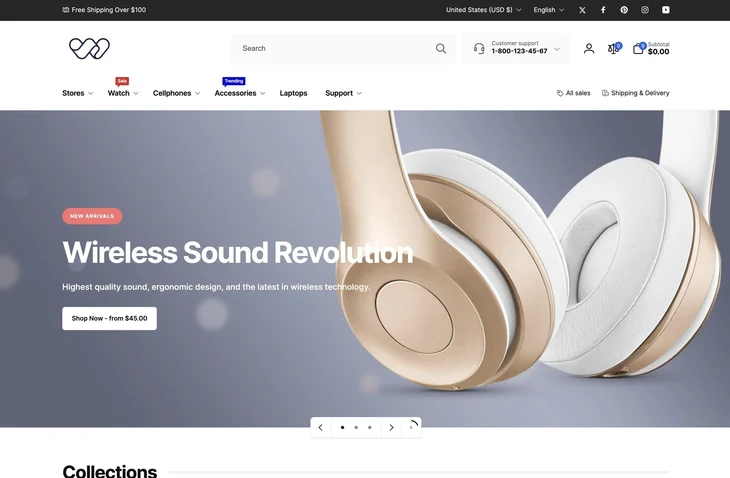
Woodstock’s homepage is built for merchandising density: an announcement bar, a mega menu, a prominent search with a support callout, a hero slider, a collections grid, and product carousels. It is the opposite of a stripped-back editorial theme, and it suits a catalog with several categories that needs everything reachable from the homepage. The default preset reads like a modern electronics store, but the layout is generic enough to re-skin for other categories.
The three presets, Woodstock, Obsidian, and Vita, are more than color swaps. Each ships a different homepage rhythm and styling, so you start from the one closest to your category and adjust from there. With 30+ sections and drag-and-drop editing, you can rearrange the homepage, product pages, and collection pages without touching code, and the built-in color swatches handle multi-variant products on the listing page.
Woodstock Features Worth Knowing
Three presets: Woodstock, Obsidian, Vita
The presets are the fastest way into the theme. You pick a starting look, then edit real sections instead of building from a blank canvas. For a small team, that shortens setup, and because the presets differ in structure rather than just color, switching direction later does not mean starting over.
30+ sections, no code
Woodstock ships a large section library with drag-and-drop editing, so most layout changes are a matter of adding, reordering, and styling sections in the theme editor. That breadth is what lets one general-purpose theme cover several categories, though it also means more choices to work through when you first set it up.
Merchandising and swatches
The theme leans into merchandising: a mega menu for larger catalogs, a collections grid, product carousels, and a color-swatches manager for multi-variant products. These are the tools a store with real product breadth needs, and they are why Woodstock stores tend to carry a fuller app stack rather than fewer.
Support and updates from Boostheme
A one-time purchase covers ongoing updates and developer support from Boostheme. Because it is a smaller vendor, plan to handle installation, configuration, and app integration yourself, and check the developer’s response times before you buy if hands-on support matters to you.
Woodstock Pricing
Woodstock is a one-time purchase at $270, with no recurring fee, and that price includes updates and support from Boostheme. Every preset is part of the single purchase, so you are not paying extra to switch looks later.
Weigh that against the alternatives. A free official theme like Dawn costs nothing but gives you fewer sections and no vendor support, while top-tier premium themes cost more and bring larger communities and template libraries. Woodstock sits between them: a paid theme’s update stream and feature depth at a lower entry price, in exchange for a smaller community. For a merchant who is comfortable self-configuring, that is a reasonable middle ground.
Woodstock Pros and Cons
Pros
- Strong real-world Core Web Vitals that keep pace with premium themes
- Three structural presets plus 30+ sections, so setup does not start from a blank page
- One-time price below the top-tier premium themes, with updates and support included
- Dense merchandising toolkit: mega menu, collections grid, carousels, color swatches
- Strongly positive Theme Store rating for a lesser-known theme
Cons
- Small merchant footprint, so a thin community and few third-party tutorials
- Few comparable live stores to reference when configuring your own
- General-purpose build, so a vertical-specific theme may fit a niche store better out of the box
- Support comes from a smaller vendor, so response times can vary
- Woodstock stores tend to run heavy app stacks, which can erode the theme’s speed if unmanaged
Who Should Use Woodstock?
Woodstock suits a merchant who wants an official, paid Theme Store theme with strong real-world speed and several preset starting points, and who does not need a large peer community to lean on. A multi-category catalog that benefits from a mega menu and dense merchandising is a natural fit, and the field-data speed means that density does not have to cost you performance. For a more section-flexible but slower alternative, see our Modular review.
If brand recognition and a deep template library matter more to you, compare Woodstock with the Prestige theme and the Impulse theme, two premium options with much larger footprints. Both cost more and trade Woodstock’s lower entry price for community depth and more tutorials to follow.
Woodstock is the wrong tool for a merchant who wants a large community and abundant how-to content, or one who would rather a niche theme handle their category out of the box. In those cases a household-name premium theme or a vertical-specific build will get you there with less trial and error.
Our Verdict on Woodstock
Woodstock is a capable, fast, mid-market theme that earns its place on real-world performance and a fair one-time price. The presets and section library cover real merchandising needs, the Theme Store rating is strong, and the field-data speed keeps pace with themes that cost more and are far better known. Its honest weakness is reach, not quality: a small footprint means you are more on your own to set it up.
For how Woodstock sits next to other options, see our Shopify theme reviews guide, and for the full detection data behind this review, the Woodstock usage statistics page. If you are comfortable configuring a theme yourself and want speed and features without a premium price, Woodstock is a sensible buy. If you want a big community and a deep template library, a household-name theme is the safer pick.
-
How much does the Woodstock Shopify theme cost?
Woodstock is a one-time purchase on the Shopify Theme Store, with no monthly fee. The price includes ongoing updates and support from the developer, Boostheme, and all three presets are part of that single purchase. You do not pay extra to switch between the preset designs later.
-
Who makes the Woodstock Shopify theme?
Woodstock is built by Boostheme, a smaller Shopify theme developer, and sold on the official Shopify Theme Store. Because it is a paid Theme Store theme, it comes with the developer’s updates and support rather than a large third-party community. Check the developer’s support response times before buying if hands-on help matters to you.
-
How many presets does Woodstock have?
Woodstock ships with three presets: Woodstock, Obsidian, and Vita. They differ in structure and styling, not just color, so you start from the one closest to your category and customize from there. With 30+ sections and drag-and-drop editing, you can reshape any of them without touching code.
-
Is Woodstock a fast Shopify theme?
Yes. In Chrome’s real-user field data, most live Woodstock stores pass Google’s Core Web Vitals, and its pass rate sits alongside far better-known premium themes. That said, Woodstock stores tend to run heavier app stacks, so keep your apps lean and compress images to protect the speed the theme gives you out of the box.
-
Is Woodstock a good theme for a small store?
Woodstock suits a merchant who is comfortable installing and configuring a theme themselves, since its small footprint means fewer tutorials and fewer comparable live stores to copy. If you want a large community and abundant how-to content, a household-name theme is easier to learn. If you value speed and features at a mid-market price, Woodstock is a reasonable pick.
-
Is there a free version of the Woodstock theme?
No. Woodstock is a paid theme on the Shopify Theme Store, sold as a one-time purchase that includes updates and support. If you want a free option, Shopify’s own themes like Dawn cost nothing but give you fewer sections and no vendor support. Woodstock’s value case rests on its presets, feature depth, and real-world speed.