ReConvert Shopify App Review 2026
Last modified: September 14, 2026
ReConvert is a Shopify app built to lift average order value at the two moments a shopper is most likely to say yes: the cart and the post-purchase thank-you page. Instead of chasing a second visit with email, it presents one-click upsells, cross-sells, and bundle offers inside the checkout flow you already own. It holds a 4.8/5 rating from 3,119 on the Shopify App Store, and in our detection data it runs on 3.2% of the 3.5M+ Shopify stores we track.
The verdict upfront: for a store with steady order flow, ReConvert is one of the most direct ways to add revenue without buying more traffic. The post-purchase upsell is close to free money because the shopper has already paid, and the editor makes those offers easy to build. The honest catch is that the lift is proportional to your order volume, and the funnels need tending, so it rewards a store that will actually test and iterate on offers.
Try ReConvert on the Shopify App Store
What is ReConvert?
ReConvert is a conversion and upsell app for Shopify. It gives you a drag-and-drop editor to build offers that fire at high-intent moments: a cart upsell before checkout, a one-click upsell on the post-purchase page, and cross-sell or bundle blocks on the product page. The goal is a bigger basket from the same visit, rather than a separate campaign to win the shopper back later.
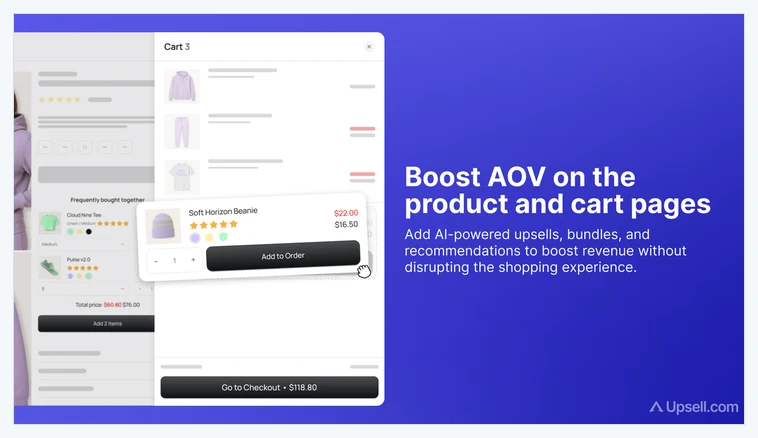
The core idea is that the highest-converting offer is the one shown to a shopper who is already buying. A post-purchase upsell needs no new payment details and no second decision to trust you, so a one-click add-on converts far better than the same offer sent by email a day later. Here is how widely ReConvert is detected across Shopify stores.
How popular is ReConvert on Shopify?
ReConvert runs on 3.2% of the Shopify stores in our dataset, which places it among the most-installed upsell apps on the platform. Upsell tooling is a crowded category, and the apps that reach this level of adoption are the ones merchants keep because the revenue shows up in the numbers. This is a tool stores add once they have orders to work with and want more from each one.
The App Store rating backs it up: 4.8/5 from 3,119 is a strong signal on a large review base, the kind of volume that is hard to fake and hard to hold if the app underdelivers. The takeaway is that ReConvert is both widely adopted and well regarded, an uncommon pairing in the upsell space.
What does ReConvert do?
ReConvert’s value is in where and how it places offers. The main pieces:
- Post-purchase one-click upsell. An offer on the thank-you page that a shopper accepts with a single click, no re-entered payment details, no second checkout.
- Cart and checkout upsells. Frequently-bought-together and add-on offers surfaced in the cart before the shopper pays.
- Cross-sell and bundle blocks. Product-page recommendations and bundles that raise the starting basket, not just the final one.
- Drag-and-drop funnel editor. A visual builder for offer pages and rules, so you can launch and change funnels without a developer.
- Segmentation and A/B testing. Trigger offers by cart contents, value, or customer, and test variants to find what actually lifts AOV.
The common thread is capturing more from a visit you already earned. Every one of these offers targets a shopper who is mid-purchase or just finished, which is why the incremental revenue lands without additional ad spend.
What ReConvert costs on Shopify
On the Shopify App Store, ReConvert’s pricing is listed as Free, or from $9.99/mo, and its paid tiers scale with the number of orders you process each month. Because the app charges against order volume and pays you back in added AOV, the math is straightforward: a store doing steady daily orders usually recovers the fee from a handful of accepted upsells, while a store with only a trickle of orders has little for it to lift. Match the plan to your order count, not your ambition.
Is ReConvert worth it?
For a store with steady order flow, yes. The post-purchase upsell alone tends to cover the subscription, because it converts a shopper who has already paid and asks for nothing but one more click. Add cart upsells and bundles and the lift compounds across every order, all without spending more to acquire the traffic.
Where it makes less sense is a store with very few orders. An upsell app multiplies what is already flowing through checkout, so if little is flowing, there is little to multiply. A new store is usually better off putting that energy into traffic and product-market fit first, then adding ReConvert once orders are consistent enough to test offers against.
Which themes run with ReConvert?
Because we detect both themes and apps, we can see the company ReConvert keeps. Its most-common theme is the conversion-focused Shrine, followed by Shopify’s free Dawn and premium themes like Impulse and Prestige, the mix you would expect on stores that already treat conversion rate as a lever worth pulling. Here are the themes most commonly running it.
| Rank | Theme | % of stores |
|---|---|---|
| 1 | Shrine | 15.4% |
| 2 | Dawn | 12.1% |
| 3 | Shrine PRO | 9.8% |
| 4 | Impulse | 5.1% |
| 5 | Prestige | 4.9% |
| 6 | Impact | 2.9% |
| 7 | Horizon | 2.9% |
| 8 | Minimog OS 2.0 | 2.4% |
| 9 | Kalles | 1.9% |
| 10 | Focal | 1.7% |
That spread points to the buyer: mostly established DTC stores that have invested in a conversion-oriented theme and are now squeezing more AOV out of the traffic they get. For the full breakdown of themes, paired apps, and store types, see the live ReConvert usage statistics.
What kinds of stores use ReConvert?
ReConvert stores lean toward high-repeat, high-consideration categories, apparel, health and beauty, food and supplements, where a shopper who is already buying will happily add a complementary item or a size-up bundle. These are catalogs with natural cross-sells, which is exactly what the app is built to surface.
The other tell is the app stack. Stores running ReConvert commonly pair it with Klaviyo, Loox, and a reviews or subscription app, the marketing-and-retention stack of a store focused on customer value rather than one-off sales. ReConvert slots into that stack as the AOV lever.
The lift tracks your order volume
The one thing to weigh with ReConvert is that its return is proportional to how many orders you process. On a store with steady daily orders, the post-purchase upsell pays for itself quickly. On a store with only a handful of orders a month, there simply is not enough volume for the upsell math to work, and the subscription can outrun the lift. It also rewards attention: the best results come from testing offers, not setting one funnel and forgetting it. Add it when you have orders to optimize and the willingness to iterate.
ReConvert vs the alternatives
The upsell category is deep. ReConvert’s strength is the post-purchase one-click flow paired with an easy editor, which makes it a fast way to add AOV without touching code. Personalization-heavy alternatives like Rebuy push further into data-driven recommendations and are a better fit for larger catalogs that want algorithmic cross-sells. For the wider picture, our guide to top-rated Shopify apps covers the tools most-installed on real stores, and ReConvert sits firmly in the upsell slot of that stack.
ReConvert pros and cons
Pros
- Post-purchase one-click upsell that converts an already-paying shopper
- Drag-and-drop funnel editor, no developer needed to launch offers
- Cart, checkout, and product-page offers all in one app
- Segmentation and A/B testing to find what actually lifts AOV
- Strong App Store rating on a large, mature review base
Cons
- Revenue lift is proportional to order volume, so a low-order store sees little
- Best results need ongoing offer testing, not a set-and-forget install
- Paid plans scale with orders, so cost rises as you grow
- Overlapping features with checkout and bundle apps can mean tuning to avoid clutter
Does ReConvert slow a Shopify store down?
Compared only against stores on the same theme, running the same number of apps and carrying a similar catalogue, stores with Reconvert installed pass Core Web Vitals 0.6 points higher of the time (1,948 comparable stores across 422 matched groups).
| Comparison | With Reconvert | Without | Stores compared |
|---|---|---|---|
| Like-for-like stores | 62.2% | 61.7% | 2,147 with · 39,192 without |
| All stores, unmatched | 62% | 67.7% | 2,324 with · 65,324 without |
Who should use ReConvert?
Reach for ReConvert if you run a store with steady daily orders and a catalog that supports natural add-ons or bundles. For that store, the post-purchase upsell and cart offers are a direct lift on average order value, and the App Store rating shows the app is trusted at scale to deliver it.
Hold off if you are a brand-new store still finding traffic and product-market fit. An upsell app multiplies existing order flow, so it pays to build that flow first, then add ReConvert once you have orders to test offers against. It is a revenue multiplier, not a revenue starter.
Our verdict
ReConvert is our pick for established Shopify stores that want more from every order without buying more traffic. The one-click post-purchase upsell is the standout, adding revenue at the lowest-friction moment in the funnel, and the easy editor plus testing tools let you actually improve offers over time. If your store is brand new and light on orders, wait until volume is steady. If orders are flowing and you are not upselling, ReConvert is close to the fastest AOV win on the App Store.