Shogun Shopify App Review 2026
Last modified: September 14, 2026

Shogun is a Shopify app built to move page design out of theme code and into a visual editor. It lets a merchant build landing pages, custom product pages, blog posts, and reusable sections with drag-and-drop, so a campaign page or a new template ships without a developer and without touching Liquid. It holds a 4.8/5 rating from 1,965 on the Shopify App Store, and in our detection data it runs on 2.3% of the 3.5M+ Shopify stores we track.
The verdict upfront: for a store that ships pages often, Shogun is a real productivity unlock, a marketing team can build and test landing pages on its own schedule instead of queuing on a developer. The honest catch is that it is a heavier, more capable builder than most stores need, and its pricing sits at the premium end of the category, so the value depends on how much page-building you actually do.
Try Shogun on the Shopify App Store
What is Shogun?
Shogun is a page-building app for Shopify. It adds a visual, drag-and-drop editor on top of your store where you assemble pages from content blocks, headings, images, product elements, countdowns, and more, then publish them as landing pages, product pages, or blog posts. The point is to give non-developers full control over layout, so the people running campaigns can build the pages those campaigns need.
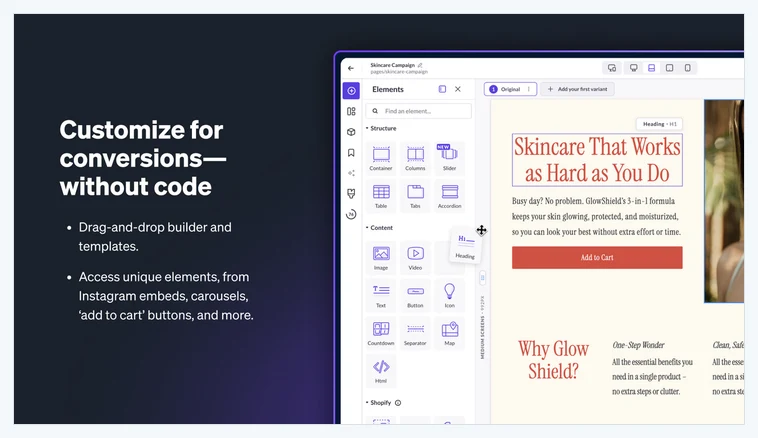
Behind the editor, Shogun keeps pages consistent with reusable sections and templates, so a brand can standardize a hero, a testimonial block, or a promo bar and drop it into any page. That reuse is what separates a page builder from a one-off HTML edit: build a block once, use it everywhere, and update it in one place. Here is how widely Shogun is detected across Shopify stores.
How popular is Shogun on Shopify?
Shogun runs on 2.3% of the Shopify stores in our dataset. That is a meaningful slice for a premium page builder, and the stores it appears on tend to be app-heavy operations that run frequent campaigns and treat their storefront as something they actively design rather than set once. It is a tool a store grows into, not a first install.
The App Store rating supports that: 4.8/5 from 1,965 is a strong score on a large review base, earned in a category where a clunky editor or a slow-loading page shows up fast in the reviews. Adoption is selective, but the stores that commit to Shogun tend to build their whole page workflow around it.
What does Shogun do?
Shogun’s value is in what it lets a non-developer build and reuse. The main pieces:
- Drag-and-drop page editor. A visual canvas for landing pages, product pages, and blog posts, assembled from blocks with no code.
- Reusable sections and templates. Build a hero, promo bar, or testimonial block once and drop it into any page, updated in one place.
- Custom product page layouts. Override the theme’s default product template for specific products or collections without forking the theme.
- Shopify content elements. Product blocks, add-to-cart buttons, collections, and countdowns that stay wired to your live catalog.
- A/B testing and analytics. Test page variants and measure which layout converts, on the higher plans.
The common thread is independence from the theme and from the development queue. Once Shogun is in place, the people who run marketing can design, publish, and test pages on their own timeline, which is the whole reason a store adopts it.
What Shogun costs on Shopify
On the Shopify App Store, Shogun’s pricing is listed as Free, or from $39/mo, but the features stores actually adopt it for, reusable templates, custom product pages, and testing, live on the paid plans, which climb into premium, higher-traffic tiers. The break-even is a function of how often you build pages: a store shipping campaign and product pages regularly earns the fee back in saved developer time, while a store that rarely changes its layout is paying for capability it will not use.
Is Shogun worth it?
For a store that ships pages often, yes. The value is measured in developer hours you no longer spend and campaigns you no longer wait on. When a marketing team can build a landing page in an afternoon instead of filing a ticket, the app pays for itself in speed alone, before you count any conversion lift from better-designed pages.
Where it makes less sense is a store with a stable layout that rarely changes. A full page builder is overkill if your product pages are set and you launch a campaign a few times a year. For occasional needs, a lighter builder or a one-off theme edit covers the job at a fraction of the cost. Shogun earns its price on volume of page work, not on owning it just in case.
Which themes run with Shogun?
Because we detect both themes and apps, we can see the company Shogun keeps. Its most-common theme is Shopify’s free Dawn, followed by premium themes like Prestige, Impulse, and Impact, the flexible, well-built themes that give a page builder a clean foundation to work on. Here are the themes most commonly running it.
| Rank | Theme | % of stores |
|---|---|---|
| 1 | Dawn | 12.8% |
| 2 | Prestige | 7.0% |
| 3 | Impulse | 5.9% |
| 4 | Impact | 3.4% |
| 5 | Symmetry | 2.4% |
| 6 | debut | 2.2% |
| 7 | Broadcast | 2.1% |
| 8 | Focal | 2.0% |
| 9 | turbo | 1.9% |
| 10 | Warehouse | 1.8% |
That mix reflects the buyer: stores that already run a capable theme and want to build beyond its default templates. For the full breakdown of themes, paired apps, and store types, see the live Shogun usage statistics.
What kinds of stores use Shogun?
Shogun stores skew toward marketing-led operations, brands that run frequent promotions, product launches, and content, where a steady stream of new pages is part of the routine. These are teams that treat the storefront as a canvas and want to change it without a release cycle.
The app stack tells the same story. Stores running Shogun carry more apps than the typical store and pair it with email, reviews, and analytics tools, the profile of a store investing in a full marketing operation. Shogun is the page-production layer of that operation.
Powerful, but heavier than many stores need
The thing to weigh with Shogun is that it is a full page-building platform, with the price and the learning curve to match. That is exactly right for a team building pages every week, and overbuilt for a store that changes its layout a few times a year. It also adds its own rendering layer to the pages it builds, so page performance is worth watching on heavy layouts. Adopt it when frequent page-building is a real part of your workflow, not for the occasional landing page.
Shogun vs the alternatives
Page builders differ mostly on power versus simplicity. Shogun sits at the powerful, marketing-team end, with reusable templates and testing built for stores that ship pages constantly. PageFly is the most-adopted builder and leans toward a broad, flexible free tier, while GemPages pushes a fast, conversion-focused editor. The right pick depends on how much you build and how much structure your team needs. For the wider view, our guide to top-rated Shopify apps covers the tools most-installed on real stores.
Shogun pros and cons
Pros
- Full drag-and-drop control over landing, product, and blog pages, no code
- Reusable sections and templates keep a brand consistent across pages
- Custom product page layouts without forking the theme
- A/B testing and analytics on higher plans to measure what converts
- Strong App Store rating on a large, mature review base
Cons
- Premium pricing that only pays back with frequent page-building
- Heavier and more complex than a store with a stable layout needs
- Adds its own rendering layer, so watch performance on heavy pages
- The features stores adopt it for sit on the paid tiers, not the free one
Does Shogun slow a Shopify store down?
Compared only against stores on the same theme, running the same number of apps and carrying a similar catalogue, stores with Shogun ‑ Landing Page Builder installed pass Core Web Vitals 2 points higher of the time (1,634 comparable stores across 443 matched groups).
| Comparison | With Shogun ‑ Landing Page Builder | Without | Stores compared |
|---|---|---|---|
| Like-for-like stores | 64% | 62% | 1,691 with · 33,367 without |
| All stores, unmatched | 63% | 68% | 1,962 with · 56,980 without |
Who should use Shogun?
Reach for Shogun if you run a marketing-led store that builds and tests pages regularly and wants that work off the development queue. For that team, the visual editor, reusable templates, and testing are a direct upgrade on both speed and control, and the App Store rating shows it holds up at scale.
Skip it if your layout is stable and you launch pages rarely. Shopify’s native pages or a lighter builder will cover the occasional campaign without the premium fee. Shogun is the right tool once page-building is a regular part of how you run the store, not a once-a-quarter task.
Our verdict
Shogun is our pick for marketing-led Shopify stores that live in their page builder, teams shipping landing pages, custom product pages, and tests on a weekly cadence. The reusable templates and independence from the development queue are what justify the premium price, and the App Store rating shows serious stores trust it. If you rarely change your layout, a lighter builder is the smarter spend. If page-building is central to how you market, Shogun is built exactly for that job.