Tinker Shopify Theme Review 2026
Last modified: October 1, 2026

Tinker is one of Shopify’s newer free themes, built for makers who care how their work is shown. It is part of Shopify’s Horizon collection and leans on modern, bento-style collection cards to give a store a curated, gallery-like feel. The verdict upfront: for a free theme, Tinker is unusually flexible thanks to Shopify’s nested block system, which lets you rearrange sections without touching code, and it comes stocked with the merchandising tools a craft brand needs to look considered from day one. The catch is a heavier, image-rich homepage that can be slow to paint, a handful of specific customization gaps, and a design that only sings for the right kind of catalog.
If you sell jewelry, accessories, or food and drink and you want an editorial, considered storefront without paying for a premium theme, Tinker is one of the more capable free options. If you need to fine-tune every detail or run a very large, fast-changing catalog, it will feel limiting. The sections below use live detection data to show exactly where it fits.
What is the Tinker Shopify theme?
Tinker is a free Online Store 2.0 theme published by Shopify and part of its newer Horizon collection, so updates arrive through the theme library with no third-party dependency. It is pitched at makers: jewelry, accessories, food and drink, and other craft-led brands that want their products presented like a gallery rather than a catalog. Bento-style collection cards and modern section layouts give it a curated, editorial character out of the box.
Because it is a first-party theme, Tinker edits through the drag-and-drop customizer with no code required. What sets it apart from most free themes is Shopify’s nested block system, which lets you rearrange the pieces inside each section, so you get genuine layout control that free themes usually reserve for paid upgrades. Here is where Tinker sits across our dataset today.
How popular is Tinker, and is it growing?
Tinker is a newer theme, so its overall share is still small, but the direction is what matters. The portion of stores we scan each month running Tinker has been climbing steadily rather than sitting flat, which is the pattern you want to see from a recently released theme picking up adopters.
Tinker has climbed from 0.3% to 0.6% of Shopify stores in our dataset over recent months.
One number stands out about how Tinker stores actually behave: they run far fewer apps than the average Shopify store. That is partly the theme and partly the audience. Tinker builds so much merchandising into the theme itself, from filtering to lookbooks, that owners need fewer add-ons to get a polished store, and a lighter app stack is one of the biggest levers on real-world speed.
Tinker design and layout
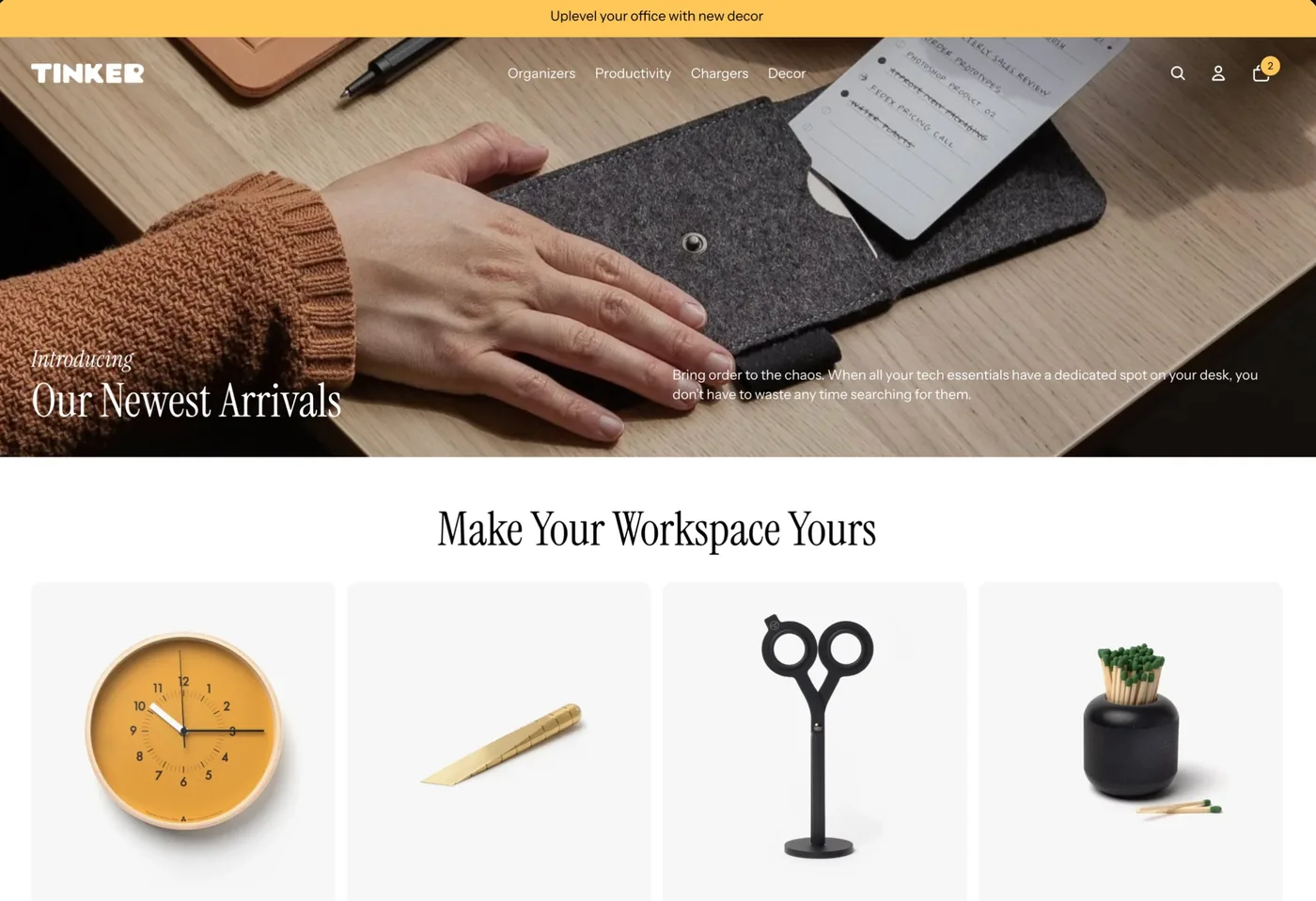
Tinker’s look is editorial and product-forward. The default homepage uses bento-style collection cards, generous spacing, and modern section layouts that frame products like a curated gallery. That styling flatters brands where the craft is the story: handmade jewelry, small-batch food and drink, considered accessories. The aim is a store that feels designed rather than assembled.
The block system is where Tinker earns its keep. Shopify’s nested blocks let you move and restyle the pieces inside each section, so two Tinker stores can look genuinely different without any custom code. That flexibility is rare in a free theme. The trade-off is that the editorial style is opinionated, so it rewards strong photography and a clear identity, and it works best when you design around its built-in behavior rather than trying to bend every element to a fixed plan.
Tinker features
For a free theme, Tinker arrives well equipped, with tools aimed squarely at showing craftsmanship and closing the sale. The built-in merchandising is a big part of why its stores run so few extra apps.
- Browsing that stays effortless: swatch filters, search, and infinite scroll on collection pages.
- Product storytelling: image zoom, video, and lookbooks to show detail and craft up close.
- Selling tools: quick buy plus pre-order, so you can sell items that are not in stock yet.
- Real layout control: Shopify’s nested blocks let you rearrange each section without code.
- Standard Online Store 2.0 sections and settings, so tutorials and help written for Shopify’s free themes apply directly.
The gaps owners raise tend to be specific rather than structural. Price variant display, fine text positioning, and some Instagram checkout compatibility are the ones that come up most. None of them break a store, but you cannot fine-tune every last detail, which is the usual ceiling on a free theme.
How fast is the Tinker theme?
Tinker’s speed needs a careful read, and the live data below shows it. We measure Tinker on real-world Core Web Vitals across live Tinker stores, using Google’s Chrome UX Report field data rather than a lab test.
| Theme | CWV pass rate | Few apps | Median LCP |
|---|---|---|---|
| Impulse | 78.4% | 85.4% | 1.6s |
| Dawn | 71.2% | 79.9% | 1.6s |
| Tinker | 56.3% | 56.4% | 1.8s |
Tinker’s own demo leans on a heavy, image-rich hero and gallery layout, but real Tinker stores tell a friendlier story, posting strong field Core Web Vitals, because live makers tend to run leaner homepages and fewer apps. The practical takeaway: Tinker can absolutely be fast, but you have to respect the visuals. Compress your images, go easy on the homepage hero, and keep the app stack lean, and the theme rewards you.
What kinds of stores use Tinker?
Tinker skews toward a clear set of niches. In our classification, apparel and accessories is by far the largest group, followed by home and garden and then health and beauty. That tracks with the theme’s maker-focused, gallery-style design, which suits products that photograph well and benefit from a curated presentation.
By business model, subscription stores are the standout group running Tinker, ahead of dropshipping, print on demand, or wholesale. That fits a theme built for brand-led sellers with a growing, repeatable catalog rather than sprawling reseller stores. For the full store-type and category breakdown, including how the mix shifts over time, see the live Tinker usage statistics.
Which apps do Tinker stores use?
The app stack on Tinker stores is notably lean, which says a lot about the theme. Reviews apps sit at the top, as they do for most young brands that need social proof, with email marketing and subscriptions close behind. Here is what we detect most often on live Tinker stores.
| Rank | App | % of stores | Category |
|---|---|---|---|
| 1 | Judge.me Product Reviews App | 35.2% | Product reviews |
| 2 | Klaviyo | 13.8% | Email Marketing |
| 3 | Loox ‑ Product Reviews App | 9.9% | Product reviews |
| 4 | Recharge | 8.8% | Subscriptions |
| 5 | Shopify Inbox | 6.5% | Support - Other |
| 6 | PageFly ✦ AI Page Builder | 4.7% | Page builder |
| 7 | Omnisend Email Marketing & SMS | 4.7% | Email Marketing |
| 8 | Google Youtube | 4.5% | |
| 9 | Instafeed ‑ Instagram Feed | 4.4% | Marketing - Other |
| 10 | GemPages Landing Page Builder | 3.8% | Page builder |
The pattern is a trust-and-retention stack on a light footprint: product reviews first for credibility, email to bring shoppers back, and subscription tooling for the recurring-order brands the theme attracts. Because Tinker builds filtering, lookbooks, and layout control into the theme, owners reach for fewer add-ons than they would on a barer free theme, which is part of why the average app count is so low.
How much does Tinker cost?
Tinker is free. It is made by Shopify and installed straight from the Shopify Theme Store as part of the Horizon collection, with no license fee and no separate cost for updates. There is no paid tier for the theme itself. Your real costs are the apps you add and the Shopify plan you run your store on, not the theme.
Why is the Tinker Theme Store rating low?
Tinker holds roughly a 1.9 out of 5 rating on the Shopify Theme Store, which can look surprising next to how capable the theme is. The number measures something different from what our detection data measures, so it is worth reading with context.
Free Shopify themes as a group rate low on the Theme Store, and Tinker is no exception. Two things drive it. First, free themes are the default choice for brand-new store owners, so a large share of one-star reviews are really frustration with Shopify, apps, or the learning curve rather than the theme code. Second, some of Tinker’s reviews name the specific customization gaps mentioned earlier, price variant display and fine positioning, which matter a lot to the owners who hit them even though they do not break a store.
Read the rating as a fair caution about Tinker’s customization ceiling and its community-and-docs support, not as evidence the theme is broken. On the metrics we can measure directly, adoption trend and real-world speed, Tinker performs well for a young free theme.
Who should use Tinker?
Tinker is a strong free starting point for a specific kind of store. Reach for it if you are a small or mid-sized maker with a growing catalog, from around a dozen products up to a few hundred, and you want a curated, editorial storefront. Jewelry, accessories, and food and drink brands are the best fits, especially those with strong product photography and subscription or pre-order offers.
Pass on Tinker if you need to control every design detail, depend on features like precise price-variant display, or run a very large, fast-changing catalog. In those cases a theme with more built-in sections or a paid option will save you time. Before you commit, take the theme’s one clear piece of advice to heart: design your store around Tinker’s built-in behavior rather than fighting it, and you will get far more out of it.
If you want a bolder, more fashion-forward free Horizon theme instead, see our Ritual review.
-
Is the Tinker Shopify theme free?
Yes. Tinker is a free Online Store 2.0 theme made by Shopify and installed from the Shopify Theme Store as part of the Horizon collection. There is no license fee and no charge for updates. Your only real costs are the apps you add and your Shopify plan, not the theme itself.
-
What is the Tinker Shopify theme best for?
Tinker is built for makers and craft brands that want a curated, editorial store. It fits jewelry, accessories, and food and drink sellers with strong photography and a catalog from about a dozen products up to a few hundred. Subscription and pre-order brands do well on it too. It is a weaker fit for very large catalogs.
-
Is Tinker a fast Shopify theme?
It can be, with care. The demo store scores modestly on Google PageSpeed because of a heavy, image-rich homepage, but real Tinker stores post strong field Core Web Vitals. The theme is not usually the bottleneck. Compress images, keep the homepage hero light, and run a lean app stack to keep a Tinker store quick.
-
Does Tinker let you customize the layout?
Yes, more than most free themes. Tinker uses Shopify’s nested block system, so you can rearrange and restyle the pieces inside each section with drag and drop, no code needed. The limits owners report are specific, like price variant display and fine text positioning, rather than broad. You get real layout control but cannot fine-tune every detail.
-
Why does Tinker have a low Theme Store rating?
Free themes attract brand-new store owners, so many low reviews are really frustration with Shopify or apps rather than the theme. Some Tinker reviews also name specific customization gaps. It sits near 1.9 out of 5, in line with other free Shopify themes, yet shows climbing adoption and solid real-world speed in our detection data.
-
What types of stores use the Tinker theme?
Tinker skews heavily to apparel and accessories, followed by home and garden and health and beauty. By business model, subscription brands are the standout group. It suits small, brand-led catalogs more than large reseller or dropshipping stores. You can see the full breakdown on the live Tinker statistics page.
Is Tinker worth installing?
For the right maker, yes. Tinker gives a craft-led brand a curated, editorial store for nothing, hands you real layout control through Shopify’s block system, and stays fast in the field as long as you keep the homepage and images in check. The low Theme Store rating is a fair caution about its customization ceiling, not a sign of a bad theme, and our live data shows a young theme with climbing adoption and solid real-world speed. For the wider picture across Shopify’s free and paid themes, see our guide to Shopify theme reviews. And any time you spot a maker store you admire, you can scan it to see whether it runs Tinker and exactly which apps it pairs with.