Instafeed for Shopify Review 2026
Last modified: October 4, 2026
Instafeed is an Instagram feed app for Shopify that pulls your Instagram posts, Reels, and customer photos onto your storefront as an auto-updating gallery, and lets you tag products so shoppers can buy straight from a post. Built by Mintt Studio, it is the most-detected social media app across the Shopify stores we scan, and it holds a 4.9-star rating from well over a thousand merchants. The verdict upfront: if you post to Instagram and want that content working as shoppable social proof on your site, Instafeed is an easy, low-cost way to do it, with a free plan to start and product tagging that turns a feed into a sales channel rather than decoration. The honest catch is that it is a display-and-tag tool, not a content engine. It shows the Instagram content you already make, so it only pays off if your feed is active, and the shoppable features matter most to stores with products worth tagging.
If your brand lives on Instagram and you want that presence to sell, Instafeed earns its place. If you rarely post or you only want a small static gallery, a lighter free widget may be enough. The sections below use live detection data to show how widely Instafeed is used, what it does, what it costs, and the kind of store it fits.
What is Instafeed?
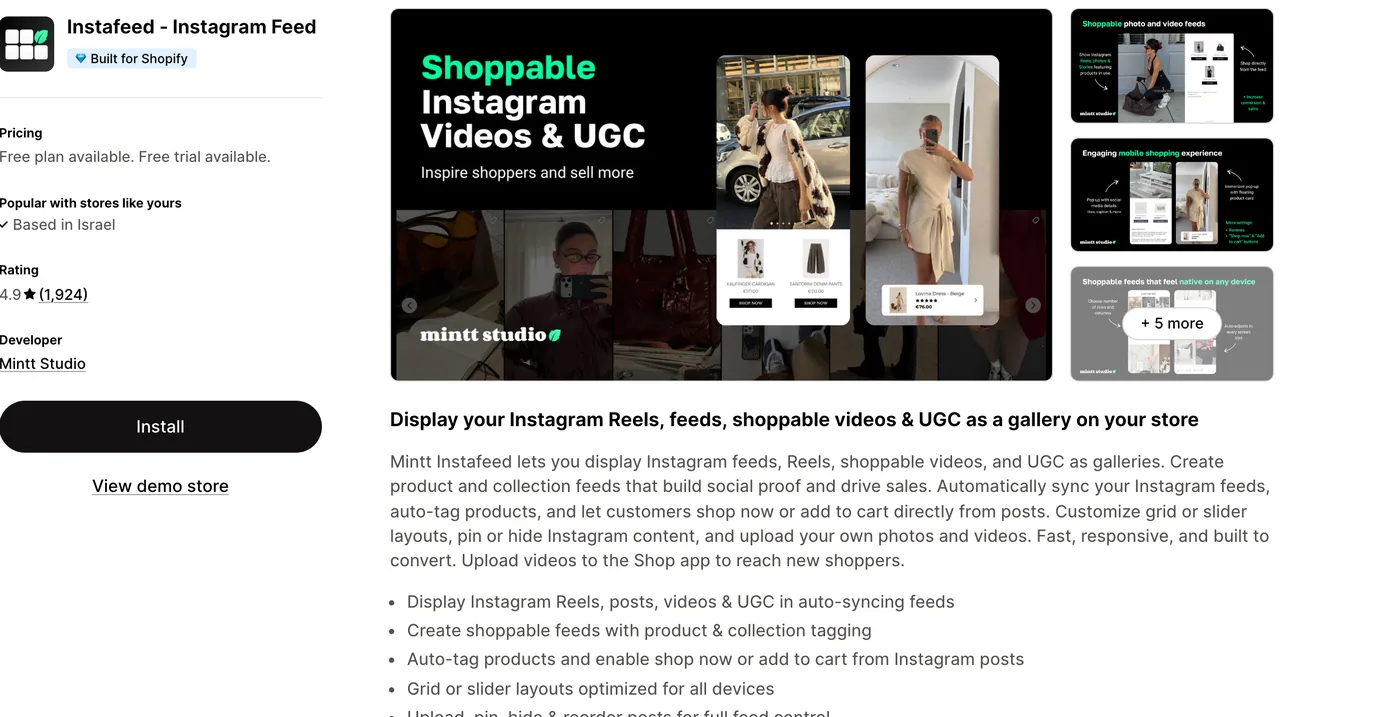
Instafeed connects your Instagram account to your Shopify store and displays your content as a gallery that updates on its own. It syncs your posts, Reels, and videos automatically, so the feed on your site stays current without you touching it, and it can also pull in user-generated content, the customer photos and tags that act as real social proof. You choose a grid or a slider, drop it anywhere with a theme block, and it renders cleanly on any theme with no app watermark. The point that separates it from a plain widget is shopping: you can tag products and collections inside a post, so a shopper who likes an outfit in your feed can add it to cart without leaving the page. Here is how widely Instafeed is detected across Shopify stores.
How popular is Instafeed on Shopify?
Instafeed is the most-used social media app in our dataset, several times more common than the next Instagram app in the ranking, and it sits near the top of every app we detect regardless of category. The stores running it carry noticeably heavier app stacks than the typical store, the mark of marketing-active brands that treat their storefront as something to build on rather than leave stock. That profile is worth keeping in mind: this is a tool chosen by stores already investing in their marketing, not a set-and-forget default.
What does Instafeed do?
Instafeed turns your Instagram presence into on-site content that can sell. Rather than asking shoppers to leave for Instagram, it brings the feed to the pages where they are already deciding to buy. The core of what it offers:
- Shoppable feeds. Tag products and collections inside a post so shoppers can shop now or add to cart directly from the image, which is where a feed stops being decoration and starts driving orders.
- Auto-syncing posts, Reels, and UGC. It pulls your latest Instagram content automatically and keeps the on-site gallery fresh, and it can surface customer photos and tagged content as social proof.
- Grid or slider layouts. Choose the format that fits the page, from a full gallery on the homepage to a compact slider on a product page, all optimized for mobile.
- Content control. Pin, hide, and reorder posts, and upload your own images and videos, so you decide exactly what shows rather than mirroring your feed blindly.
- Clean, fast rendering. It works across themes with no branding watermark and is built to load without dragging the page down.
The common thread is control plus commerce. You get the credibility of a live Instagram feed and the ability to make any part of it buyable, which is why stores use it to shorten the path from social scrolling to checkout.
What Instafeed costs on Shopify
Instafeed has three tiers. The free plan covers a basic auto-syncing feed and is enough to test it on a page. The Pro plan runs about eight dollars a month and adds more feeds and customization. The Plus plan is around twenty dollars a month, or cheaper billed yearly, and adds the full shoppable tagging, multiple feeds, and priority support. Most stores start free and upgrade once the feed earns its place, so you can prove it works before you pay.
Is Instafeed worth it?
For a store with an active Instagram presence, yes. A live feed adds fresh social proof that a static page cannot, and the shoppable tagging turns browsing into a buying path you can measure. Because the free plan lets you launch a feed at no cost and the paid tiers are inexpensive, the risk of trying it is low and the upside, a feed that quietly converts, is real.
Where it makes less sense is a store that barely posts to Instagram or sells something a feed does not flatter. Instafeed shows the content you already have, so an empty or neglected Instagram makes for an empty gallery. It rewards brands that post regularly and have products worth tagging, and gives little back to those that do not.
Which themes run with Instafeed?
Because we detect both themes and apps, we can see the company Instafeed keeps. Its most common theme is Shopify’s free Dawn, followed by popular premium themes like Prestige and Impulse, the kind of polished, conversion-minded themes you would expect from marketing-active stores. Here are the themes most commonly running it.
| Rank | Theme | % of stores |
|---|---|---|
| 1 | Dawn | 14.4% |
| 2 | Prestige | 8.2% |
| 3 | Horizon | 5.0% |
| 4 | Impulse | 3.9% |
| 5 | Broadcast | 3.6% |
| 6 | Symmetry | 3.1% |
| 7 | Minimog OS 2.0 | 2.5% |
| 8 | Ella | 2.5% |
| 9 | Impact | 2.4% |
| 10 | Stiletto | 1.9% |
That spread, a free flagship theme at the top with premium themes close behind, tells you Instafeed fits stores at every level, from a first storefront on Dawn to an established brand on a paid theme. For the full breakdown of themes, paired apps, and store types, see the live Instafeed usage statistics.
What kinds of stores use Instafeed?
Instafeed stores skew toward visual, marketing-active brands with real catalogs to show. They tend to carry larger product ranges than the typical store and run heavier app stacks, the profile of an operation already investing in reviews, email, and conversion tools rather than running bare. These are the stores for which an Instagram feed is not an afterthought but part of how they sell.
That fit makes sense. A brand pouring effort into Instagram content wants a return from it beyond likes, and putting that content on the storefront, made shoppable, is the return. A store that treats Instagram as an occasional post will not get the same value, which is exactly where the note below lands.
Keep the feed connected and lean
Two things to watch. First, the Instagram connection: feeds run on Instagram’s API, so tokens can expire and a feed may need reconnecting now and then to keep updating, which is worth a periodic check. Second, weight: a long feed loads many images, so keep the gallery to a sensible length and let it lazy-load rather than dropping a hundred posts on one page, or you trade social proof for a slower page. And remember it only shows what you post, so an inactive Instagram gives you an empty feed.
Instafeed pros and cons
Pros
- Turns your Instagram feed into fresh, on-site social proof that updates itself
- Shoppable tagging lets shoppers add to cart straight from a post
- Genuine free plan, with inexpensive paid tiers and no app watermark
- Grid or slider layouts that work on any theme and on mobile
Cons
- Shows only the content you already post, so a quiet Instagram means an empty feed
- Instagram connection can need reconnecting when tokens expire
- Full shoppable features sit on the paid Plus tier
- A long feed adds images that can slow a page if you overdo it
An Instagram feed pulls in images and scripts, so speed is worth checking with Instafeed. On plain averages, stores that use it perform about the same as those that do not, and when you compare fairly against similar stores, the ones running Instafeed actually pass Google’s speed test (Core Web Vitals) a little more often, about 69% versus 66% for comparable stores without it, among stores with enough traffic to appear in Google’s Chrome UX Report.
Does Instafeed slow a store down?
Compared only against stores on the same theme, running the same number of apps and carrying a similar catalogue, stores with Instafeed ‑ Instagram Feed installed pass Core Web Vitals 2.1 points higher of the time (3,303 comparable stores across 639 matched groups).
| Comparison | With Instafeed ‑ Instagram Feed | Without | Stores compared |
|---|---|---|---|
| Like-for-like stores | 67.7% | 65.6% | 3,503 with · 37,984 without |
| All stores, unmatched | 67.3% | 67.9% | 3,812 with · 55,130 without |
Who should use Instafeed?
Reach for Instafeed if Instagram is part of how you market and you want that presence to sell on your own site. It suits apparel, beauty, and lifestyle brands with photogenic products and a steady posting habit, where a shoppable feed adds proof and a buying path at once. The free plan makes it easy to start, and it pairs naturally with the other tools in a store’s marketing stack. If you are comparing options, our roundup of the Shopify Instagram apps puts it next to the main alternatives.
Skip it, for now, if you rarely post to Instagram or you only want a small fixed gallery that never changes, since a lighter widget or a theme section will cover that without another app. Instafeed pays off when the feed is active and the products are worth tagging, so match it to how you actually use Instagram.
And if video-first is the actual goal, with Instagram Reels and TikTok clips doing more of the merchandising than static feed images, our ReelUp Shoppable Videos stats page covers a Built for Shopify app built around the shoppable-video gallery instead of the Instagram feed layout.
Our verdict
Instafeed is our pick for brands that already put work into Instagram and want that content selling on their store. Start on the free plan, add a shoppable feed to your homepage or a key product page, and upgrade to tagging once it proves out. If your Instagram is quiet or your products are not especially visual, a lighter gallery is enough, but for an active, image-led brand this is the tool that turns a feed into a sales channel.
-
What is Instafeed used for?
Instafeed is used to show your Instagram content on your Shopify store. It pulls your posts, Reels, and customer photos into an auto-updating gallery, and lets you tag products inside them so shoppers can buy from a post. Stores use it to add fresh social proof and turn Instagram browsing into on-site sales.
-
Is Instafeed free?
Yes, Instafeed has a genuine free plan that covers a basic auto-syncing feed, which is enough to test it on a page. Paid plans add more feeds, customization, and full shoppable tagging, starting around eight dollars a month for Pro and about twenty dollars a month for Plus, cheaper if billed yearly. Most stores start free and upgrade once the feed proves its worth.
-
Does Instafeed slow down my Shopify store?
On its own, no. Instafeed is built to load cleanly on any theme without a watermark. The thing to watch is length: a feed showing many images loads more media, so keep the gallery to a sensible number of posts and let it lazy-load. Used that way, it adds social proof without a noticeable hit to page speed.
-
Can you make an Instagram feed shoppable with Instafeed?
Yes, that is one of its main features. You can tag products and collections inside a post, so a shopper who likes something in your feed can shop now or add to cart without leaving the page. This turns a display gallery into a buying path. Full shoppable tagging sits on the paid Plus plan.
-
Do you need an Instagram account to use Instafeed?
Yes. Instafeed displays the content from your Instagram account, so you connect that account first and the app syncs your posts and Reels from it. Because it mirrors your feed, an active Instagram gives you a full, fresh gallery, while a rarely-updated account leaves the feed sparse. You can also upload your own images to supplement it.
-
Which stores use Instafeed most?
Visual, marketing-active brands with real catalogs, think apparel, beauty, and lifestyle stores that post to Instagram regularly. In our data Instafeed is the most-used social media app on Shopify, and the stores running it carry heavier app stacks than average. Its most common theme is Shopify’s free Dawn, followed by premium themes like Prestige and Impulse.
Is Instafeed worth it for Shopify?
For an image-led brand that posts to Instagram, yes. The data shows why it is popular: Instafeed is the most-detected social media app across the Shopify stores we scan, chosen by marketing-active brands with real catalogs, and it turns an Instagram feed into shoppable, self-updating social proof on your own pages. Its free plan makes it low-risk to try, and the paid tiers stay inexpensive as you add tagging and feeds. The catch is that it only reflects the content you post, so it rewards an active Instagram and gives little back to a quiet one. If you are still setting up your feed, our guide on how to add an Instagram feed to Shopify walks through the options, and you can see where it sits among the top-rated Shopify apps. Any time you want to know a store’s setup, you can scan it to see whether it runs Instafeed and what theme and apps it pairs with.