7 Shopify Store Protector Apps - 2026
Last modified: October 6, 2026
| # | Image | Name | Price / month | Rating | Adoption |
|---|---|---|---|---|---|
| 1 |
|
BM Country Blocker IP Blocker
|
From $12/mo | (307) | — |
| 2 |

|
Easy Watermarks
|
Free + from $9/mo | (237) | — |
| 3 |

|
Locksmith
|
From $19/mo | (59) | — |
| 4 |

|
Cozy Country Redirect (GeoIP Country Redirect/Blocker)
|
— | — | — |
| 5 |

|
Easy Wholesale Lock for B2B (EasyLockdown ‑ Page Locks)
|
Free + from $9.99/mo | (322) | <0.1% |
| 6 |
|
Negate ‑ Bot Protection (Loop CyberSecurity Bot Protect)
|
From $6.99/mo | (310) | 0.2% |
| 7 |

|
Photolock | Anti‑Theft
|
— | — | — |
|
Show More
|
|||||
Data first, opinion second: we track usage across 3.5+ million Shopify stores daily, and have since 2017. The stats tell us what merchants actually use; our editors rank the final picks by quality, pricing, and fit.
BM Country Blocker IP Blocker
Ideal for: Shopify stores catching repeat fraud from a specific region, VPN range, or affiliate source and wanting to shut it down with one rule rather than a workflow.
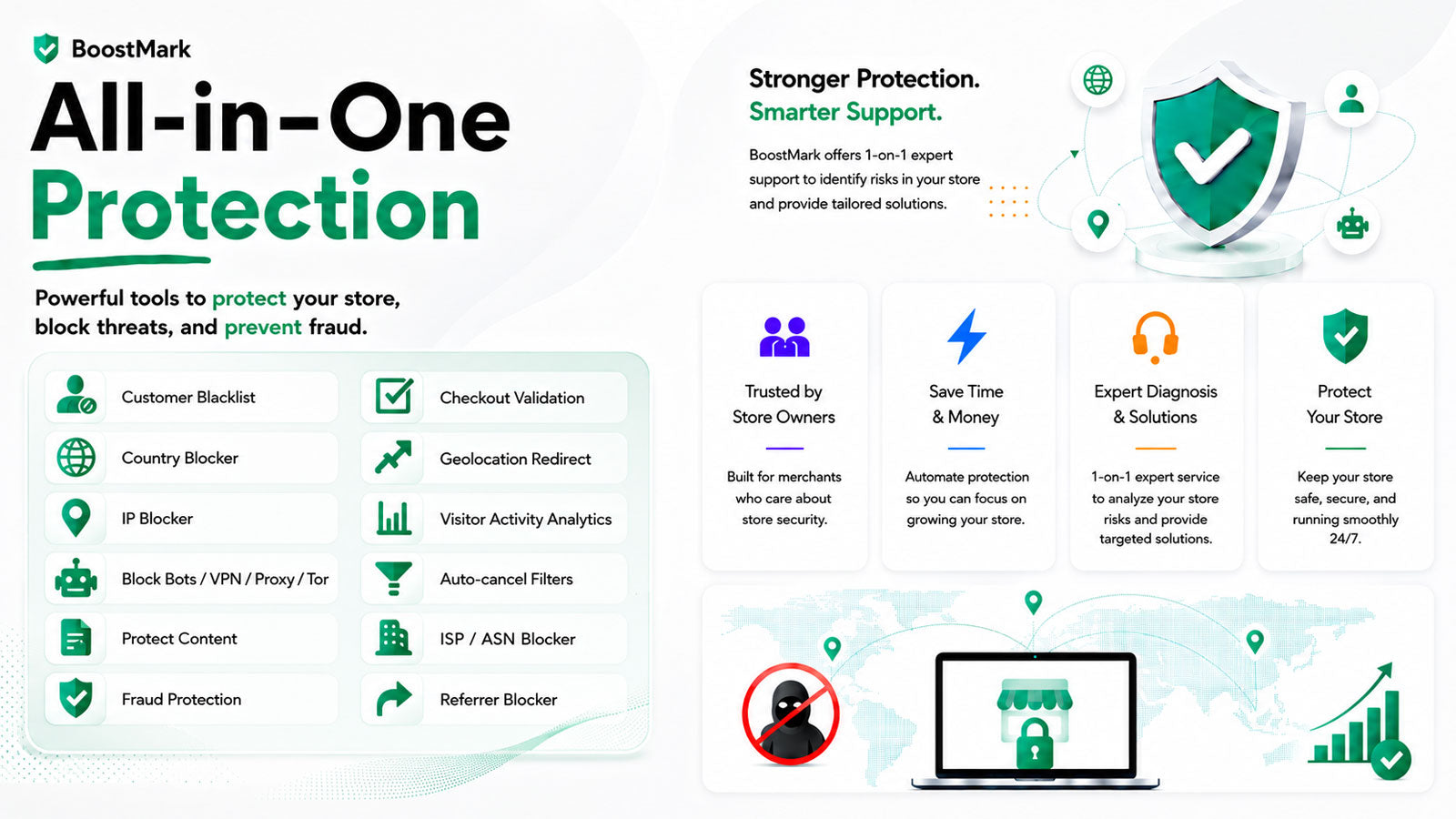
Based on adoption data from stores in our dataset, BM Country Blocker sits in the Fraud Protection category and is the one app in the set that enforces blocking in two places at once. The storefront layer stops visitors by country, state, city, IP, VPN, ISP, or referrer. The order layer rejects submits by email, name, or phone, so a fraudster who swaps IPs between attempts is still caught at the final step.
BM Country Blocker Usage Statistics
BM Country Blocker install share on the Shopify stores in our dataset, refreshed daily.
The free pay-as-you-go tier is metered per 100 page views for stores with light traffic. The flat plan opens every rule type for everyone above that line. Reviews skew toward one-shot wins: a merchant hires it to block one country, one VPN range, or one abusive email loop, and the review is a single sentence saying the thing stopped.
BM Country Blocker IP Blocker Highlights:
- Blocks visitors by country, state, city, IP, or IP range
- Blocks VPN, proxy, and ISP ranges, plus specific referrers
- Rejects orders at submit by email, name, or phone
- Free pay-as-you-go tier for very light traffic
- Rated 4.9/5 on 207 reviews
Easy Watermarks
This is an advanced watermarking app. It allows you to add text, logos and stickers to protect your product photos with ease. There is a user-friendly interface that makes this a perfect tool for anyone, even those who have no technical skills or experience. You can add your custom logo to the app dashboard to use in watermarking in seconds. The logo can be uploaded in .png or .jpg formats.
To help you know what the images will look like after the watermark, you can see them in a preview screen. You can make changes to the image within the preview window. This can include changing the position and size of the watermark. Stickers can be added to your website’s images include ‘sale’, ‘free shipping’, ‘out of stock’ and many more. Stickers can be added and removed with keywords that can be changed within the product edit pages.
To help you with the app if you are struggling, you can speak to a support team via live chat.
Easy Watermarks Highlights:
- The app includes image optimization features to help you improve website speed.
- Images are always backed up and can be restored with a click.
- You can add a watermark to your images in bulk.
- You can add badges and stickers to badges with the use of tags and keywords.
Locksmith
This app allows you to control access to your online storefront. It is highly versatile and is really easy to configure and use. Once you’re done setting up the protection, your content can only be accessed by those that you would like to access your page. There are numerous options to lock your content. For instance, you can provide users with tags that automatically grant them access. Or you can give a passcode or provide a secret link that provides a secure access point.
There are also ways to allow those who’ve subscribed to your MailChimp mailing list to gain access. Therefore, this app can also be used as a way to build your mailing list and grow your business that way.
You could restrict access based on buying behaviors as well. You can reward customers based on products they’ve bought, variant or the value within a cart. The options are really immense and you can be sure that your site is going to be secure with this app.
Locksmith Highlights:
- Numerous security features that help you protect your content from being accessed without your permission.
- You can lock the content based on several behaviors and actions.
- Create your own rules or use some premade rules that are set up for you.
- Easy to install and configure for your website.
Cozy Country Redirect (GeoIP Country Redirect/Blocker)
This app is perfect for those who have different stores for different regions of the world. There are several actions that can take place if the app determines that the audience is not right for the address that they’re trying to gain access to. For one they can do an instant redirect to the correct website or they can display a popup displaying the correct web address for them to visit. This popup can be displayed to your specifications, this can include uploading your own fonts. All designs can be previewed before going live on your website and the popup can be translated into any language that you need.
The app is compatible with Googlebot and Adwords. There is no redirect when these are accessing your website. Therefore, the tool will not impact your website’s search rank. The app is integrated with Google Analytics, therefore, you can see the number of redirects that have been taken on your website.
There are also options that allow you to whitelist IP and URLs. Therefore, if you publish a blog on one site, you can allow anyone to visit those web pages but not other pages on your website.
GeoIP Country Redirect/Blocker Highlights:
- Can block people from certain regions from visiting your website.
- Protects your website from known bad IP addresses.
- Integrates with Google Analytics and doesn’t disrupt the work of Googlebot that indexes your website.
- You can whitelist URLs to ensure you only host the blogs in one place.
Easy Wholesale Lock for B2B (EasyLockdown ‑ Page Locks)
EasyLockdown is simple, powerful and allows for complete access management to your website. You don’t need any technical skills to make it happen, just a knowledge of how you would like to grant access to those wanting to know more about you. You can lock all kinds of areas of your website from the collections, products, pages and blogs. You can do this for certain groups of customers or you can do it for everyone, the choice is yours.
In addition, the app allows you to lock down the entire website with just a single click. Or you can section your website and lock down parts of it with ease. You’re also able to hide prices from your visitors if you would like to.
There are lots of flexible rules that allow you to protect your store. You can set rules based on the number of orders, the amount spent, dates of orders, customer tags, locations and more. To prevent users from being annoyed, customers who are locked out of certain areas won’t know the area exists, it is completely hidden from them.
The app uses the server side to check permissions. Therefore, even if you’ve disabled JavaScript, then the app can block hackers and prevent locked content from be accessed. The app is perfect for building all kinds of websites from membership to wholesale websites. It takes very little effort and you can see the results immediately.
EasyLockdown ‑ Page Locks Highlights:
- Can lock down a page or an entire site with a click of a button.
- You can set your own access rules for your customers and users.
- Protects locked content from being stolen by hackers.
- Hides locked content from those who can’t access it, so they don’t know about it.
Negate ‑ Bot Protection (Loop CyberSecurity Bot Protect)
This is a premium fraud preventative tool that is great for businesses of any size. It uses artificial intelligence in combination with the best browser diagnostic tools to help protect your website. It will carefully inspect every website visitor to your store and if there is something unusual, then it will let you know. This will be sent to both Google and Facebook ad accounts to restrict that user from accessing your adverts going forward, therefore preventing you from spending money on visitors who aren’t going to add value to you.
The app works unlikely other apps by preventing bots from arriving on your site in the first place by identifying and taking proactive steps to prevent the criminals or bots from accessing your website. At the same time, the tool can work as soon as you install it and signup to the service.
This app also protects you from clever scams where bots are trained to act as real customers. This can get Google and Facebook to tag these bots are interested customers and then concentrate on these people to get them back to your store. However, this app recognizes the differences and blocks these attempts.
Loop CyberSecurity Bot Protect Highlights:
- Improves the returns you can collect from your advertising budgets.
- This app is proactive in protecting your store from malicious bots.
- Take back control of your Google and Facebook adverts.
- Maximize profits.
Photolock | Anti‑Theft
This app protects your store images from being copied or stolen without permission. You can add an image or text watermark to all images on your website with ease and within seconds. This is great when you want to sell photographs or you have images where you’ve paid for them from a premium image.
This app also has other features that can help you to protect your work. For instance, you can prevent users from dragging images from your website and save them into a file on the desktop. This is a classic tactic. The app will also disable the right-click option for visitors, that is another way that users can steal images off your website.
When this app is active, users won’t be able to use typical keyboard shortcuts either. This will prevent them from copying text and other content from your website too. And you can be sure that users can’t find your images and copying them from Google as it prevents Google from displaying images in search results.
Photolock | Anti‑Theft Highlights:
- This app can disable the common options that allow users to steal content.
- Create custom messages that warn visitors who try to copy content.
- You can add watermarks to your images.
- Stop images from being stolen via search engines with ease.
-
How often do Shopify Store Protector Apps update their security features?
Shopify Store Protector Apps frequently update their security features to combat new threats, with many offering automatic updates to ensure ongoing protection.
-
Can Shopify Store Protector Apps protect against content theft?
Yes, these apps can protect against content theft by disabling right-click functions, adding watermarks, and other content protection methods.
-
Do Shopify Store Protector Apps offer real-time security monitoring?
Yes, several Shopify Store Protector Apps provide real-time monitoring features, allowing store owners to instantly detect and respond to any security threats.
Conclusion: 6 Best Shopify Store Protector Apps
If you’re looking to protect your store, above are the best Shopify store protector apps that you can use. Which ones will you use?
You might like other security apps like terms and conditions apps or age verification apps. Or browse best Shopify apps.